<?xml version="1.0" encoding="utf-8"?><feed xmlns="http://www.w3.org/2005/Atom" ><generator uri="https://jekyllrb.com/" version="3.10.0">Jekyll</generator><link href="https://jazracherif.github.io/feed.xml" rel="self" type="application/atom+xml" /><link href="https://jazracherif.github.io/" rel="alternate" type="text/html" /><updated>2026-06-03T20:41:59+00:00</updated><id>https://jazracherif.github.io/feed.xml</id><title type="html">Cherif Jazra</title><subtitle>Technical deep dives into GPU-accelerated data systems, NVIDIA RAPIDS, libcudf, CUDA programming, and the future of accelerated analytics.</subtitle><author><name>Cherif Jazra</name></author><entry><title type="html">On Pope Leo XIV’s Letter on Artificial Intelligence</title><link href="https://jazracherif.github.io/ai/philosophy/ethics/technology/2026/06/03/on-pope-leo-xivs-letter-on-artificial-intelligence.html" rel="alternate" type="text/html" title="On Pope Leo XIV’s Letter on Artificial Intelligence" /><published>2026-06-03T07:00:00+00:00</published><updated>2026-06-03T07:00:00+00:00</updated><id>https://jazracherif.github.io/ai/philosophy/ethics/technology/2026/06/03/on-pope-leo-xivs-letter-on-artificial-intelligence</id><content type="html" xml:base="https://jazracherif.github.io/ai/philosophy/ethics/technology/2026/06/03/on-pope-leo-xivs-letter-on-artificial-intelligence.html"><![CDATA[<p><img src="/assets/img/magnificas-humanitas.png" alt="magnificas humanitas encyclical" /></p>
<p>On May 15, 2026, Pope Leo XIV released an encyclical letter expressing his thoughts on Artificial Intelligence for all of us to reflect on. This couldn’t have come at a better time, because today more than ever, the fast development of AI technology has been challenging me to reflect more deeply and with more urgency on what are the most important things to focus my life on, as a parent, a citizen, an engineer. I would thus like to relay his letter and offer some of my thoughts, especially on the first half of it, and in the humble spirit that claims no full knowledge of the truth.</p>

<p>The letter is long but worth a read. In it, Pope Leo XIV challenges us to think about whether the promise of AI technology will be pursued under the delusion of human infallibility and self-sufficiency or in the spirit of an authentic and responsible stewardship that honors and preserves. <strong>Rather than humans sacrificing their dignity and being subservient to technology, it is technology that must be directed to serve human dignity</strong>. The pope thus spends a good portion of his letter explaining the main principles developed by the Catholic Church to honor and preserve the dignity of every human being, the principle of common good, of universal destination of goods, of subsidiarity, of solidarity, and of social justice. <em>“The fundamental dignity of each person, therefore, is neither acquired nor earned, nor does it need to be justified [..] Every human person possesses an infinite dignity, inalienably grounded in his or her very being, which prevails in and beyond every circumstance, state, or situation the person may ever encounter”</em> [53]. The same spirit pervades the sacred American creed written 250 years ago, that all <em>“men are created equal, that they are endowed by their Creator with certain unalienable Rights, that among these are Life, Liberty and the pursuit of Happiness”</em>.</p>

<p>Today, the challenges facing humanity are immense because society is dominated by the modern technological way of being. In order to confront this reality, we must be clear-eyed about what technology truly is, not the sum of all created technical things but <strong>a reflection of our own modern way of revealing the world</strong>, our <em>“tendency to let the logic of <u>efficiency</u>, <u>control</u>, and <u>profit</u> alone shape personal, social and economic decisions”</em>[92](emphasis mine). A new historical reality has set in, one in which the dominant actors driving these technological breakthroughs are private corporations large enough to mediate almost all societal interactions and with enough financial resources to bend the democratic system in their favor. As Pope Leo XIV says, <em>“In many cases within the digital context, control over platforms, infrastructure, data and computing power does not rest with States, but with major economic and technological actors. These entities effectively set the conditions for access, determine the rules of visibility and shape the very possibilities for participation. When such power is concentrated in the hands of a few, it tends to become opaque and evade public oversight, increasing the risk of distorted forms of development that give rise to new dependencies, exclusions, manipulations and inequalities.”</em>[95]</p>

<p>The impending arrival of what is now called Artificial General Intelligence (AGI) technology has been dazzling the world, feeding its craving for unlimited superhuman capabilities on demand, but at the same time auguring an era that deeply questions the role of humans in society. Pope Leo XIV warns us not to confuse artificial intelligence with human intelligence and not to succumb to the hubris of the Tower of Babel. <strong>AI systems are very useful but they are not human</strong>. They <em>“do not undergo experiences, do not possess a body, do not feel joy or pain, do not mature through relationships and do not know from within what love, work, friendship or responsibility mean. Nor do they have a moral conscience, since they do not judge good and evil, grasp the ultimate meaning of situations, or bear responsibility for consequences”</em>[99]. All that AI is trained to do is to imitate language and simulate empathy and understanding. It feels nothing, it is simply a cold and empty <em>“form of statistical adaptation based on data and feedback, which can be very effective, but does not imply inner growth”</em>. The distinction between human and artificial intelligence is so fundamental that it ought not even be questioned, and yet here we are so lost to technological thinking that this fact is no longer “obvious” and needs to be argued. In the letter, the pope has a message of vigilance for those developing this technology because he understands <strong>technology is not a morally neutral instrument</strong>. All human creations embody in them the values of their creator. <em>“Every technical tool embodies choices and priorities through what it measures, ignores and optimizes, and how it classifies people and situations.”</em>[104] And for this reason, with AI even more than any other technology, it is important to understand and <em>“examine how that system is designed and what vision of the human person and society is embedded in the data and models that guide it”</em> [104]</p>

<p>Pope Leo XIV uses the provocative concept of <strong>Disarming AI</strong> to wake us up to the reality of a race to the bottom in an AI-weaponized world with catastrophic consequences. This expression brings our mind back to the time when the atomic bomb was detonated to end WWII and destroyed countless lives in the most horrific way possible. Shortly after humanity realized that it had created a technology that could bring it to its end. The evident potential for mutual destruction and annihilation were so overwhelming that they awakened global consciousness and sustained the movement to disarm nuclear weapons during the Cold War. <strong>We have not yet seen today’s AI Hiroshima moment</strong>. Still in the future lies the threat of uncontrollable autonomous AI weapons or society-wide AI automation leading to massive unemployment and breakdown of social relations. These dangers are much discussed today, but there is one more that the pope emphasized which I really appreciate, one that is much less talked about and less conceptualized. This is the subtle but slower and more profound way AI will impoverish our human existence as it presents itself as the ultimate possibility of liberation from human suffering. <strong>Trans-humanism</strong> and <strong>post-humanism</strong> [116] are today’s ideologies pushing furthest in this direction. In reality if left to seep through society without any sense of the impending danger, AI technology will turn out to be the biggest challenge to the human creative spirit and pursuit of happiness.</p>

<p>All my readings and experience indicate to me that for millennia now, from the early greek philosophical writings, to the first century apostolic gospels and epistles expressing the radical Christian message, to the 20th century modern existential philosophies responding to the calamities of two World Wars, human being at its core has been understood to mean overcoming a fallen, average, and dispersed absorption in worldly matters. <strong>But overcoming how</strong>? Certainly not by removing the body altogether and replacing it with a machine (or by escaping to Mars), but overcoming by a process of resolutely taking up the responsibility for our ownmost possibilities, freed to face the anxiety of our finitude, embedded in our communities, rooted in a place of belonging, and from the Christian point of view grounded in the unity of being that is God. The most optimistic supporters of AI will have us all believe our salvation lies in a human created technology. Pope Leo XIV, however, understands this not to be true, that there is no final solution to the problem of human existence, that the danger lies in thinking that there is, that instead it falls as a task to every generation to renew human existential possibilities and make them available to the largest number of people: <em>“I am convinced that the concrete way of living out social relationships in the light of the Gospel is not established once and for all, but remains a task entrusted, from generation to generation, to the Christian community.”</em></p>

<p>There is more in this letter that is worth pondering and I hope to touch on in future posts after more reflection and reading. I would just like to close with the special message that Pope Leo XIV addressed to developers and engineers working on the development of AI technology, and I would say in technology in general and not just as engineers, whether in Silicon Valley or around the world, that is worth asking oneself about (emphasis mine):</p>

<blockquote>
  <p><em>“I wish to address a special appeal to those who develop artificial intelligence. In one sense, technological innovation can represent human participation in the divine act of creation. <strong>Developers, therefore, bear a particular ethical and spiritual responsibility, for every design choice reflects a vision of humanity</strong>. Just as the creator of an artistic or literary work must consider the values it conveys, so developers are called to embed values in their projects with due seriousness: with transparency, responsibility toward affected communities and careful attention to ensuring that what is being cultivated is a genuine good”</em> [111].</p>
</blockquote>

<p><br /></p>

<hr />

<p><br />
<a href="https://www.vatican.va/content/leo-xiv/en/encyclicals/documents/20260515-magnifica-humanitas.html">Encyclical Letter, Magnifica Humanitas</a></p>

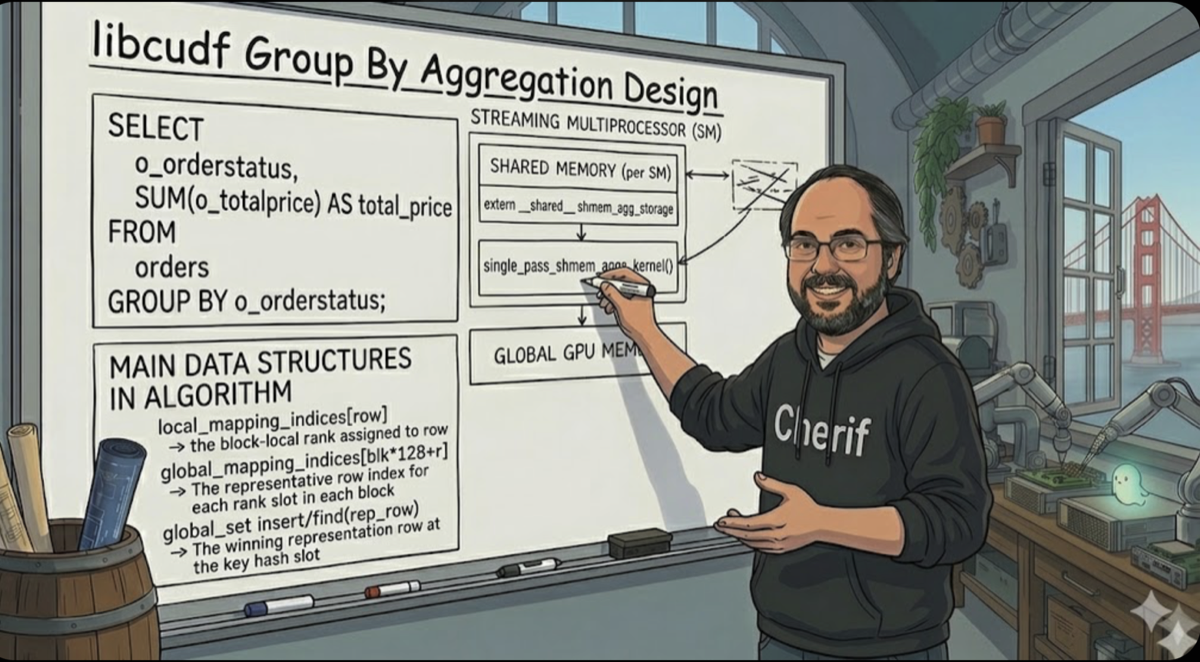
<p><a href="https://youtu.be/aaYJ_4QcZfE?si=hhuR_rCbwi7Shej5">Short speech by the pope summarizing his thoughts on Disarming AI</a></p>]]></content><author><name>Cherif Jazra</name></author><category term="ai" /><category term="philosophy" /><category term="ethics" /><category term="technology" /><category term="ai" /><category term="agi" /><category term="philosophy" /><category term="society" /><category term="pope" /><summary type="html"><![CDATA[A reflection on Pope Leo XIV's AI encyclical, arguing for human dignity, moral responsibility, and prudent stewardship as AGI approaches.]]></summary><media:thumbnail xmlns:media="http://search.yahoo.com/mrss/" url="https://jazracherif.github.io/assets/img/magnificas-humanitas.png" /><media:content medium="image" url="https://jazracherif.github.io/assets/img/magnificas-humanitas.png" xmlns:media="http://search.yahoo.com/mrss/" /></entry><entry><title type="html">Inside RAPIDS libcudf: a deep dive into a simple GroupBy aggregation</title><link href="https://jazracherif.github.io/database/gpu/nvidia/rapids/libcudf/2026/05/13/libcudf-technical-deep-dive.html" rel="alternate" type="text/html" title="Inside RAPIDS libcudf: a deep dive into a simple GroupBy aggregation" /><published>2026-05-13T07:00:00+00:00</published><updated>2026-05-13T07:00:00+00:00</updated><id>https://jazracherif.github.io/database/gpu/nvidia/rapids/libcudf/2026/05/13/libcudf-technical-deep-dive</id><content type="html" xml:base="https://jazracherif.github.io/database/gpu/nvidia/rapids/libcudf/2026/05/13/libcudf-technical-deep-dive.html"><![CDATA[<p><img src="/assets/img/libcudf-groupby-top.png" alt="data flow animation of author explaining libcudf GroupBy hash-aggregat on a whiteboard" /></p>

<p>Traditional OLAP database execution engines were designed for the <strong>CPU</strong>: 1) optimized for a handful of powerful cores, 2) deep cache hierarchies, and 3) sequential or lightly vectorized processing. In the past decade, however, <strong>GPU</strong> performance and functionality have greatly advanced, driven largely by the generative AI revolution, to the point of becoming a viable platform for running relational workloads. GPU-accelerated data systems that can run queries orders of magnitude faster than their CPU equivalents will enable the next big revolution in analytics, fuelled by AI agents. Their architecture and programming models are, however, different enough from the CPU, that specialized algorithms must be developed to achieve high performance on analytical workloads. This post aims to illuminate the kind of algorithms NVIDIA’s RAPIDS project has built to close that gap. It is the first in a series exploring <a href="https://github.com/rapidsai/cudf">libcudf</a>, NVIDIA’s core DataFrame library for single-node GPU data processing.</p>

<div class="tldr">
<p class="tldr-label">TL;DR</p>
<ol>
  <li>The post dives into libcudf's <strong>hash-aggregate fast path</strong> for a <code>GROUP BY … SUM</code> query with <strong>low per-block key cardinality</strong>: each block must see at most 128 distinct grouping values to stay on the shared-memory path.</li>
  <li>For the dataset analysed, <strong>libcudf uses a two-level shared-memory strategy to tame atomic contention.</strong> Each CUDA block deduplicates its rows in a private on-chip hash set before touching global memory, so the device-wide hash set sees at most one insert/lookup per distinct key per block and the output column receives at most one atomic add per distinct key per block, not one per row.</li>
  <li><strong>The algorithm runs in four sequential phases.</strong> (1) Initialize the device hash set with a sentinel value; (2) map every row to a block-local rank and elect cross-block key representatives via CAS into the device hash set; (3) retrieve unique keys from the hash set and rewrite index arrays to dense output offsets; (4) accumulate partial sums in a shared-memory accumulator array, then flush one atomic add per group per block to the output column.</li>
  <li><strong>For 100M rows, the dominant cost is data structure overhead, not compute.</strong> A significant fraction of total kernel time is spent initialising the oversized hash table (allocated at 2× input size) and scanning it in the Interlude, costs that are independent of key cardinality and grow with input size. <strong>Future posts will explore performance at higher scale factors</strong>.</li>
</ol>
</div>

<p><em>This report was produced with the help of AI agents.</em></p>

<h2 id="1-introduction-relational-algebra-on-gpus">1. Introduction: Relational Algebra on GPUs</h2>

<p>Mapping relational algebra onto GPUs introduces a massive semantic gap compared to CPU. Operators like <strong>joins</strong>, <strong>aggregations</strong>, and <strong>sorts</strong> must be entirely reimagined for the GPU SIMT (Single Instruction, Multiple Thread) architecture. Conventional algorithms natively optimized for CPUs often hit brutal bottlenecks on GPUs due to <strong>thread divergence</strong>, <strong>uncoalesced memory access</strong>, and severe penalties for <strong>global synchronisation</strong>.</p>

<p>To bridge this runtime gap, NVIDIA developed <strong>libcudf</strong>: a C++ library implementing foundational DataFrame operations and relational primitives natively on the GPU. It has emerged as the de facto execution framework for a massive portion of the accelerated data ecosystem, underpinning projects like <code class="language-plaintext highlighter-rouge">Spark RAPIDS</code>, <code class="language-plaintext highlighter-rouge">Dask-cuDF</code>, <code class="language-plaintext highlighter-rouge">Velox CuDF</code> and numerous independent database research efforts.</p>

<p>The central questions driving this exploration are:</p>
<ul>
  <li>How does libcudf translate fundamental relational operators into massively parallel GPU kernels?</li>
  <li>What are its structural strengths, and where does the GPU memory/compute model impose hard limits?</li>
  <li>What does the developer tooling look like, and how does one reason about its hardware utilization?</li>
</ul>

<p>To answer these questions, I begin by identifying at a high level which algorithms underlie key primitives. I take as an example the simple groupby aggregation and break down into components showing how the library implements them. I identify the main data structures and provide illustration that show the movement of data as the algorithm runs. While some runtime info is provided for the 100M dataset in this post, the next one will focus on actual run and reviews learning from the debugging tools.</p>

<h3 id="the-aggregation-problem">The Aggregation Problem</h3>

<p><code class="language-plaintext highlighter-rouge">GROUP BY</code> is one of the foundational operators in relational database systems. Its job is to partition an input relation into disjoint subsets then reduces each group to a single output row by applying one or more aggregate functions. For example, a simple question a retail merchant might ask is what the breakdown of the total price of orders by order status, identifying the amount of missed dollar opportunity for orders not completed and investigating improvements. We will use this example in the rest of the blog post.</p>

<p>In a query execution engine the <code class="language-plaintext highlighter-rouge">GROUP BY</code> physical operator must solve two logical subproblems:</p>

<ol>
  <li>
    <p><strong>Key partitioning</strong>: determine, for every input row, which output group it belongs to. This is effectively a dictionary-encoding problem: map an arbitrarily-typed key (integer, string, composite) to a dense integer group-id in [0, K) where K is the number of distinct keys.</p>
  </li>
  <li>
    <p><strong>Aggregation</strong>: reduce all rows assigned to the same group-id to a single scalar per aggregate column (e.g., sum all values from column C for group-id 3), using an aggregate function such as <code class="language-plaintext highlighter-rouge">SUM</code>, <code class="language-plaintext highlighter-rouge">COUNT</code>, <code class="language-plaintext highlighter-rouge">MIN</code>, <code class="language-plaintext highlighter-rouge">MAX</code>, <code class="language-plaintext highlighter-rouge">AVG</code>, etc</p>
  </li>
</ol>

<p>These two subproblems are algorithm-agnostic: the same logical goals can be achieved via two fundamentally different physical strategies.</p>
<ul>
  <li>The <strong>sort-aggregate</strong> approach sorts all rows by key first, after which identical keys are contiguous and can be reduced in a single scan; comparison sort costs O(n log n), while radix sort can be linear for fixed-width keys.</li>
  <li>The <strong>hash-aggregate</strong> approach builds a hash table mapping each distinct key to its running accumulator, updating it in expected O(n) time, no sort required, but concurrent writes to shared buckets introduce contention.</li>
</ul>

<p>The algorithm must also be adapted to the number of keys and columns being operated on as well as the kind of data types used for partition and aggregation. Simple primitive types like float and int come with hardware and basic language support, while more advanced ones like string and datetime require specialized handling.</p>

<p>Recently, a big use case has been supporting user-provided functions (UDFs) for aggregation, which come with their own challenges, mainly the requirement to compile them first into low-level code before running them efficiently.</p>

<h3 id="cpu-vs-gpu-challenges">CPU vs GPU Challenges</h3>
<p>Various kinds of CPU-focused solutions have been developed over decades and evolved with CPU cache hierarchies, branch prediction, and thread-level parallelism. GPUs introduce a different execution model: aggregation algorithms must explicitly manage the memory hierarchy, limit global atomic contention, minimize warp divergence, and keep key-comparison logic executable entirely on-device.</p>

<table class="compact-table compact-table-wrap-first">
  <thead>
    <tr><th>Topic</th><th>CPU</th><th>GPU</th></tr>
  </thead>
  <tbody>
    <tr><td><strong>Parallelism model</strong></td><td>Few powerful cores, usually with private per-thread or per-core aggregation state.</td><td>Thousands of threads run together, so shared output state can become a serialization bottleneck.</td></tr>
    <tr><td><strong>On-chip memory management</strong></td><td>Hardware caches absorb much of the reuse automatically.</td><td>Shared memory is small, explicit, and central to fast aggregation.</td></tr>
    <tr><td><strong>Memory access pattern</strong></td><td>Random probes mostly stall the issuing core.</td><td>Scattered warp accesses can waste memory bandwidth. Coalesced access is a must.</td></tr>
    <tr><td><strong>Atomic contention</strong></td><td>Engines avoid shared state with private accumulators and merge phases.</td><td>Low-cardinality groups can serialize thousands of global atomic updates to the same output slot.</td></tr>
    <tr><td><strong>Instruction divergence</strong></td><td>Branchy probe loops mainly affect one core's pipeline prediction logic.</td><td>Divergent probe lengths serialize lanes within a warp and reduce overall utilization.</td></tr>
    <tr><td><strong>Output size &amp; memory provisioning</strong></td><td>Hash tables and output buffers can grow during execution.</td><td>Buffers are usually sized before kernels launch.</td></tr>
    <tr><td><strong>Key comparison &amp; hashing</strong></td><td>Hash and equality functions are ordinary host code.</td><td>Comparators and hashers must be device-callable.</td></tr>
    <tr><td><strong>Spill &amp; bounded memory</strong></td><td>Spill to disk or remote storage is a mature execution path.</td><td>Fast paths generally assume working state fits in device memory; GPU spill support is still maturing.</td></tr>
    <tr><td><strong>Large-scale &amp; distributed execution</strong></td><td>Distributed engines have mature shuffle, spill, and fault tolerance.</td><td>GPU clusters add high bandwidth but GPU-to-GPU shuffle and fault-tolerance tooling is still maturing.</td></tr>
  </tbody>
</table>

<p>I’ll focus on the high-level algorithm libcudf uses to compute a simple <code class="language-plaintext highlighter-rouge">Groupby</code> + <code class="language-plaintext highlighter-rouge">Sum</code> aggregation on the GPU, taking you through its flow from the initialization of data structures to identifying unique groupings, and aggregating the data into final output buffers. Throughout, I’ll highlight the libcudf CUDA kernels used, how they take advantage of the GPU’s limited but very fast shared memory to update intermediate results in a massively parallel way, and use block synchronization to ensure threads remain in lockstep. I’ll also describe some of the other libraries libcudf relies on, such as cuCollections for the static sets and hashmaps, and the Thrust library for lower-level data-parallel algorithms like <strong>scatter</strong> and <strong>for_each</strong>. Future posts will provide a more in-depth look at an actual run of the algorithm and its performance, also introducing a new visualization tool I have developed to understand the flow of interaction between CPU and GPU.</p>

<h2 id="2-setup-software-and-hardware-used">2. Setup: Software and Hardware used</h2>

<h3 id="library-versions">Library Versions</h3>

<p>The investigation was performed on <strong>RAPIDS v26.02.00</strong>, released on <strong>February 4, 2026</strong>. The cuCollections dependency used is pinned to commit <a href="https://github.com/NVIDIA/cuCollections/commit/d3701ae8e7f2a08f25f9713e182692b4ca544112"><code class="language-plaintext highlighter-rouge">d3701ae</code></a>.</p>

<p>The code examples in this post link to my own annotated forks that include additional comments to aid understanding:</p>
<ul>
  <li><strong>My cuDF fork</strong>: <a href="https://github.com/jazracherif/cudf/tree/v26.02.00_analysis">github.com/jazracherif/cudf, v26.02.00_analysis</a></li>
  <li><strong>My cuCollections fork</strong>: <a href="https://github.com/jazracherif/cuCollections/tree/v26.02.00_analysis">github.com/jazracherif/cuCollections, v26.02.00_analysis</a></li>
</ul>

<h3 id="gb10-device">GB10 Device</h3>

<p>This analysis was performed on the DGX Spark running the GB10 NVIDIA GPU (Blackwell). Here are some key hardware specs relevant to this analysis to keep in mind:</p>

<table class="compact-table">
  <thead><tr><th>Spec</th><th>Value</th></tr></thead>
  <tbody>
    <tr><td>Architecture</td><td>Blackwell (SM 12.1)</td></tr>
    <tr><td>Streaming Multiprocessors</td><td>48 SMs</td></tr>
    <tr><td>CUDA cores</td><td>6,144 (128 per SM)</td></tr>
    <tr><td>Shared memory per SM</td><td>100 KB (max per block: 99 KB)</td></tr>
    <tr><td>L2 cache</td><td>24 MB</td></tr>
    <tr><td>Memory</td><td>128 GB LPDDR5x, <strong>unified</strong> (CPU + GPU share the same pool, zero-copy via ATS)</td></tr>
    <tr><td>Memory bandwidth</td><td>~273–301 GB/s</td></tr>
    <tr><td>Host CPU</td><td>1× Grace (20-core Arm Neoverse V2)</td></tr>
  </tbody>
</table>

<p>The unified memory architecture means there is no PCIe transfer step for the input table, the Arrow Parquet file is read directly into the shared pool and is immediately accessible by both CPU and GPU. The memory bandwidth figure (~273–301 GB/s) will be the primary bottleneck for this workload, as the hash-set initialization and Interlude scans are purely bandwidth-bound.</p>

<h3 id="code-invoked">Code Invoked</h3>

<p>The input dataset is the order table from TPCH with <strong>100 million rows</strong> (1.8 GB Parquet file). Future posts will explore much larger datasets. The below libcudf C++ code is invoked on an ingested table stored in the Apache Arrow format:</p>

<div class="language-cpp highlighter-rouge"><div class="highlight"><pre class="highlight"><code><span class="c1">// Assume Table already loaded into GPU memory</span>
<span class="n">cudf</span><span class="o">::</span><span class="n">table_view</span> <span class="n">tv</span> <span class="o">=</span> <span class="n">cudf_table</span><span class="o">-&gt;</span><span class="n">view</span><span class="p">();</span>

<span class="c1">// Create GroupBy operator by specifying the `key` column to group on</span>
<span class="n">cudf</span><span class="o">::</span><span class="n">groupby</span><span class="o">::</span><span class="n">groupby</span> <span class="nf">gb</span><span class="p">(</span><span class="n">cudf</span><span class="o">::</span><span class="n">table_view</span><span class="p">{{</span><span class="n">tv</span><span class="p">.</span><span class="n">column</span><span class="p">(</span><span class="n">src</span><span class="p">.</span><span class="n">key_col</span><span class="p">)}});</span>

<span class="c1">// create aggregation for each column, here only 1 SUM agg</span>
<span class="n">cudf</span><span class="o">::</span><span class="n">groupby</span><span class="o">::</span><span class="n">aggregation_request</span> <span class="n">req</span><span class="p">;</span>
<span class="n">req</span><span class="p">.</span><span class="n">values</span> <span class="o">=</span> <span class="n">tv</span><span class="p">.</span><span class="n">column</span><span class="p">(</span><span class="n">src</span><span class="p">.</span><span class="n">value_col</span><span class="p">);</span>
<span class="n">req</span><span class="p">.</span><span class="n">aggregations</span><span class="p">.</span><span class="n">push_back</span><span class="p">(</span><span class="n">cudf</span><span class="o">::</span><span class="n">make_sum_aggregation</span><span class="o">&lt;</span><span class="n">cudf</span><span class="o">::</span><span class="n">groupby_aggregation</span><span class="o">&gt;</span><span class="p">());</span>

<span class="c1">// Aggregate on default stream</span>
<span class="k">auto</span> <span class="p">[</span><span class="n">result_keys</span><span class="p">,</span> <span class="n">agg_results</span><span class="p">]</span> <span class="o">=</span> <span class="n">gb</span><span class="p">.</span><span class="n">aggregate</span><span class="p">({</span><span class="n">req</span><span class="p">});</span>
</code></pre></div></div>

<p>The equivalent SQL command is:</p>

<div class="language-sql highlighter-rouge"><div class="highlight"><pre class="highlight"><code><span class="k">SELECT</span>   <span class="n">o_orderstatus</span><span class="p">,</span>
         <span class="k">SUM</span><span class="p">(</span><span class="n">o_totalprice</span><span class="p">)</span> <span class="k">AS</span> <span class="n">total_price</span>
<span class="k">FROM</span>     <span class="n">orders</span>
<span class="k">GROUP</span> <span class="k">BY</span> <span class="n">o_orderstatus</span><span class="p">;</span>
</code></pre></div></div>

<p>The goals are:</p>

<ul>
  <li>Understand <strong>how libcudf selects and executes the groupby sum path</strong> using a string key and float64 column.</li>
  <li>Break down the algorithm into understandable pieces and show where in the code these are implemented</li>
  <li>Identify the main GPU kernel launch to its source location in cuDF and associated libraries.</li>
  <li>Explain the two-level shared-memory aggregation strategy that libcudf uses to reduce global atomic contention.</li>
</ul>

<p>In a followup post, I will cover the following:</p>
<ul>
  <li><strong>Capture a real run of the algorithm with real Nsight Systems on GB10</strong>: confirms kernel names, ordering, and timing on a 100M-row workload.</li>
  <li>Review each kernel performance with Nsight Compute</li>
  <li>Look at the flow of messages using a custom viewer I have developed.</li>
</ul>

<p>With 100M input rows that need to be reduced into K distinct <code class="language-plaintext highlighter-rouge">o_orderstatus</code> values, a naïve GPU approach, one global atomic-add per row directly into the output column, will suffer from severe <strong>memory contention</strong>, particularly when cardinality is low. cuDF avoids this by staging the reduction through <strong>shared memory</strong>.</p>

<h2 id="3-architecture-at-a-glance-the-four-phase-data-flow">3. Architecture at a Glance: The Four-Phase Data Flow</h2>

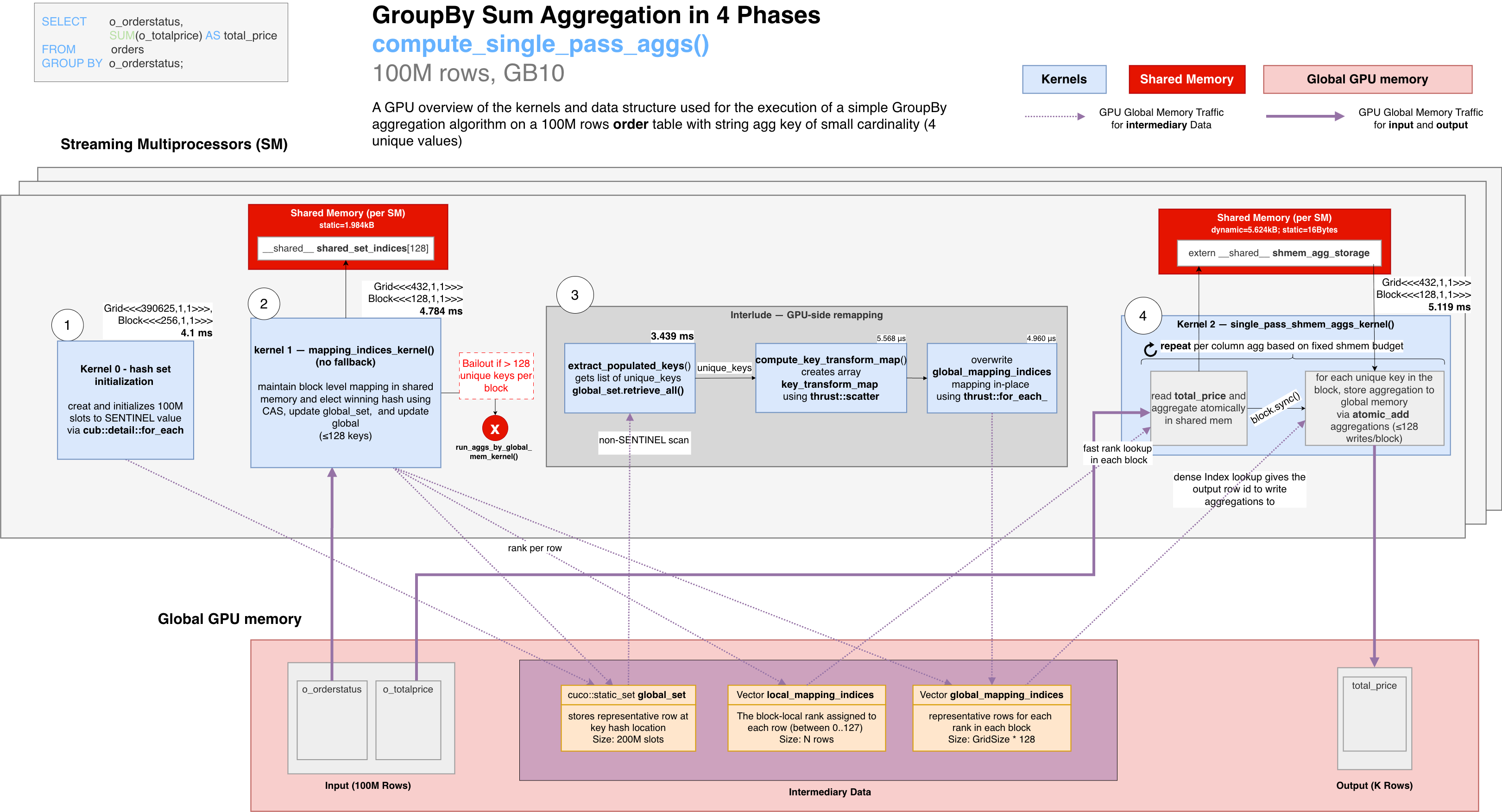
<p>The diagram below shows the overall execution of the aggregation from the GPU’s perspective (from left to right), covering kernels and main data structures used.</p>

<p><img src="/assets/img/libcudf-groupby.png" alt="libcudf groupby data flow" /></p>

<p>Use it as a map that links together all the details. The following sections below will zoom into each region: the kernel implementations (§5), and a step-by-step trace (§6), and more details about the <code class="language-plaintext highlighter-rouge">global_set</code> structure (§8)</p>

<p>Four algorithmic steps are highlighted:</p>
<ol>
  <li>Initialization</li>
  <li>Block Level Membership and Index Mapping</li>
  <li>Interlude: Dense output index remapping</li>
  <li>Final step: Shared-memory accumulation + flush</li>
</ol>

<p>The diagram highlights the different data structures stored in global memory and those in the shared memory, with reference to the 100M row dataset.</p>

<p><strong>Global memory</strong> (visible to all blocks):</p>
<ul>
  <li><em>Input:</em> <code class="language-plaintext highlighter-rouge">o_orderstatus</code>, <code class="language-plaintext highlighter-rouge">o_totalprice</code> (N=100M rows)</li>
  <li><em>Intermediary:</em> <code class="language-plaintext highlighter-rouge">global_set</code> (800 MB, 200M slots each 4 bytes), <code class="language-plaintext highlighter-rouge">local_mapping_indices</code> (one <code class="language-plaintext highlighter-rouge">int32</code> per row), <code class="language-plaintext highlighter-rouge">global_mapping_indices</code> (128 <code class="language-plaintext highlighter-rouge">int32</code> entries per block)</li>
  <li><em>Output:</em> <code class="language-plaintext highlighter-rouge">total_price</code> (K values)</li>
</ul>

<p><strong>Shared memory</strong> (private to each SM, discarded after the kernel):</p>
<ul>
  <li><code class="language-plaintext highlighter-rouge">shared_set</code> / <code class="language-plaintext highlighter-rouge">__shared__ slots[128]</code>: phase 2 only; the <code class="language-plaintext highlighter-rouge">cuco::static_set_ref</code> hash map backing store, used by <code class="language-plaintext highlighter-rouge">find_local_mapping</code> to probe for key existence and assign block-local ranks via CAS</li>
  <li><code class="language-plaintext highlighter-rouge">shared_set_indices[128]</code>: phase 2 only; parallel flat array mapping each block-local rank to the first input row that claimed it (rank → representative row-index)</li>
  <li><code class="language-plaintext highlighter-rouge">shmem_agg_storage</code>: phase 4 only; dynamic partial-sum accumulator storage indexed by block-local rank. For one <code class="language-plaintext highlighter-rouge">double</code> SUM over 128 ranks, the logical accumulator is 1 KB before alignment and any additional per-aggregation layout overhead.</li>
</ul>

<h2 id="4-the-groupbysum-algorithm">4. The GroupBy.Sum() Algorithm</h2>

<ol>
  <li><strong>Initialization</strong>:
    <ul>
      <li>Before any row is processed, a global hash set (<code class="language-plaintext highlighter-rouge">global_set</code>) is initialized to size 2x the input (200M slots) with a SENTINEL value (spawning a <code class="language-plaintext highlighter-rouge">cub::detail::for_each</code> on the gpu side).
        <div class="language-plaintext highlighter-rouge"><div class="highlight"><pre class="highlight"><code>global_set[0..200M) &lt;- SENTINEL
</code></pre></div>        </div>
      </li>
    </ul>
  </li>
  <li><strong>Block Level Membership and Index Mapping</strong>:
    <ul>
      <li>This phase reads the key column and determines which <code class="language-plaintext highlighter-rouge">o_orderstatus</code> group every input row belongs to. At this point the grouping is only local to a block. Each CUDA block uses a <strong>private hash table in shared-memory</strong> to map its rows to at most 128 distinct keys, assigning each a <code class="language-plaintext highlighter-rouge">block-local rank</code> (see below <code class="language-plaintext highlighter-rouge">what is a block-local rank?</code>).</li>
      <li>For each new key, using <code class="language-plaintext highlighter-rouge">CAS</code> (the compare-and-swap atomic instruction), it atomically elects  a single representative row where that key was first seen and inserts it into <code class="language-plaintext highlighter-rouge">global_set</code> to be used across all blocks.</li>
      <li>Two index arrays are maintained for use in later phases: 1) the <code class="language-plaintext highlighter-rouge">local_mapping_indices</code> stores the block-local rank value allocated to each row later used to generate the per block aggregation, and 2) the <code class="language-plaintext highlighter-rouge">global_mapping_indices</code> stores the winning row for each rank slot of that block, later turned into a global ranking.
        <div class="language-plaintext highlighter-rouge"><div class="highlight"><pre class="highlight"><code>local_mapping_indices[row]        -&gt; the block-local rank assigned to row  
global_mapping_indices[blk*128+r] -&gt; The representative row index for each rank slot in each block
global_set insert/find(rep_row)   -&gt; The winning representative row at the key hash slot
</code></pre></div>        </div>
      </li>
    </ul>
  </li>
  <li><strong>Interlude: Dense Output Index Remapping</strong>:
    <ul>
      <li>Between the two main kernels, a set of device operations scans <code class="language-plaintext highlighter-rouge">global_set</code> (via <code class="language-plaintext highlighter-rouge">retrieve_all</code> / <code class="language-plaintext highlighter-rouge">cub::DeviceSelect::If</code>) to collect the K representative row-indices, then builds a dense output ordering (0..K-1) via <code class="language-plaintext highlighter-rouge">thrust::scatter</code>, and rewrites <code class="language-plaintext highlighter-rouge">global_mapping_indices</code> in-place via <code class="language-plaintext highlighter-rouge">thrust::for_each_n</code> so every block agrees on the same output slot for each group. These algorithms launch over the full input or hash-set range even though only K ≪ N slots are populated, trading excess thread count for uniform, divergence-free execution that saturates memory bandwidth.
        <div class="language-plaintext highlighter-rouge"><div class="highlight"><pre class="highlight"><code>global_mapping_indices[blk*128+r] -&gt; dense output index in total_price[0..K-1]
</code></pre></div>        </div>
      </li>
    </ul>
  </li>
  <li><strong>Shared-Memory Accumulation + Global Reduction</strong>:
    <ul>
      <li>Now that membership and output ordering are known, each block accumulates its assigned <code class="language-plaintext highlighter-rouge">o_totalprice</code> values entirely within shared memory (no cross-block, no global atomics yet).</li>
      <li>Each block then flushes only up to 128 partial <code class="language-plaintext highlighter-rouge">o_totalprice</code> sums to the correct output slot using the remapped <code class="language-plaintext highlighter-rouge">global_mapping_indices</code>, one atomic-add per distinct <code class="language-plaintext highlighter-rouge">o_orderstatus</code> value per block rather than one per row.</li>
      <li>For this dataset the number of global atomics is reduced by a factor of roughly <code class="language-plaintext highlighter-rouge">100M / (num_blocks × avg_labels_per_block)</code> compared to the naïve approach.</li>
      <li>The logic is repeated based on the number of aggregation outputs to produce and available shared memory within a block
        <div class="language-plaintext highlighter-rouge"><div class="highlight"><pre class="highlight"><code>r = local_mapping_indices[row]
shmem_price_accum[r] += o_totalprice[row]
global_label_idx = global_mapping_indices[blk*128+r]
total_price[global_label_idx] += shmem_price_accum[r]
</code></pre></div>        </div>
      </li>
    </ul>
  </li>
</ol>

<p><strong>Note</strong>: Phase 2 and Phase 4 communicate through the index arrays produced by Phase 2 and rewritten by the Interlude; no inter-block GPU synchronisation is needed between Phase 2 and Phase 4.</p>

<blockquote>
  <p><strong>What is a block-local rank?</strong></p>
  <ul>
    <li>The key idea behind the fast path is that each CUDA block first locally deduplicates the keys among the rows it processes, then connects those per-block results to the final global output groups. This is done via <strong>block-local ranks</strong>.</li>
    <li>Each CUDA block assigns a small integer, starting from 0, to each distinct <code class="language-plaintext highlighter-rouge">o_orderstatus</code> value the first time it is encountered among that block’s assigned rows. That integer is the <strong>block-local rank</strong>: a dense index into the block’s private shared-memory accumulator array. In the fast path, valid ranks are <code class="language-plaintext highlighter-rouge">0..127</code>. This numbering is <strong>private to this block</strong>; another block may assign rank 0 to “O” or any other <code class="language-plaintext highlighter-rouge">o_orderstatus</code>.</li>
    <li>The Interlude phase converts the representative row-indices stored in <code class="language-plaintext highlighter-rouge">global_mapping_indices</code> after Phase 2 into final dense global output indices (<code class="language-plaintext highlighter-rouge">0..K-1</code>), where K is the total number of unique keys across all rows. This ensures that all blocks agree on the same output slot for each group before phase 4 runs.</li>
  </ul>
</blockquote>

<h2 id="5-deep-dive-into-each-phase-kernels-and-data-structures">5. Deep Dive into each phase: Kernels and Data Structures</h2>

<p>Now that the data flow and hash-set mechanics are established, this section revisits the same phases at the level of the actual kernels and helper functions. All the kernels below are invoked from a single host function, <a href="https://github.com/jazracherif/cudf/tree/v26.02.00_analysis/cpp/src/groupby/hash/compute_single_pass_aggs.cuh#L30"><code class="language-plaintext highlighter-rouge">compute_single_pass_aggs()</code></a>.</p>

<h3 id="phase-1-hash-set-initialization">Phase 1: Hash set initialization</h3>

<p>Before any row is processed, a <code class="language-plaintext highlighter-rouge">cub::detail::for_each</code> kernel sweeps all 200M slots of <code class="language-plaintext highlighter-rouge">global_set</code> and writes the SENTINEL value (typically <code class="language-plaintext highlighter-rouge">INT32_MAX</code>) to each one. This establishes the “empty” state that <code class="language-plaintext highlighter-rouge">insert_and_find</code>’s CAS loop uses to distinguish occupied from free slots. At 4 bytes × 200M slots = 800 MB of writes, this kernel is purely memory-bandwidth-bound (~4.1 ms on this dataset).</p>

<h3 id="phase-2-key-insertion-and-index-mapping">Phase 2: Key insertion and index mapping</h3>

<p>Every input row is processed by the <a href="https://github.com/jazracherif/cudf/tree/v26.02.00_analysis/cpp/src/groupby/hash/compute_mapping_indices.cuh#L120"><code class="language-plaintext highlighter-rouge">mapping_indices_kernel</code></a> kernel. For each row, the thread performs three steps:</p>

<ol>
  <li>
    <p><strong>Block-local deduplication</strong>: <a href="https://github.com/jazracherif/cudf/tree/v26.02.00_analysis/cpp/src/groupby/hash/compute_mapping_indices.cuh#L25"><code class="language-plaintext highlighter-rouge">find_local_mapping()</code></a> inserts the row’s key into <a href="https://github.com/jazracherif/cudf/tree/v26.02.00_analysis/cpp/src/groupby/hash/compute_mapping_indices.cuh#L140"><code class="language-plaintext highlighter-rouge">shared_set</code></a>, a block-private mini hash table <a href="https://github.com/jazracherif/cuCollections/tree/v26.02.00_analysis/include/cuco/static_set_ref.cuh#L63"><code class="language-plaintext highlighter-rouge">cuco::static_set_ref</code></a> backed by <code class="language-plaintext highlighter-rouge">__shared__ slots[]</code> (capacity = <a href="https://github.com/jazracherif/cudf/tree/v26.02.00_analysis/cpp/src/groupby/hash/helpers.cuh#L29"><code class="language-plaintext highlighter-rouge">GROUPBY_CARDINALITY_THRESHOLD = 128</code></a> unique keys). <code class="language-plaintext highlighter-rouge">shared_set</code> is used only for existence checks (new key vs. duplicate); a separate flat <code class="language-plaintext highlighter-rouge">__shared__</code> array <code class="language-plaintext highlighter-rouge">shared_set_indices[rank] = row_idx</code> maps each block-local rank to the first input row that claimed it. <code class="language-plaintext highlighter-rouge">local_mapping_indices[row]</code> is written with the block-local group rank (0..127): for a new key it is assigned by atomically incrementing <code class="language-plaintext highlighter-rouge">cardinality</code>; for a duplicate it is copied from <code class="language-plaintext highlighter-rouge">local_mapping_indices[matched_row]</code> after a <code class="language-plaintext highlighter-rouge">block.sync()</code>. <code class="language-plaintext highlighter-rouge">local_mapping_indices</code> provides a local per block grouping of the rows that will be re-used in phase 4 of the later accumulation step.</p>
  </li>
  <li>
    <p><strong>Global key registration</strong>: <a href="https://github.com/jazracherif/cudf/tree/v26.02.00_analysis/cpp/src/groupby/hash/compute_mapping_indices.cuh#L69"><code class="language-plaintext highlighter-rouge">find_global_mapping()</code></a> iterates over <code class="language-plaintext highlighter-rouge">shared_set_indices[0..cardinality-1]</code> and inserts each representative row-index into the <strong>global</strong> <code class="language-plaintext highlighter-rouge">cuco::static_set</code>. The CAS inside <code class="language-plaintext highlighter-rouge">global_set.insert_and_find()</code> atomically elects a single <strong>representative row</strong> for that key across all blocks. The winning row-index is stored in <code class="language-plaintext highlighter-rouge">global_mapping_indices[block × 128 + rank]</code>. <strong>Only one global insertion</strong> is made per distinct <code class="language-plaintext highlighter-rouge">o_orderstatus</code> value <em>per block</em>, not per row.</p>
  </li>
  <li>
    <p><strong>Overflow detection</strong>: if <code class="language-plaintext highlighter-rouge">cardinality &gt; 128</code>, the <a href="https://github.com/jazracherif/cudf/tree/v26.02.00_analysis/cpp/src/groupby/hash/compute_mapping_indices.cuh#L173"><code class="language-plaintext highlighter-rouge">needs_global_memory_fallback</code></a> flag is set and all threads in the block break out of the input loop. After the kernel, the host checks this flag and if set, falls back a slower naïve global-memory aggregation path instead <a href="https://github.com/jazracherif/cudf/tree/v26.02.00_analysis/cpp/src/groupby/hash/compute_single_pass_aggs.cuh#L76"><code class="language-plaintext highlighter-rouge">run_aggs_by_global_mem_kernel</code></a>.</p>
  </li>
</ol>

<h3 id="phase-3-interlude-dense-output-index-remapping">Phase 3, Interlude: Dense output index remapping</h3>

<p>When there is no overflow, <a href="https://github.com/jazracherif/cudf/tree/v26.02.00_analysis/cpp/src/groupby/hash/compute_single_pass_aggs.cuh#L151"><code class="language-plaintext highlighter-rouge">extract_populated_keys()</code></a> is invoked to extract unique key row-indices from <code class="language-plaintext highlighter-rouge">global_set</code> into a contiguous buffer via <code class="language-plaintext highlighter-rouge">cuco::static_set::retrieve_all()</code>, which fires two CUB kernels (<code class="language-plaintext highlighter-rouge">DeviceCompactInitKernel</code> + <code class="language-plaintext highlighter-rouge">DeviceSelectSweepKernel</code>).</p>

<p>The key transition in this phase is the meaning of <code class="language-plaintext highlighter-rouge">global_mapping_indices</code>:</p>

<p><strong>Before Interlude:</strong></p>
<div class="language-plaintext highlighter-rouge"><div class="highlight"><pre class="highlight"><code>global_mapping_indices = representative input row-index, in range [0..N-1]
</code></pre></div></div>

<p><strong>After Interlude:</strong></p>
<div class="language-plaintext highlighter-rouge"><div class="highlight"><pre class="highlight"><code>global_mapping_indices = dense output index into total_price[], in range [0..K-1]
</code></pre></div></div>

<p>This is done in 2 steps:</p>

<ol>
  <li>A <a href="https://github.com/jazracherif/cudf/tree/v26.02.00_analysis/cpp/src/groupby/hash/compute_single_pass_aggs.cuh#L156"><code class="language-plaintext highlighter-rouge">compute_key_transform_map()</code></a> step builds the dense renumbering (<code class="language-plaintext highlighter-rouge">key_transform_map</code>) that maps any representative input row-index to a compact output slot [0, K):
    <div class="language-plaintext highlighter-rouge"><div class="highlight"><pre class="highlight"><code>key_transform_map[representative_input_row_idx] 
     = output_group_index   (0..K-1)
</code></pre></div>    </div>
  </li>
  <li>A second <a href="https://github.com/jazracherif/cudf/tree/v26.02.00_analysis/cpp/src/groupby/hash/compute_single_pass_aggs.cuh#L160"><code class="language-plaintext highlighter-rouge">thrust::for_each_n</code></a> kernel then rewrites <code class="language-plaintext highlighter-rouge">global_mapping_indices</code>  in place using this map so that every entry holds a finalized output group index.</li>
</ol>

<h3 id="phase-4-shared-memory-accumulation--flush">Phase 4: Shared-memory accumulation + flush</h3>

<p>This phase is implemented by a single kernel, <a href="https://github.com/jazracherif/cudf/tree/v26.02.00_analysis/cpp/src/groupby/hash/compute_shared_memory_aggs.cu#L207"><code class="language-plaintext highlighter-rouge">single_pass_shmem_aggs_kernel</code></a></p>

<p>Each block declares <a href="https://github.com/jazracherif/cudf/tree/v26.02.00_analysis/cpp/src/groupby/hash/compute_shared_memory_aggs.cu#L232"><code class="language-plaintext highlighter-rouge">extern __shared__ cuda::std::byte shmem_agg_storage[]</code></a>: a dynamically-sized shared memory buffer laid out by <a href="https://github.com/jazracherif/cudf/tree/v26.02.00_analysis/cpp/src/groupby/hash/compute_shared_memory_aggs.cu#L33"><code class="language-plaintext highlighter-rouge">calculate_columns_to_aggregate()</code></a> as <code class="language-plaintext highlighter-rouge">num_agg_columns × cardinality × sizeof(element_type)</code> bytes (plus alignment padding), where <code class="language-plaintext highlighter-rouge">cardinality ≤ GROUPBY_CARDINALITY_THRESHOLD = 128</code>.</p>

<p>The kernel breaks the computation into a loop covering a number of aggregation output columns based on available shared memory, with the inner loop running the following two sub-phases:</p>

<div class="language-plaintext highlighter-rouge"><div class="highlight"><pre class="highlight"><code>┌─ Sub-phase 1: per-row accumulation into shared memory ──────────────────────┐
│  For each `row` assigned to a block, use previously generated               |
| `local_mapping_indices` to aggregated rows with same key in each block:     │
│    shmem_agg_storage[local_mapping_indices[row]] += source_value[row]       │
│    (via cudf::detail::atomic_add into shared memory)                        │
└─────────────────────────────────────────────────────────────────────────────┘
                              |
                          block.sync()
                              |
                              V
┌─ Sub-phase 2: flush partial results to global output columns ───────────────┐
│  For each `unique key` resident in this block:                              │
│    target_global_col[global_mapping_indices[blk×128+rank]]                  │
│        += shmem_agg_storage[rank]                                           │
│    (via cudf::detail::atomic_add into global memory)                        │
└─────────────────────────────────────────────────────────────────────────────┘
</code></pre></div></div>

<p><code class="language-plaintext highlighter-rouge">target_global_col</code> will contain the final aggregation value for each column.</p>

<p>The global <code class="language-plaintext highlighter-rouge">atomic_add</code> in sub-phase 2 is reached via an inlined two-level compile-time template dispatch (<code class="language-plaintext highlighter-rouge">type_dispatcher</code> × <code class="language-plaintext highlighter-rouge">aggregation_dispatcher</code>) that resolves the runtime column type and aggregation kind to a single pre-compiled specialization with no GPU branching. For <code class="language-plaintext highlighter-rouge">SUM</code> on <code class="language-plaintext highlighter-rouge">double</code> input (<code class="language-plaintext highlighter-rouge">o_totalprice</code>), this lands at <a href="https://github.com/jazracherif/cudf/tree/v26.02.00_analysis/cpp/src/groupby/hash/global_memory_aggregator.cuh#L68"><code class="language-plaintext highlighter-rouge">update_target_element_gmem&lt;double, SUM&gt;</code></a>, which calls <a href="https://github.com/jazracherif/cudf/tree/v26.02.00_analysis/cpp/src/groupby/hash/global_memory_aggregator.cuh#L79"><code class="language-plaintext highlighter-rouge">cudf::detail::atomic_add</code></a> directly.</p>

<h3 id="wrapup-output-key-gather">Wrapup: Output Key Gather</h3>

<p>After aggregation, the unique key row-indices retrieved from the hash set are used to <strong>gather</strong> the corresponding rows from the original input keys table into a dense output keys table:</p>

<div class="language-plaintext highlighter-rouge"><div class="highlight"><pre class="highlight"><code>output_keys[i] = input_keys[unique_key_indices[i]]   for i in [0, K)
</code></pre></div></div>

<p>For string key columns this gather requires a multi-step CUB prefix scan over character offsets followed by a parallel character copy kernel (<a href="https://github.com/jazracherif/cudf/tree/v26.02.00_analysis/cpp/include/cudf/strings/detail/gather.cuh#L156"><code class="language-plaintext highlighter-rouge">gather_chars_fn_char_parallel</code></a>).</p>

<h2 id="6-step-by-step-example-of-the-algorithm-from-input-rows-to-final-output-indices">6. Step-By-Step Example of the algorithm: from input rows to final output indices</h2>

<p>The example below traces the whole algorithm with two small blocks. The values are artificial, but the roles of <code class="language-plaintext highlighter-rouge">local_mapping_indices</code>, <code class="language-plaintext highlighter-rouge">global_mapping_indices</code>, <code class="language-plaintext highlighter-rouge">unique_key_indices</code>, and <code class="language-plaintext highlighter-rouge">key_transform_map</code> match the real execution.</p>

<p><strong>Setup</strong>:</p>
<ul>
  <li>2 blocks (B0, B1),</li>
  <li><code class="language-plaintext highlighter-rouge">GROUPBY_CARDINALITY_THRESHOLD = 128</code></li>
  <li>K=3 unique aggregation key values, <code class="language-plaintext highlighter-rouge">"F"</code>, <code class="language-plaintext highlighter-rouge">"O"</code>, and <code class="language-plaintext highlighter-rouge">"P"</code></li>
  <li>MurmurHash3 slot assignments in the 200M-slot <code class="language-plaintext highlighter-rouge">global_set</code>:
    <ul>
      <li><code class="language-plaintext highlighter-rouge">hash("F")%200M = 47_000_000</code></li>
      <li><code class="language-plaintext highlighter-rouge">hash("O")%200M = 103_000_000</code></li>
      <li><code class="language-plaintext highlighter-rouge">hash("P")%200M = 182_000_000</code>.</li>
    </ul>
  </li>
</ul>

<h3 id="step-1-input-partitioning">Step 1: Input partitioning</h3>

<p>Each block is assigned a contiguous slice of the 100M input rows:</p>

<p><strong>Block0</strong> (rows 1000..1004):</p>

<table class="df-table" style="--df-table-gutter: 80%">
  <thead><tr><th>Row</th><th>Key</th></tr></thead>
  <tbody>
    <tr><td>1000</td><td>"F"</td></tr>
    <tr><td>1001</td><td>"O"</td></tr>
    <tr><td>1002</td><td>"F"</td></tr>
    <tr><td>1003</td><td>"P"</td></tr>
    <tr><td>1004</td><td>"O"</td></tr>
  </tbody>
</table>

<p><strong>Block1</strong> (rows 5000..5004):</p>

<table class="df-table" style="--df-table-gutter: 80%">
  <thead><tr><th>Row</th><th>Key</th></tr></thead>
  <tbody>
    <tr><td>5000</td><td>"O"</td></tr>
    <tr><td>5001</td><td>"P"</td></tr>
    <tr><td>5002</td><td>"O"</td></tr>
    <tr><td>5003</td><td>"F"</td></tr>
    <tr><td>5004</td><td>"P"</td></tr>
  </tbody>
</table>

<h3 id="step-2-phase-2-block-local-rank-assignment--global-set-insertion-compute_mapping_indices">Step 2: Phase 2 block-local rank assignment + global set insertion (<a href="https://github.com/jazracherif/cudf/tree/v26.02.00_analysis/cpp/src/groupby/hash/compute_mapping_indices.cuh"><code class="language-plaintext highlighter-rouge">compute_mapping_indices</code></a>)</h3>

<ul>
  <li>Each block builds a private shmem hash set, assigning a <code class="language-plaintext highlighter-rouge">rank</code> to each new key on first encounter.</li>
  <li>For every key that is new to that block, it calls <code class="language-plaintext highlighter-rouge">insert_and_find(row_idx)</code> on the shared <code class="language-plaintext highlighter-rouge">global_set</code> (200M slots, <code class="language-plaintext highlighter-rouge">cuda::thread_scope_device</code>) to claim a globally unique slot via CAS.</li>
  <li><code class="language-plaintext highlighter-rouge">insert_and_find</code> returns <code class="language-plaintext highlighter-rouge">{iterator_to_slot, bool_inserted}</code>.</li>
  <li>Dereferencing the iterator (<code class="language-plaintext highlighter-rouge">*it</code>) yields the <strong>row index stored in that slot</strong>; always the winning thread’s <code class="language-plaintext highlighter-rouge">row_idx</code>, regardless of which thread won the CAS race.</li>
  <li>That row index is what gets written to <code class="language-plaintext highlighter-rouge">global_mapping_indices</code>.</li>
</ul>

<p>Assume Block0 wins the global CAS races, and each block assigns local ranks in first-seen row order. <code class="language-plaintext highlighter-rouge">local_mapping_indices</code> maps each input row to its block-local rank:</p>

<ul>
  <li>Block0 first sees “F”, then “O”, then “P” → F=rank0, O=rank1, P=rank2</li>
  <li>Block1 first sees “O”, then “P”, then “F” → O=rank0, P=rank1, F=rank2</li>
</ul>

<p><strong><code class="language-plaintext highlighter-rouge">local_mapping_indices</code></strong>: block-local rank per row:</p>

<table class="df-table" style="--df-table-gutter: 30%">
  <thead><tr><th>Row</th><th>Value</th><th>Description</th></tr></thead>
  <tbody>
    <tr><td>1000</td><td>0</td><td>"F" → rank 0 (first seen) - Block0</td></tr>
    <tr><td>1001</td><td>1</td><td>"O" → rank 1</td></tr>
    <tr><td>1002</td><td>0</td><td>"F" duplicate → rank 0</td></tr>
    <tr><td>1003</td><td>2</td><td>"P" → rank 2</td></tr>
    <tr><td>1004</td><td>1</td><td>"O" duplicate → rank 1</td></tr>
    <tr><td>...</td><td></td><td></td></tr>
    <tr><td>5000</td><td>0</td><td>"O" → rank 0 (first seen) - Block1</td></tr>
    <tr><td>5001</td><td>1</td><td>"P" → rank 1</td></tr>
    <tr><td>5002</td><td>0</td><td>"O" duplicate → rank 0</td></tr>
    <tr><td>5003</td><td>2</td><td>"F" → rank 2</td></tr>
    <tr><td>5004</td><td>1</td><td>"P" duplicate → rank 1</td></tr>
    <tr><td>..</td><td></td><td></td></tr>
    <tr><td>N-1</td><td></td><td></td></tr>
  </tbody>
</table>

<p><strong><code class="language-plaintext highlighter-rouge">global_set</code></strong> after Phase 2 (200M slots, only 3 occupied), stores the winning representative row for this key, all from Block0 rows.</p>

<table class="df-table" style="--df-table-gutter: 20%">
  <thead><tr><th>Slot</th><th>Value</th><th>Description</th></tr></thead>
  <tbody>
    <tr><td>hash("F") % 200M</td><td>1000</td><td>First winning row with key "F"</td></tr>
    <tr><td>hash("O") % 200M</td><td>1001</td><td>First winning row with key "O"</td></tr>
    <tr><td>hash("P") % 200M</td><td>1003</td><td>First winning row with key "P"</td></tr>
    <tr><td>all other ~199M slots</td><td>SENTINEL</td><td>Empty</td></tr>
  </tbody>
</table>

<p><strong><code class="language-plaintext highlighter-rouge">global_mapping_indices</code></strong> after Phase 2 contains representative input row indices, not yet mapped to the dense output grouping. Since B0 won the CAS races, B0’s winning rows are what gets stored:</p>

<table class="df-table" style="--df-table-gutter: 20%">
  <thead><tr><th>Index</th><th>Value</th><th>Description</th></tr></thead>
  <tbody>
    <tr><td>[0×128 + 0]</td><td>1000</td><td>B0 rank 0 ("F") → winning row 1000</td></tr>
    <tr><td>[0×128 + 1]</td><td>1001</td><td>B0 rank 1 ("O") → winning row 1001</td></tr>
    <tr><td>[0×128 + 2]</td><td>1003</td><td>B0 rank 2 ("P") → winning row 1003</td></tr>
    <tr><td>[0×128 + 3..127]</td><td>SENTINEL</td><td>Unused B0 slots</td></tr>
    <tr><td>[1×128 + 0]</td><td>1001</td><td>B1 rank 0 ("O") → uses B0 winning row 1001</td></tr>
    <tr><td>[1×128 + 1]</td><td>1003</td><td>B1 rank 1 ("P") → uses B0 winning row 1003</td></tr>
    <tr><td>[1×128 + 2]</td><td>1000</td><td>B1 rank 2 ("F") → uses B0 winning row 1000</td></tr>
    <tr><td>[1×128 + 3..127]</td><td>SENTINEL</td><td>Unused B1 slots</td></tr>
    <tr><td>..</td><td>SENTINEL</td><td>Unused</td></tr>
    <tr><td>NBLOCKS * 128 - 1</td><td>SENTINEL</td><td>Unused</td></tr>
  </tbody>
</table>

<p>Note: B1 also attempted to insert “O”, “P”, and “F” but the CAS returned <code class="language-plaintext highlighter-rouge">DUPLICATE</code>. The iterator still points to the existing slot, so <code class="language-plaintext highlighter-rouge">*it</code> gives the same row index B0 stored. Both blocks therefore agree on the same representative input row index per key.</p>

<h3 id="step-3-extract_populated_keys-compact-global_set--unique_key_indices">Step 3: <a href="https://github.com/jazracherif/cudf/tree/v26.02.00_analysis/cpp/src/groupby/hash/compute_single_pass_aggs.cuh#L151"><code class="language-plaintext highlighter-rouge">extract_populated_keys()</code></a>: compact <strong>global_set</strong> → <strong>unique_key_indices</strong></h3>

<p><code class="language-plaintext highlighter-rouge">retrieve_all()</code> scans <code class="language-plaintext highlighter-rouge">global_set</code> linearly from slot 0 to slot 199M via <code class="language-plaintext highlighter-rouge">cub::DeviceSelect::If</code>, collecting the row-index values stored in each non-SENTINEL slot:</p>

<div class="language-plaintext highlighter-rouge"><div class="highlight"><pre class="highlight"><code>scan order: slot hash("F")%200M comes first, then hash("O")%200M, then hash("P")%200M
            (i.e. in ascending slot-position order, regardless of insertion order)

unique_key_indices = [1000, 1001, 1003]   ← representative input row index per slot, in slot-scan order
                       i=0    i=1    i=2
</code></pre></div></div>

<p>These are the same row indices already in <code class="language-plaintext highlighter-rouge">global_mapping_indices</code>, just deduplicated by scanning the hash table. Their position in <code class="language-plaintext highlighter-rouge">unique_key_indices</code> (0, 1, 2) defines the dense output row each key will occupy.</p>

<h3 id="step-4-compute_key_transform_map-invert-unique_key_indices-via-thrustscatter">Step 4: <a href="https://github.com/jazracherif/cudf/tree/v26.02.00_analysis/cpp/src/groupby/hash/compute_single_pass_aggs.cuh#L155"><code class="language-plaintext highlighter-rouge">compute_key_transform_map()</code></a>: invert <strong>unique_key_indices</strong> via <strong>thrust::scatter</strong></h3>

<p>Scatters counting values <code class="language-plaintext highlighter-rouge">0, 1, 2</code> to positions <code class="language-plaintext highlighter-rouge">unique_key_indices[0,1,2]</code>. The result is an array of size N (number of input rows), where each populated index is the representative input row index mapped to its final dense output row.</p>

<table class="df-table">
  <thead><tr><th>Index</th><th>Value</th><th>Description</th></tr></thead>
  <tbody>
    <tr><td>[1000]</td><td>0</td><td>Row 1000 ("F") → dense output row 0</td></tr>
    <tr><td>[1001]</td><td>1</td><td>Row 1001 ("O") → dense output row 1</td></tr>
    <tr><td>[1002]</td><td>-</td><td>-</td></tr>
    <tr><td>[1003]</td><td>2</td><td>Row 1003 ("P") → dense output row 2</td></tr>
    <tr><td>all other ~99M entries</td><td>(uninitialized)</td><td>Irrelevant; never read</td></tr>
  </tbody>
</table>

<h3 id="step-5-thrustfor_each_n-rewrites-global_mapping_indices-in-place-with-dense-output-rows">Step 5: <a href="https://github.com/jazracherif/cudf/tree/v26.02.00_analysis/cpp/src/groupby/hash/compute_single_pass_aggs.cuh#L157"><code class="language-plaintext highlighter-rouge">thrust::for_each_n</code></a>: rewrites <strong>global_mapping_indices</strong> in-place with dense output rows</h3>

<p>Each non-SENTINEL entry (a representative input row index in 0..N-1) is replaced with <code class="language-plaintext highlighter-rouge">key_transform_map[old_idx]</code> (the corresponding dense output row in 0..K-1). The representative rows 1000, 1001, and 1003 are not usable as output indices directly; there are only K=3 output rows, so they must be remapped to 0, 1, and 2:</p>

<p><strong><code class="language-plaintext highlighter-rouge">global_mapping_indices</code></strong> after remapping (dense output indices, replacing representative row indices): Notice that the ranks have the same value across all blocks; it is a global mapping.</p>

<table class="df-table">
  <thead><tr><th>Index</th><th>Value</th><th>Description</th></tr></thead>
  <tbody>
    <tr><td>[0×128 + 0]</td><td>0</td><td>B0 rank 0 ("F") → output row 0</td></tr>
    <tr><td>[0×128 + 1]</td><td>1</td><td>B0 rank 1 ("O") → output row 1</td></tr>
    <tr><td>[0×128 + 2]</td><td>2</td><td>B0 rank 2 ("P") → output row 2</td></tr>
    <tr><td>[0×128 + 3..127]</td><td>SENTINEL</td><td>Unused B0 slots</td></tr>
    <tr><td>[1×128 + 0]</td><td>1</td><td>B1 rank 0 ("O") → output row 1</td></tr>
    <tr><td>[1×128 + 1]</td><td>2</td><td>B1 rank 1 ("P") → output row 2</td></tr>
    <tr><td>[1×128 + 2]</td><td>0</td><td>B1 rank 2 ("F") → output row 0</td></tr>
    <tr><td>[1×128 + 3..127]</td><td>SENTINEL</td><td>Unused B1 slots</td></tr>
    <tr><td>..</td><td>SENTINEL</td><td>Unused</td></tr>
    <tr><td>NBLOCKS * 128 - 1</td><td>SENTINEL</td><td>Unused</td></tr>
  </tbody>
</table>

<h3 id="step-6-kernel-2-accumulate--flush-compute_shared_memory_aggs">Step 6: Kernel 2, accumulate + flush (<a href="https://github.com/jazracherif/cudf/tree/v26.02.00_analysis/cpp/src/groupby/hash/compute_shared_memory_aggs.cu"><code class="language-plaintext highlighter-rouge">compute_shared_memory_aggs</code></a>)</h3>

<p>Now we have a mapping from every row to its block-local accumulator, and from every block-local accumulator to its global output row. Each block reads its rows, accumulates <code class="language-plaintext highlighter-rouge">o_totalprice</code> into shmem using <code class="language-plaintext highlighter-rouge">local_mapping_indices[row]</code> as the shmem slot, then flushes at most 128 partial sums to global memory using <code class="language-plaintext highlighter-rouge">global_mapping_indices[block*128 + local_rank]</code> as the <code class="language-plaintext highlighter-rouge">total_price</code> output index.</p>

<h2 id="7-algorithm-complexity-summary">7. Algorithm Complexity Summary</h2>

<p>Assuming the following:</p>
<ul>
  <li>N = total number of input rows (100M in this dataset).</li>
  <li>K = number of distinct groupby keys.</li>
  <li>capacity = hash-table size (2N slots = 200M).</li>
</ul>

<table class="compact-table compact-table-wrap-first">
  <thead><tr><th>Stage</th><th>Time complexity</th><th>Dominant cost</th></tr></thead>
  <tbody>
    <tr><td>Phase 1: hash set init</td><td>O(N)</td><td>Memory bandwidth: write sentinel to 2N slots (~4.1 ms)</td></tr>
    <tr><td>Phase 2: key insertion + local mapping</td><td>O(N) avg</td><td>Hash probing + atomic inserts</td></tr>
    <tr><td>Phase 3 Interlude: unique key extraction + dense index remap</td><td>O(capacity) = O(2N)</td><td><strong>NOT O(K)</strong>, <code>retrieve_all()</code> must scan every one of the 200M hash-table slots to find the K occupied ones. Cost is fixed by table size, not by the number of distinct keys (~3.4 ms even when K=3)</td></tr>
    <tr><td>Phase 4: SUM accumulation</td><td>O(N)</td><td>Shared-memory atomics (fast) + global atomics (flush)</td></tr>
    <tr><td>Key gather</td><td>O(K + total key bytes) for strings</td><td>Offset scan + character copy</td></tr>
  </tbody>
</table>

<p>Total: <strong>O(N)</strong> average with low constant factors when cardinality ≤ 128 groups per block. The asymptotic result is simple; the practical win comes from changing global atomic frequency from per-row to per-block-per-group.</p>

<h2 id="8-appendix-a-deeper-look-into-hash-set-global_set">8. Appendix: A Deeper Look into hash set <strong>global_set</strong></h2>

<p>The hash groupby is built around a <strong>device-side open-addressing hash set</strong> (<code class="language-plaintext highlighter-rouge">cuco::static_set</code>), referred to as <code class="language-plaintext highlighter-rouge">global_set</code> in the code, that stores one representative input row-index per unique key. It does not store the aggregation key values directly; instead, each stored row-index points back into the original key column, and the row hasher/comparator use that row to hash and compare the key value.</p>

<p>Since many rows can have the same aggregation key, <code class="language-plaintext highlighter-rouge">insert_and_find()</code> uses CAS (compare-and-swap) to claim empty global slots and elect one representative row for each key across all blocks. Each block first maintains its own block-private <code class="language-plaintext highlighter-rouge">shared_set</code> in shared memory to deduplicate rows locally, then only the block-local representative rows are inserted/looked up in <code class="language-plaintext highlighter-rouge">global_set</code>.</p>

<p>Multiple blocks may attempt to register the same key, but only the first successful CAS writes that key’s global representative row-index into the set. In order to minimize collision cost without knowing the distinct key count in advance, the set’s capacity is sized for the worst case in which every input row has a distinct key: twice the number of rows in the dataset.</p>

<p><code class="language-plaintext highlighter-rouge">global_set</code> slot layout:</p>
<ul>
  <li>N = 100M rows</li>
  <li>load factor = 50%</li>
  <li>capacity = 2 × num_input_rows = 200M slots</li>
</ul>

<p>Example content with 2 unique key values:</p>
<table class="df-table">
  <thead><tr><th>#</th><th>value</th><th>Notes</th></tr></thead>
  <tbody>
    <tr><td>0</td><td>EMPTY</td><td></td></tr>
    <tr><td>1</td><td>EMPTY</td><td></td></tr>
    <tr><td>2</td><td>7</td><td>Row 7 has a unique <code>o_orderstatus</code> value that hashes into this slot</td></tr>
    <tr><td>3</td><td>EMPTY</td><td></td></tr>
    <tr><td>…</td><td>…</td><td></td></tr>
    <tr><td>1000</td><td>12</td><td>Row 12 has a different unique <code>o_orderstatus</code> value that hashes into a different slot in this set</td></tr>
    <tr><td>…</td><td>EMPTY</td><td></td></tr>
    <tr><td>199M</td><td>EMPTY</td><td></td></tr>
  </tbody>
</table>

<h3 id="set-design">Set design</h3>

<p>The hash set is constructed in <a href="https://github.com/jazracherif/cudf/tree/v26.02.00_analysis/cpp/src/groupby/hash/compute_groupby.cu#L126"><code class="language-plaintext highlighter-rouge">compute_groupby()</code></a> with the following specifications:</p>

<ul>
  <li><strong>Key type</strong>: <code class="language-plaintext highlighter-rouge">int32_t</code> (cuDF <code class="language-plaintext highlighter-rouge">size_type</code>). Row hashing and equality comparison are performed by cuDF’s row comparator against the <code class="language-plaintext highlighter-rouge">o_orderstatus</code> (<code class="language-plaintext highlighter-rouge">utf8</code>) column. MurmurHash3 over character bytes, byte-wise equality.</li>
  <li><strong>Capacity</strong>: <code class="language-plaintext highlighter-rouge">2 × N</code> slots where N = num_input_rows (used as a worst-case upper bound for distinct key count; <code class="language-plaintext highlighter-rouge">CUCO_DESIRED_LOAD_FACTOR = 0.5</code>). For N = 100M rows: 200M slots × 4 bytes = <strong>800 MB</strong>. Construction fires <code class="language-plaintext highlighter-rouge">cub::detail::for_each::static_kernel&lt;initialize_functor&lt;long,int&gt;&gt;</code> to fill all slots with the sentinel in parallel. For 100M rows, initialization costs <strong>4.105 ms</strong>, ~23.5% of total groupby kernel time.</li>
  <li><strong>Probing scheme</strong>: <code class="language-plaintext highlighter-rouge">cuco::linear_probing&lt;1,</code> <a href="https://github.com/jazracherif/cudf/tree/v26.02.00_analysis/cpp/src/groupby/hash/helpers.cuh#L56"><code class="language-plaintext highlighter-rouge">row_hasher_with_cache_t</code></a><code class="language-plaintext highlighter-rouge">&gt;</code>. Linear probing with CGSize=1 (each probe step is handled by a single thread, advancing one slot at a time), with an optional row-hash cache (pre-computed hashes stored in a <code class="language-plaintext highlighter-rouge">device_uvector</code>).</li>
  <li><strong>Thread scope</strong>: <code class="language-plaintext highlighter-rouge">cuda::thread_scope_device</code>. All GPU threads can access the same set.</li>
  <li><strong>Sentinel</strong>: <a href="https://github.com/jazracherif/cudf/tree/v26.02.00_analysis/cpp/src/groupby/hash/compute_mapping_indices.cuh#L134"><code class="language-plaintext highlighter-rouge">CUDF_SIZE_TYPE_SENTINEL</code></a> <code class="language-plaintext highlighter-rouge">= INT32_MAX</code>. Marks empty slots.</li>
  <li><strong>Memory</strong>: <code class="language-plaintext highlighter-rouge">rmm::mr::polymorphic_allocator</code>. Backed by the caller-supplied RMM pool.</li>
  <li><strong>Storage layout</strong>: <a href="https://github.com/jazracherif/cuCollections/tree/v26.02.00_analysis/include/cuco/storage.cuh#L44"><code class="language-plaintext highlighter-rouge">cuco::storage&lt;BucketSize=1&gt;</code></a>. Two-level slot hierarchy: array of buckets, each holding <code class="language-plaintext highlighter-rouge">BucketSize</code> contiguous slots. <code class="language-plaintext highlighter-rouge">BucketSize &gt; 1</code> lets a thread probe multiple slots per step (beneficial for memory-bandwidth-bound workloads). For cuDF GroupBy, hardcoded to <a href="https://github.com/jazracherif/cudf/tree/v26.02.00_analysis/cpp/src/groupby/hash/helpers.cuh#L22"><code class="language-plaintext highlighter-rouge">GROUPBY_BUCKET_SIZE = 1</code></a> (flat per-slot probing); appropriate here since key cardinality is low and contention is minimal.</li>
</ul>

<h3 id="findinginserting-a-key-in-the-set">Finding/Inserting a key in the set</h3>

<p>The set stores <strong>row indices</strong> (<code class="language-plaintext highlighter-rouge">int32_t</code>), not actual key values. When the set needs to hash or compare a candidate slot, it calls back into the original input column data on the GPU (via <code class="language-plaintext highlighter-rouge">d_row_hash</code>). This indirection is set up before any kernels run, in <code class="language-plaintext highlighter-rouge">dispatch_groupby()</code>:</p>

<ol>
  <li><code class="language-plaintext highlighter-rouge">preprocessed_table::create(keys, stream)</code>: copies the <code class="language-plaintext highlighter-rouge">column_device_view</code> metadata structs (data pointers, null masks, type IDs) into a GPU buffer so kernels can dereference them. The actual column bytes were already in GPU memory via RMM. <strong>Cost: ~143 bytes</strong> (one string column’s metadata, as seen in the RMM trace).</li>
  <li><code class="language-plaintext highlighter-rouge">self_comparator</code>: host factory that wraps the <code class="language-plaintext highlighter-rouge">preprocessed_table</code> and produces <code class="language-plaintext highlighter-rouge">device_row_comparator</code>, a GPU callable implementing <code class="language-plaintext highlighter-rouge">operator()(i, j)</code> → byte-wise string equality via <code class="language-plaintext highlighter-rouge">type_dispatcher</code>.</li>
  <li><code class="language-plaintext highlighter-rouge">row_hasher</code>: same pattern; produces <code class="language-plaintext highlighter-rouge">device_row_hasher</code>, a GPU callable implementing <code class="language-plaintext highlighter-rouge">operator()(i)</code> → MurmurHash3 over all columns of row <code class="language-plaintext highlighter-rouge">i</code>. Both share the same <code class="language-plaintext highlighter-rouge">preprocessed_table</code> via <code class="language-plaintext highlighter-rouge">shared_ptr</code> to avoid a redundant GPU upload.</li>
</ol>

<p>These two callables are then embedded directly into the <code class="language-plaintext highlighter-rouge">cuco::static_set</code> constructor as the <strong>probing scheme</strong> and <strong>equality comparator</strong>, so every insert and lookup the set performs reaches back into the original key column memory.</p>

<p><strong><a href="https://github.com/jazracherif/cuCollections/tree/v26.02.00_analysis/include/cuco/detail/open_addressing/open_addressing_ref_impl.cuh#L520"><code class="language-plaintext highlighter-rouge">insert_and_find(i)</code></a> logic for row index <code class="language-plaintext highlighter-rouge">i</code></strong>:</p>

<div class="language-plaintext highlighter-rouge"><div class="highlight"><pre class="highlight"><code>1. slot = d_row_hash(i) % 200M_slots          ← initial probe position from o_orderstatus string bytes

2. occupant = *slot
  pre-CAS check: d_row_equal(i, occupant)    ← does the row stored in this slot match row i's key?
      EQUAL     → return {slot, false}         ← key seen before; occupant is the representative (no CAS needed)
      AVAILABLE → go to step 3                 ← slot is empty (SENTINEL); attempt insert
      UNEQUAL   → slot += 1, repeat step 2    ← occupied by a different key; linear probe

3. CAS(slot, SENTINEL, i)                     ← atomically try to claim this empty slot
      SUCCESS   → return {slot, true}          ← we won; row i is now the representative
      DUPLICATE → return {slot, false}         ← another thread won the same key; slot holds the representative
      CONTINUE  → repeat step 2 at same slot  ← a different key raced us here; re-probe from this slot
</code></pre></div></div>

<p>Phase 2 kernel <code class="language-plaintext highlighter-rouge">mapping_indices_kernel</code> uses this operation in two scopes. First, each row probes the block-private <code class="language-plaintext highlighter-rouge">shared_set</code> to get a block-local rank. Then only the rows that represent keys new to that block probe the global <code class="language-plaintext highlighter-rouge">global_set</code>, where the CAS in step 3 performs the cross-block election: whichever thread wins the compare-and-swap for a given <code class="language-plaintext highlighter-rouge">o_orderstatus</code> value becomes the globally agreed representative row for that key. The <code class="language-plaintext highlighter-rouge">CONTINUE</code> result (a raced-but-different-key loss) sends the thread back to re-evaluate the slot it just lost, not to advance, since the winner may have written a key equal to <code class="language-plaintext highlighter-rouge">i</code>.</p>]]></content><author><name>Cherif Jazra</name></author><category term="database" /><category term="gpu" /><category term="nvidia" /><category term="rapids" /><category term="libcudf" /><category term="libcudf" /><category term="rapids" /><category term="cuda" /><category term="gpu-databases" /><category term="groupby" /><category term="cuCollections" /><category term="blackwell" /><category term="dgx-spark" /><summary type="html"><![CDATA[A walkthrough of libcudf's four-phase hash-aggregate fast path for GROUP BY + SUM on GPU — covering CUDA kernel design, cuCollections open-addressing hash tables, shared-memory strategy, and CPU vs GPU execution trade-offs.]]></summary><media:thumbnail xmlns:media="http://search.yahoo.com/mrss/" url="https://jazracherif.github.io/assets/img/libcudf-groupby-top.png" /><media:content medium="image" url="https://jazracherif.github.io/assets/img/libcudf-groupby-top.png" xmlns:media="http://search.yahoo.com/mrss/" /></entry><entry><title type="html">NVIDIA GTC 2026 Accelerated Analytics - Part 2: Industry Use Cases and Training Labs</title><link href="https://jazracherif.github.io/nvidia/gtc/analytics/gpu/2026/04/17/accelerated-analytics-at-gtc-2026-part2-industry-cases-and-training-labs.html" rel="alternate" type="text/html" title="NVIDIA GTC 2026 Accelerated Analytics - Part 2: Industry Use Cases and Training Labs" /><published>2026-04-17T07:00:00+00:00</published><updated>2026-04-17T07:00:00+00:00</updated><id>https://jazracherif.github.io/nvidia/gtc/analytics/gpu/2026/04/17/accelerated-analytics-at-gtc-2026-part2-industry-cases-and-training-labs</id><content type="html" xml:base="https://jazracherif.github.io/nvidia/gtc/analytics/gpu/2026/04/17/accelerated-analytics-at-gtc-2026-part2-industry-cases-and-training-labs.html"><![CDATA[<p><em>This is Part 2 of my series on Accelerated Analytics at GTC 2026, focusing on 3 industry talks and 2 DLI training workshops. Read <a href="/nvidia/gtc/analytics/gpu/2026/04/09/accelerated-analytics-at-gtc-2026-part1-technical-deep-dives.html">Part 1: Technical Deep Dives</a>.</em></p>

<p>This post tackles the following sessions:</p>

<ol>
  <li>
    <p><strong>Quais Taraki</strong> (CTO, EDB) shows how <a href="#edb">standard Postgres breaks under agentic query loads</a> and walks through PGAA — a GPU-accelerated HTAP solution that swaps the Postgres compute back-end for Iceberg + Spark RAPIDS, achieving 100× TPC-DS speedup and enabling a complete LangFlow-based agentic stack on top.</p>
  </li>
  <li>
    <p><strong>Liang Chen</strong> and <strong>Prudhvi Vatala</strong> from Snap detail <a href="#snap">how Spark RAPIDS cut A/B pipeline costs by 90%</a> — not through any Spark tuning magic, but by rerouting 11,000 idle inference L4s into a three-tier fallback Spark fleet at near-zero incremental cost.</p>
  </li>
  <li>
    <p><strong>Harishankar G</strong> and <strong>Jalakandeshwaran A</strong> from Zoho give a <a href="#zoho">deep dive into Velociraptor</a>, their in-house GPU OLAP engine built as a Postgres extension, which runs all 22 TPC-H queries at 1 TB on a single H200 in under two minutes — then explain why PCIe is still the bottleneck even after every I/O optimization.</p>
  </li>
  <li>
    <p><strong>Hirakendu Das</strong>, <strong>Navin Kumar</strong>, and <strong>Rishi Chandra</strong> lead a <a href="#dlit81642">hands-on Spark RAPIDS workshop</a> covering the cuDF plugin, Project Aether’s automated qualify → tune → validate loop, and Ether Assistant’s LLM-based UDF rewriter.</p>
  </li>
  <li>
    <p><strong>Allison Ding</strong> walks through a <a href="#dlit81754">full GPU data science pipeline</a> — from zero-copy feature engineering with cuDF and GPU Polars, through cuML model training (k-means 40×, XGBoost 7×), to Triton Inference Server deployment with dynamic batching.</p>
  </li>
</ol>

<h3 id="industry-use-cases">Industry Use Cases</h3>

<h4 id="edb"><a href="https://www.nvidia.com/en-us/on-demand/session/gtc26-ex82253/">🔗 [EDB] Supercharging Postgres for Agentic Analytics with Rapids Accelerator and Apache Iceberg</a></h4>

<p><small><strong>Quais Taraki</strong> · CTO, EDB</small></p>

<details class="session-abstract"><summary>NVIDIA Session overview</summary><p>As data volumes increase, the primary bottleneck for high-performance AI agents will shift from the model to the data. This increases the importance of the underlying data engine’s ability to process massive enterprise datasets in real time. This scaling problem is further amplified by the desire to make the latest transactional business data seamlessly available to agentic processing. Join the experts from EDB for a technical deep dive into how to overcome these scaling and transactional integration hurdles using the world's most popular open-source database. We will showcase the architecture behind GPU acceleration in EDB Postgres AI, specifically how offloading complex analytical workloads to an NVIDIA RAPIDS Accelerator for Apache Spark eliminates traditional CPU bottlenecks. Through a review of TPC-DS benchmarks, we will demonstrate how to transform Postgres into a high-throughput engine capable of powering autonomous agentic analytics for real-time business decision-making. We will also showcase how EDB Postgres makes all transactional data available to GPU processing in real time through Apache Iceberg. This establishes a GPU-accelerated Hybrid Analytics and Transactional Processing (HTAP) stack, which at the same time avoids vendor lock-in by being fully compatible with the modern open analytics ecosystems.
</p></details>

<p>EDB (EnterpriseDB) develops solutions on top of PostgreSQL, such as the proprietary extension PostgreSQL Analytics Accelerator (PGAA) discussed in this talk. EDB recognizes the problem that Analytics Agents are now bottlenecked by CPU-based data systems for their OLAP needs. In this talk, Quais discusses PGAA, their hybrid OLTP/OLAP solution that relies on Spark Rapids GPU acceleration for large-scale analytics and making it available to Agents via technologies like langflow and kserve. More on PGAA in their <a href="https://www.enterprisedb.com/blog/achieving-predictable-performance-scale-agentic-analytics">blog post</a>.</p>

<p><strong>Takeaways</strong></p>

<table class="takeaway-table">

<tr>
  <td class="tk-head"><strong>1. Agent queries time out on standard Postgres — the database becomes the bottleneck</strong></td>
  <td class="tk-time">@ 03:54</td>
</tr>
<tr>
  <td colspan="2" class="tk-content">
    <takeaway-tag name="pain"></takeaway-tag>
    <span class="tk-body">
      Agents generate far more complex and random query patterns than human-written queries. "We see customers hitting timeouts with large data sets, thereby starving the agent." Constraining the agents or doing an application rewrite are the typical mitigations — both undesirable. The fix must come from the database layer.
    </span>
    <img src="/assets/img/gtc-2026/sessions/edb-pgaa-tpcds-benchmark.png" alt="EDB PGAA TPC-DS benchmark: Postgres times out vs Spark RAPIDS on L40S" />
  </td>
</tr>

<tr>
  <td class="tk-head"><strong>2. PGAA swaps the Postgres compute back-end: Iceberg + DataFusion + Spark Connect on RAPIDS</strong></td>
  <td class="tk-time">@ 05:11</td>
</tr>
<tr>
  <td colspan="2" class="tk-content">
    <takeaway-tag name="design"></takeaway-tag>
    <takeaway-tag name="storage"></takeaway-tag>
    <span class="tk-body">
      EDB's Postgres Analytics Accelerator (PGAA) replaces the Postgres compute back-end with three components: (1) replicate data to object storage in Apache Iceberg format; (2) DataFusion — "a columnar vectorized open source query engine" — as a plug-and-play compute layer; (3) Spark Connect to offload massive distributed joins to a Spark cluster, further accelerated via Spark RAPIDS on GPU. The Postgres front-end and SQL interface remain unchanged.
    </span>
    <img src="/assets/img/gtc-2026/sessions/edb-pgaa-architecture.png" alt="EDB PGAA architecture: Iceberg + DataFusion + Spark Connect on RAPIDS" />
  </td>
</tr>

<tr>
  <td class="tk-head"><strong>3. TPC-DS: Postgres times out at 10 TB; Spark RAPIDS on L40S is 100× faster; Blackwell adds 14× more</strong></td>
  <td class="tk-time">@ 05:57</td>
</tr>
<tr>
  <td colspan="2" class="tk-content">
    <takeaway-tag name="benchmark"></takeaway-tag>
    <takeaway-tag name="tco"></takeaway-tag>
    <span class="tk-body">
      Three-tier TPC-DS comparison across data sizes: standard Postgres (orange) grows unbounded and times out at 10 TB; vanilla Spark+PGAA (blue) is a substantial improvement; Spark RAPIDS on L40S (green) lands "on the order of 100x over standard Postgres." Re-ran on RTX 6000 Pro (Blackwell): "a further 14x speedup" on top of that.
    </span>
    <img src="/assets/img/gtc-2026/sessions/edb-pgaa-tpcds-comparison.png" alt="EDB PGAA TPC-DS three-tier comparison: Postgres vs Spark vs Spark RAPIDS on L40S" />
  </td>
</tr>

<tr>
  <td class="tk-head"><strong>4. Full agentic stack: AIDB vectorization + MCP endpoints + NVIDIA NIMs + LangFlow on top of PGAA</strong></td>
  <td class="tk-time">@ 08:02</td>
</tr>
<tr>
  <td colspan="2" class="tk-content">
    <takeaway-tag name="design"></takeaway-tag>
    <span class="tk-body">
      Above the analytics layer: the AIDB extension generates embedding vectors from Postgres data for semantic search; MCP endpoints expose all data stores to LLM agents; containerized NVIDIA NIMs run local model inference via KServe; LangFlow provides a low/no-code agent authoring environment. The entire stack runs on NVIDIA GPUs. Speaker's admission: "there are a lot of moving parts… a lot of security to consider" — EDB packages all of it so customers don't have to.
    </span>
  </td>
</tr>

<tr>
  <td class="tk-head"><strong>5. EDB ships the full stack as a sovereign, batteries-included Postgres platform</strong></td>
  <td class="tk-time">@ 09:41</td>
</tr>
<tr>
  <td colspan="2" class="tk-content">
    <takeaway-tag name="oss"></takeaway-tag>
    <takeaway-tag name="design"></takeaway-tag>
    <span class="tk-body">
      Stack choices are opinionated: <strong>Lakekeeper</strong> as the Iceberg catalog ("a much more modern version than, say, something like Hive Metastore"), <strong>LangFlow</strong> for agent authoring, NVIDIA NIMs on <strong>KServe</strong> for inference. The platform is "complete, batteries included, modular, composable, sovereign, open source" — deployable on IBM mainframes, on-premise, all hyperscalers, or custom Supermicro+NVIDIA hardware.
    </span>
    <img src="/assets/img/gtc-2026/sessions/edb-pgaa-agentic-stack.png" alt="EDB PGAA full agentic stack: AIDB + MCP + NVIDIA NIMs + LangFlow" />
  </td>
</tr>

</table>

<h4 id="snap"><a href="https://www.nvidia.com/en-us/on-demand/session/gtc26-s81678/">🔗 [Snap] How Snap Saves Millions with Accelerated Apache Spark</a></h4>

<p><small><strong>Liang Chen</strong> · Staff Software Engineer, Snap, Inc.<br /><strong>Prudhvi Vatala</strong> · Sr. Engineering Manager, Snap, Inc.</small></p>

<details class="session-abstract"><summary>NVIDIA Session overview</summary><p>Snap's A/B experimentation platform processes 10 petabytes per day across ~45,000 machines with a strict 11 AM SLA and zero tolerance for failure. This talk is an eight-month engineering journey: from discovering the RAPIDS Spark accelerator, through benchmarks, infrastructure blockers, and a novel GPU reuse strategy, to a fully productionized petabyte-scale GPU Spark platform that cut costs by 90%.</p></details>

<p>This session takes us through Snap’s experience adopting Spark on RAPIDS for its A/B pipelines. All these experiments were done on GCP instances featuring L4 and T4 GPUs like the g2-standard-48, with an on-demand price of $1.76. Interestingly, using Spark on RAPIDS was mostly a smooth experience with little engineering effort; the main bottleneck was rather the scarcity of GPUs available for these data processing jobs, at a time when almost everything is going toward AI inference and training. The team’s main engineering effort was thus moving their system over to the AI K8s GKE cluster to take advantage of the idle GPUs often seen late at night. Nevertheless, the team highlights their collaborative effort with Google and NVIDIA in getting this to work. Look at this companion <a href="https://eng.snap.com/snap-nvidia-gcp">article</a> from Snap Engineering for a good read.</p>

<p><strong>Takeaways</strong></p>

<table class="takeaway-table">

<tr>
  <td class="tk-head"><strong>1. Non I/O-bound jobs saw significant speedups with Spark Rapids, particularly in join and repartition stages</strong></td>
  <td class="tk-time">@ 04:21</td>
</tr>
<tr>
  <td colspan="2" class="tk-content">
    <takeaway-tag name="benchmark"></takeaway-tag>
    <takeaway-tag name="tco"></takeaway-tag>
    <span class="tk-body">
      For the merge sort join operator on 3 TB of input, total Spark execution time dropped 20×, leading to a wall-time speedup of 2.5×. For the union operator on 9 TB of input, total Spark execution time dropped ~4×, for a wall-time speedup of 1.8×. Aggregation's wall-time speedup was 1.6×. The authors note that in the first two cases, the speedup was due to no longer seeing terabytes of data spilling onto disk when using RAPIDS. 
    </span>
    <div class="image-grid">
      <img src="/assets/img/gtc-2026/sessions/s81678-snap-operator-speedup-1.png" alt="Snap Rapids Spark operator speedup benchmark - slide 1" />
      <img src="/assets/img/gtc-2026/sessions/s81678-snap-operator-speedup-2.png" alt="Snap Rapids Spark operator speedup benchmark - slide 2" />
      <img src="/assets/img/gtc-2026/sessions/s81678-snap-operator-speedup-3.png" alt="Snap Rapids Spark operator speedup benchmark - slide 3" />
      <img src="/assets/img/gtc-2026/sessions/s81678-snap-operator-speedup-4.png" alt="Snap Rapids Spark operator speedup benchmark - slide 4" />
    </div>
  </td>
</tr>

<tr>
  <td class="tk-head"><strong>2. At Peak, the actual bottleneck is GPU Availability!</strong></td>
  <td class="tk-time">@ 08:54</td>
</tr>
<tr>
  <td colspan="2" class="tk-content">
    <takeaway-tag name="pain"></takeaway-tag>
    <takeaway-tag name="tco"></takeaway-tag>
    <span class="tk-body">
      A/B cluster uses 60k machines to finish within its time window. GPUs would reduce peak machine count by two-thirds — from 62,000 to ~20,000 GPUs simultaneously, still a huge amount! On-demand GPU procurement at that scale was not feasible. The breakthrough was finding idle capacity already inside Snap: the ML inference fleet for ad ranking and content recommendations drops to low utilization between 2–5 AM Pacific as users sleep, leaving thousands of GPUs sitting idle every night.
    </span>
    <div class="image-grid">
      <img src="/assets/img/gtc-2026/sessions/s81678-snap-gpu-availability-1.png" alt="Snap GPU availability bottleneck - slide 1" />
      <img src="/assets/img/gtc-2026/sessions/s81678-snap-gpu-availability-2.png" alt="Snap GPU availability bottleneck - slide 2" />
    </div>
  </td>
</tr>


<tr>
  <td class="tk-head"><strong>3. Reusing the inference fleet's idle window — the unlock for scale</strong></td>
  <td class="tk-time">@ 11:12</td>
</tr>
<tr>
  <td colspan="2" class="tk-content">
    <takeaway-tag name="design"></takeaway-tag>
    <takeaway-tag name="tco"></takeaway-tag>
    <span class="tk-body">
      Snap built a Spark-on-GKE platform that runs batch jobs on the same infrastructure as the serving stack. Jobs use GPUs only when available and fall back to CPU GKE, then Dataproc — "GPU acceleration is just opportunistic, never mandatory." Pipelines were shifted into the 1–5 AM idle window by moving from client timestamps to server timestamps and rescheduling upstream Airflow dependencies to start at 2–3 AM.
    </span>
  </td>
</tr>

<tr>
  <td class="tk-head"><strong>4. Three-tier fallback: GPU GKE → CPU GKE → Dataproc; no job ever fails to complete</strong></td>
  <td class="tk-time">@ 15:46</td>
</tr>
<tr>
  <td colspan="2" class="tk-content">
    <takeaway-tag name="design"></takeaway-tag>
    <span class="tk-body">
      At submission: no GPU quota → fall back to CPU Kubernetes. At runtime: GPU preempted by serving traffic → retry on GPU GKE, then CPU GKE, then Dataproc. "Every single job has a path to completion." Production shows 99% hourly job success rate and 96% daily — "and these numbers aren't even cherry picked. These numbers include all the infra failures even beyond GPUs."
    </span>
  </td>
</tr>

<tr>
  <td class="tk-head"><strong>5. 90% net cost reduction; 11,000 L4s, 81% less memory, zero new spend</strong></td>
  <td class="tk-time">@ 22:15</td>
</tr>
<tr>
  <td colspan="2" class="tk-content">
    <takeaway-tag name="tco"></takeaway-tag>
    <takeaway-tag name="benchmark"></takeaway-tag>
    <span class="tk-body">
      Because Snap reuses idle capacity, "there is no net new compute cost added." Net experimentation platform footprint dropped 90%. Apples-to-apples (counting GPU cost as incremental): 76% savings. The switch to g2-standard-48 instances leads to a dramatic drop in resource usage and costs: the pipeline now runs on ~11,000 L4s during the six-hour overnight window, "number of cores went down 62.5%," "memory went from about three petabytes to half a petabyte, 81% reduction." 
    </span>
    <div class="image-grid">
      <img src="/assets/img/gtc-2026/sessions/s81678-snap-spark-on-gke.png" alt="Snap Spark-on-GKE cost reduction: 90% net savings, 11,000 L4s, 81% memory reduction" />
      <img src="/assets/img/gtc-2026/sessions/s81678-snap-cost-breakdown.png" alt="Snap cost breakdown: cores -62.5%, memory 3PB → 0.5PB" />
    </div>
  </td>
</tr>

</table>

<h4 id="zoho"><a href="https://www.nvidia.com/en-us/on-demand/session/gtc26-s82203/">🔗 [Zoho] Build a GPU-Accelerated Database Engine With CUDA</a></h4>
<p><small><strong>Harishankar G</strong> · Leadership Staff, Zoho Corp.</small> <br />
<small><strong>Jalakandeshwaran A</strong> · Leadership Staff, Zoho Corp.</small></p>

<details class="session-abstract"><summary>NVIDIA Session overview</summary><p>Join us for a deep dive into how data-intensive workloads can be accelerated using GPUs. This session explores the inner workings of a GPU-accelerated query pipeline that offers excellent performance by leveraging custom kernels and NVIDIA libraries like Thurst and nvCOMP. Learn how data transfer becomes the primary bottleneck, and how faster interconnects like NVLink and GPU-accelerated decompression help mitigate the issue.</p></details>

<p><strong>Takeaways</strong></p>

<table class="takeaway-table">

<tr>
  <td class="tk-head"><strong>1. Velociraptor processes all 22 TPC-H queries at SF1k (1TB) in under 2 minutes on a single H200 GPU</strong></td>
  <td class="tk-time">@ 03:37</td>
</tr>
<tr>
  <td colspan="2" class="tk-content">
    <takeaway-tag name="benchmark"></takeaway-tag>
    <span class="tk-body">
      Zoho's in-house GPU-accelerated OLAP engine, shipped as a Postgres extension, runs the full TPC-H benchmark at scale factor 1000 on a single GPU with 90 GB of memory. "The longest query executes in under eight seconds. The shortest one runs in under a second. And the median query execution time is five seconds." It currently powers Zoho Analytics' largest customers.
    </span>
    <div class="image-grid">
      <img src="/assets/img/gtc-2026/sessions/s82203-zoho-t1-1.png" alt="Zoho Velociraptor TPC-H Benchmark showing total execution time at SF1000" />
      <img src="/assets/img/gtc-2026/sessions/s82203-zoho-t1-2.png" alt="Zoho Velociraptor TPC-H Benchmark showing median query execution time at SF1000" />
    </div>
  </td>
</tr>

<tr>
  <td class="tk-head"><strong>2. Plan conversion layer decouples GPU-optimal rewrites from the Postgres front-end and keeps the original plan for OOM fallback</strong></td>
  <td class="tk-time">@ 04:48</td>
</tr>
<tr>
  <td colspan="2" class="tk-content">
    <takeaway-tag name="design"></takeaway-tag>
    <span class="tk-body">
      Postgres selects hash vs. sort group-by based on work_mem and expected cardinality — optimal for CPU, not for GPU. A plan conversion step lets Velociraptor substitute GPU-optimal choices while keeping the original Postgres plan intact for OOM fallback: "allows us to keep the original plan untouched in case we need to fall back due to situations like out of memory." It also let the team switch from Apache Calcite to Postgres as the front-end with minimal changes to code generation and execution layers.
    </span>
  </td>
</tr>

<tr>
  <td class="tk-head"><strong>3. Four-layer I/O stack: columnar storage + block filtering + compression + late materialization — all to minimize bytes sent to the GPU</strong></td>
  <td class="tk-time">@ 06:27</td>
</tr>
<tr>
  <td colspan="2" class="tk-content">
    <takeaway-tag name="storage"></takeaway-tag>
    <takeaway-tag name="design"></takeaway-tag>
    <span class="tk-body">
      Techniques compound: (1) column-store layout skips unneeded columns; (2) per-block min/max metadata prunes blocks that can't pass a filter without reading them; (3) columnar layout boosts compression ratios since same-type data compresses better; (4) late materialization fetches only columns needed for the current operator. The result: sometimes only a very small amount of data per batch actually crosses the PCIe bus.
    </span>
  </td>
</tr>

<tr>
  <td class="tk-head"><strong>4. GPU decompression blows past the PCIe limit for high-compression data; LZ4 for strings is the weak link</strong></td>
  <td class="tk-time">@ 10:23</td>
</tr>
<tr>
  <td colspan="2" class="tk-content">
    <takeaway-tag name="memory-bw"></takeaway-tag>
    <takeaway-tag name="benchmark"></takeaway-tag>
    <span class="tk-body">
      A three-stage pipeline — disk read → PCIe transfer → GPU decompress — runs concurrently using nvCOMP. On PCIe Gen 4 x8 (13 GB/s cap), GPU-accelerated decompression of cascaded RLE/delta columns exceeds the interconnect ceiling for highly compressed data. On H200 (PCIe Gen 5, 58 Gbps; 8.5× the memory bandwidth of the previous system), numbers are similarly strong. Weak link: LZ4 used for strings and doubles has lower throughput at low compression ratios — Blackwell's on-chip LZ4 decompressor is on the team's roadmap.
    </span>
    <div class="image-grid">
      <img src="/assets/img/gtc-2026/sessions/s82203-zoho-t4-1.png" alt="Zoho GPU decompression throughput vs PCIe limit - slide 1" />
      <img src="/assets/img/gtc-2026/sessions/s82203-zoho-t4-2.png" alt="Zoho GPU decompression throughput vs PCIe limit - slide 2" />
      <img src="/assets/img/gtc-2026/sessions/s82203-zoho-t4-3.png" alt="Zoho GPU decompression throughput vs PCIe limit - slide 3" />
      <img src="/assets/img/gtc-2026/sessions/s82203-zoho-t4-4.png" alt="Zoho GPU decompression throughput vs PCIe limit - slide 4" />
    </div>
  </td>
</tr>

<tr>
  <td class="tk-head"><strong>5. Even after all optimizations, GPU execution is only 25% of end-to-end query time — PCIe is still the bottleneck</strong></td>
  <td class="tk-time">@ 12:15</td>
</tr>
<tr>
  <td colspan="2" class="tk-content">
    <takeaway-tag name="pain"></takeaway-tag>
    <takeaway-tag name="benchmark"></takeaway-tag>
    <span class="tk-body">
      "Despite all of these optimizations… the actual time spent on executing the query on the GPU in a benchmark like TPC-H is only 25% of the end-to-end time. So we are still bottlenecked by the interconnect and decompression." The team is explicitly waiting for NVLink as a CPU-to-GPU interconnect on x86 — NVLink already reaches 900 GB/s for hosted devices vs. PCIe Gen 6 at 128 GB/s. They welcomed the Intel/NVIDIA NVLink fusion partnership as a step in that direction.
    </span>
    <img src="/assets/img/gtc-2026/sessions/s82203-zoho-t5-1.png" alt="Zoho query time breakdown: GPU execution is only 25% of end-to-end time, PCIe is the bottleneck" />
  </td>
</tr>

</table>

<h3 id="dli-training-labs">DLI Training Labs</h3>

<h4 id="dlit81642"><a href="https://www.nvidia.com/en-us/on-demand/session/gtc26-dlit81642/">🔗 Accelerate Apache Spark With GPU and AI: A Hands-On Workshop</a></h4>

<p><small><strong>Hirakendu Das</strong> · Principal Software Engineer, NVIDIA<br /><strong>Navin Kumar</strong> · Sr. System Software Engineer, NVIDIA<br /><strong>Rishi Chandra</strong> · Systems Software Engineer, NVIDIA</small></p>

<details class="session-abstract"><summary>NVIDIA Session overview</summary><p>A hands-on DLI workshop covering three layers of GPU-accelerated Spark: the RAPIDS cuDF plugin (zero-code-change columnar acceleration), Project Aether (automated qualification, testing, and migration toolchain), and Ether Assistant (LLM-based UDF rewriter). Uses the NVIDIA Decision Support (NDS) TPC-DS-derived benchmark throughout.</p></details>

<p>Apache Spark usage is predominant in enterprise. Four different use cases are highlighted at the beginning of the training session to remind us how central the system is and how enabling RAPIDS on Spark has wide impact across enterprise operations:</p>
<ol>
  <li>RAW ETL into the data lake</li>
  <li>Analytics on this ingested data</li>
  <li>Loading data from the lake into traditional data warehouses</li>
  <li>Pre-processing this data for machine learning training and other data science use cases.</li>
</ol>

<p><img src="/assets/img/gtc-2026/sessions/dlit81642-apache-spark-accelerate-workshop-hero.png" alt="Accelerate Apache Spark with GPU and AI workshop overview slide" /></p>

<p><strong>Takeaways</strong></p>

<table class="takeaway-table">

<tr>
  <td class="tk-head"><strong>1. cuDF is the CUDA library at the center of RAPIDS Spark</strong></td>
  <td class="tk-time">@ 07:41</td>
</tr>
<tr>
  <td colspan="2" class="tk-content">
    <takeaway-tag name="design"></takeaway-tag>
    <span class="tk-body">
      cuDF implements relational algebra on the GPU. Each node will convert the Spark physical plan into a plan that can be run over CuDF. Data is stored in columnar format and remains so until an unsupported operator forces a CPU fallback. The cost is the conversion round-trip not the operation itself. The RAPIDS qualification tools help determine if the overall query will overcome these challenges or not.
    </span>
    <div class="post-images">
      <img src="/assets/img/gtc-2026/sessions/dlit81642-cudf-rapids-spark-architecture.png" alt="cuDF at the center of RAPIDS Spark: columnar data flow through physical operators" />
    </div>
  </td>
</tr>

<tr>
  <td class="tk-head"><strong>2. Spark on GPU wins on compute intensive tasks like joins, aggregates, sorts over high-cardinality data — not I/O-bound ops</strong></td>
  <td class="tk-time">@ 12:18</td>
</tr>
<tr>
  <td colspan="2" class="tk-content">
    <takeaway-tag name="design"></takeaway-tag>
    <takeaway-tag name="pain"></takeaway-tag>
    <span class="tk-body">
      "If you have systems with very large amounts of high cardinality data.. and joins and aggregates and sorting, those tend to be the most ideal workloads for GPU." I/O-bound jobs, where most time is spent reading from or writing to a data store, see little benefit. Small datasets also underperform due to the overhead of staging data into GPU memory. Know which regime your job is in before expecting a speedup.
    </span>
    <div class="post-images">
      <img src="/assets/img/gtc-2026/sessions/dlit81642-gpu-wins-high-cardinality.png" alt="GPU wins on high-cardinality joins, aggregates, and sorts — not I/O-bound ops" />
    </div>
  </td>
</tr>

<tr>
  <td class="tk-head"><strong>3. Project Aether automates the full qualify → submit → profile → tune → validate loop</strong></td>
  <td class="tk-time">@ 13:56</td>
</tr>
<tr>
  <td colspan="2" class="tk-content">
    <takeaway-tag name="design"></takeaway-tag>
    <takeaway-tag name="algo"></takeaway-tag>
    <span class="tk-body">
      The old manual migration process — qualification, staging, POC, config iteration, production argument — requires enough engineering resources that "this process generally stops somewhere before getting the workloads migrated." Aether wraps all four steps (`qualify`, `submit`, `profile`, `report`) into a single <strong>aether run</strong> command. Results and configs are stored in a <strong>SQLite</strong> history database. Supports on-prem, Amazon EMR, and Google Dataproc.
    </span>
    <div class="image-grid">
      <img src="/assets/img/gtc-2026/sessions/dlit81642-aether-qualify-pipeline.png" alt="Project Aether qualify pipeline: automated qualification and staging" />
      <img src="/assets/img/gtc-2026/sessions/dlit81642-aether-run-command.png" alt="Project Aether single aether run command wrapping all four steps" />
    </div>
  </td>
</tr>


<tr>
  <td class="tk-head"><strong>4. Aether TuneML: XGBoost model predicts optimal Spark config changes with 90% AUC ranking accuracy</strong></td>
  <td class="tk-time">@ 43:10</td>
</tr>
<tr>
  <td colspan="2" class="tk-content">
    <takeaway-tag name="algo"></takeaway-tag>
    <takeaway-tag name="benchmark"></takeaway-tag>
    <span class="tk-body">
      Replacing rule-based formulas (QualX tunable with `aether profile`) with an XGBoost model trained on 100 NDS queries (90 train / 10 holdout), TuneML uses profiling metrics (input bytes, shuffle read/write bytes, spill rates) to predict speedup for candidate config changes. Ranking AUC ~90%: "90% of the time, the configs should lead to some speedup." Roadmap: replace XGBoost with a fine-tunable DNN and add reinforcement learning for efficient config space exploration.
    </span>
  </td>
</tr>


<tr>
  <td class="tk-head"><strong>5. The two critical GPU Spark configs are `sql.files.maxPartitionBytes` and `sql.shuffle.partitions`</strong></td>
  <td class="tk-time">@ 53:09</td>
</tr>
<tr>
  <td colspan="2" class="tk-content">
    <takeaway-tag name="design"></takeaway-tag>
    <takeaway-tag name="memory-cap"></takeaway-tag>
    <span class="tk-body">
      `maxPartitionBytes` controls data per read partition; `shuffle.partitions` controls the number of shuffle tasks for joins and group-bys. "In order to take advantage of the massive parallelism, you want to have bigger and bigger batch sizes or tasks" — but too large and the job spills. Memory spill metrics in event logs are the leading indicator that shuffle tasks are oversized. These two configs drive 80% of the tuning value.
    </span>
    <div class="post-images">
      <img src="/assets/img/gtc-2026/sessions/dlit81642-spark-gpu-configs-partition-tuning.png" alt="Critical GPU Spark configs: maxPartitionBytes and shuffle.Partitions tuning guide" />
    </div>
  </td>
</tr>


<tr>
  <td class="tk-head"><strong>6. UDFs force a full GPU→CPU PCIe round trip — columnar→row conversion included</strong></td>
  <td class="tk-time">@ 01:03:25</td>
</tr>
<tr>
  <td colspan="2" class="tk-content">
    <takeaway-tag name="pain"></takeaway-tag>
    <takeaway-tag name="design"></takeaway-tag>
    <span class="tk-body">
      "You have to ship all the data back over PCIe to the CPU. You have to convert from those columnar batches back to row-by-row formats. You have to run the UDF, and then you have to reverse that process." The RAPIDS Accelerator cannot optimize inside a UDF — it's opaque to the query planner. Any UDF in a GPU Spark job is a performance cliff, especially for compute-heavy functions where the GPU speedup would have been highest.
    </span>
    <div class="post-images">
      <img src="/assets/img/gtc-2026/sessions/dlit81642-udf-gpu-cpu-pcie-roundtrip.png" alt="UDFs force full GPU→CPU PCIe round trip including columnar-to-row conversion" />
    </div>
  </td>
</tr>

<tr>
  <td class="tk-head"><strong>7. Ether Assistant: LLM rewrites CPU UDFs to GPU columnar — test generation → conversion → benchmark</strong></td>
  <td class="tk-time">@ 01:05:18</td>
</tr>
<tr>
  <td colspan="2" class="tk-content">
    <takeaway-tag name="design"></takeaway-tag>
    <takeaway-tag name="algo"></takeaway-tag>
    <span class="tk-body">
      Three-phase LLM pipeline: (1) generate unit tests for the existing CPU UDF, (2) rewrite the UDF to SQL or cuDF columnar using those tests for verification, (3) generate a synthetic dataset and benchmark both versions for speedup. Each phase is an iterative feedback loop before proceeding. The target is the RAPIDS UDF interface — a `evaluateColumnar()` override that hands the UDF GPU columnar batches directly, eliminating the PCIe round trip entirely.
    </span>
    <div class="image-grid">
      <img src="/assets/img/gtc-2026/sessions/dlit81642-ether-assistant-udf-rewrite-as-sql.png" alt="Ether Assistant benchmark rewrite as Sql" />
      <img src="/assets/img/gtc-2026/sessions/dlit81642-ether-assistant-udf-rewrite-as-cudf-code.png" alt="Ether Assistant LLM pipeline: UDF rewrite to cuDF columnar" />
    </div>
  </td>
</tr>

</table>

<h4 id="dlit81754"><a href="https://www.nvidia.com/en-us/on-demand/session/gtc26-dlit81754/">🔗 From Ingestion to Inference: Mastering the High-Performance GPU Data Science Pipeline</a></h4>

<p><small><strong>Allison Ding</strong> · Senior Developer Advocate, Data Science, NVIDIA</small></p>

<details class="session-abstract"><summary>NVIDIA Session overview</summary><p>A hands-on DLI workshop walking through an end-to-end GPU-accelerated data science pipeline: data ingestion and feature engineering with cuDF/GPU Polars, unsupervised and supervised learning with cuML, and model deployment with Triton Inference Server. Uses the IEEE CIS fraud detection dataset throughout. Notebooks remain available for six months post-session.</p></details>

<p>This session covers the tools developed by NVIDIA for the full end-to-end machine learning workflow, from feature wrangling and exploration with cuDF, to accelerating various machine learning models for classification, regression, and clustering tasks with cuML, a drop-in replacement for scikit-learn, and finally how to profile and deploy the model to inference servers like Triton.</p>

<p><img src="/assets/img/gtc-2026/sessions/dlit81754-session-hero.png" alt="From Ingestion to Inference: GPU Data Science Pipeline workshop overview slide" /></p>

<p><strong>Takeaways</strong></p>

<table class="takeaway-table">

<tr>
  <td class="tk-head"><strong>1. Apache Arrow is the zero-copy glue between cuDF, cuML, and GPU Polars</strong></td>
  <td class="tk-time">@ 10:33</td>
</tr>
<tr>
  <td colspan="2" class="tk-content">
    <takeaway-tag name="design"></takeaway-tag>
    <takeaway-tag name="memory-bw"></takeaway-tag>
    <span class="tk-body">
      All CUDA-X libraries — cuDF, cuML, cuGraph, cuVS — share data through Apache Arrow: "Arrow provides zero copy data transfers from pandas to CUDA-X, which means the data doesn't need to be copied or converted, just a pointer is passed." This is what allows the entire pipeline to stay on GPU without marshaling overhead between steps.
    </span>
    <img src="/assets/img/gtc-2026/sessions/dlit81754-t1-apache-arrow-zero-copy-glue.png" alt="Apache Arrow as zero-copy glue between cuDF, cuML, and GPU Polars" />
  </td>
</tr>

<tr>
  <td class="tk-head"><strong>2. cuDF group-by: 200× faster; merges: 130× faster on GPU</strong></td>
  <td class="tk-time">@ 12:35</td>
</tr>
<tr>
  <td colspan="2" class="tk-content">
    <takeaway-tag name="benchmark"></takeaway-tag>
    <takeaway-tag name="memory-bw"></takeaway-tag>
    <span class="tk-body">
      Key cuDF operation speedups: CSV reads ~20×, merges ~130×, group-by ~200×, select+filter ~3×. The full data processing + EDA + feature engineering pipeline on the IEEE CIS dataset runs in 43 seconds on GPU vs. 87 seconds on CPU — about 2× end-to-end, with the gains concentrated in the merge and aggregation steps.
    </span>
    <img src="/assets/img/gtc-2026/sessions/dlit81754-t2-cudf-groupby-merge-speedup.png" alt="cuDF operation speedups: group-by 200×, merges 130×, CSV reads 20×" />
  </td>
</tr>

<tr>
  <td class="tk-head"><strong>3. GPU Polars uses cuDF as its engine — same performance, Polars syntax</strong></td>
  <td class="tk-time">@ 18:07</td>
</tr>
<tr>
  <td colspan="2" class="tk-content">
    <takeaway-tag name="design"></takeaway-tag>
    <takeaway-tag name="benchmark"></takeaway-tag>
    <span class="tk-body">
      "GPU Polars uses CUDA-X as its execution engine" — it is not an alternative to cuDF, it is cuDF with a Polars API surface. The only change required: set `engine="gpu"` in the `.collect()` call. An email domain aggregation query runs in 78ms on CPU vs 11ms on GPU — 7×. Choose cuDF for pandas users, GPU Polars for Polars users; same hardware, same performance.
    </span>
    <img src="/assets/img/gtc-2026/sessions/dlit81754-t3-gpu-polars-cudf-engine.png" alt="GPU Polars uses cuDF as its engine — same performance, Polars syntax" />
  </td>
</tr>

<tr>
  <td class="tk-head"><strong>4. cuML accelerates highly parallelizable algorithms like UMAP: 40× on 2D, 20× on 3D — GPU makes it interactive</strong></td>
  <td class="tk-time">@ 37:45</td>
</tr>
<tr>
  <td colspan="2" class="tk-content">
    <takeaway-tag name="benchmark"></takeaway-tag>
    <takeaway-tag name="algo"></takeaway-tag>
    <span class="tk-body">
      2D UMAP projection: 48 seconds on CPU, 1.3 seconds on GPU (~37×). 3D UMAP: 56 seconds → 2.8 seconds (~20×). KNN graph construction, mutual reachability distance, and gradient descent layout steps are all parallelized. At these speeds, exploratory cluster visualization becomes interactive during model development rather than a batch job.
    </span>
  </td>
</tr>

<tr>
  <td class="tk-head"><strong>5. Both supervised and unsupervised algorithms can be accelerated: k-means 40× faster; XGBoost training 7× faster; grid search cross-validation 4×</strong></td>
  <td class="tk-time">@ 42:15</td>
</tr>
<tr>
  <td colspan="2" class="tk-content">
    <takeaway-tag name="benchmark"></takeaway-tag>
    <takeaway-tag name="algo"></takeaway-tag>
    <span class="tk-body">
      k-means: 4.9s CPU → 1.3s GPU, "over 40 times speedup." XGBoost single training run: 26.8s → 4.6s (7×). 5-fold cross-validation: 124s → 26.7s (~5×). 3-fold cross-validated grid search (9 XGBoost runs): 159s → 44s (4×). The acceleration applies to gradient/hessian computation, tree building, and loss evaluation — all four XGBoost phases are GPU-parallelized.
    </span>
  </td>
</tr>

<tr>
  <td class="tk-head"><strong>6. cuDF and cuML profilers give per-operation and line-by-line CPU vs GPU breakdown</strong></td>
  <td class="tk-time">@ 48:08</td>
</tr>
<tr>
  <td colspan="2" class="tk-content">
    <takeaway-tag name="design"></takeaway-tag>
    <span class="tk-body">
      Both <strong>cuDF</strong> and <strong>cuML</strong> ship with two built-in profilers: an operation-level breakdown (what ran on CPU vs GPU) and a line-by-line profiler that pinpoints bottlenecks. Common performance killers to watch for: small batch sizes that cause repeated CPU↔GPU transfers, silent CPU fallbacks for unsupported operations, and complex string operations which don't accelerate well on GPU.
    </span>
    <img src="/assets/img/gtc-2026/sessions/dlit81754-t6-cudf-cuml-profiler.png" alt="cuDF and cuML profilers: per-operation and line-by-line CPU vs GPU breakdown" />
  </td>
</tr>

<tr>
  <td class="tk-head"><strong>7. Triton Inference Server: dynamic batching from 128 to 1024, 100% success rate in testing</strong></td>
  <td class="tk-time">@ 01:16:26</td>
</tr>
<tr>
  <td colspan="2" class="tk-content">
    <takeaway-tag name="design"></takeaway-tag>
    <takeaway-tag name="benchmark"></takeaway-tag>
    <span class="tk-body">
      Triton sits between client applications and GPUs, supporting Python, TensorRT, ONNX, and PyTorch backends. For the XGBoost fraud model (461 input features, 1 output probability), dynamic batching is configured from 128 to 1024. In the workshop demo, Triton reports "100% success rate, zero failure rate." Metrics surface latency, throughput, queue efficiency, and per-GPU utilization.
    </span>
    <img src="/assets/img/gtc-2026/sessions/dlit81754-t7-triton-dynamic-batching.png" alt="Triton Inference Server: dynamic batching from 128 to 1024, 100% success rate" />
  </td>
</tr>

</table>

<hr />

<h3 id="cross-session-themes">Cross-session themes</h3>

<p>The five sessions share a common vocabulary captured in the takeaway tags. Here is what each theme amounted to across all sessions.</p>

<table class="takeaway-table">

<tr>
  <td colspan="2" class="tk-head"><takeaway-tag name="pain"></takeaway-tag> <strong>GPU scarcity and PCIe bandwidth — not compute — are the hardest constraints; CPU databases and UDFs are performance cliffs</strong></td>
</tr>
<tr>
  <td colspan="2" class="tk-content">
    <ul class="tk-body">
      <li>[<a href="#edb">EDB</a>] Postgres times out on agentic query loads even at modest data sizes; the database layer, not the model, is the bottleneck</li>
      <li>[<a href="#snap">Snap</a>] At peak demand, GPU availability — not Spark configuration — was Snap's primary constraint</li>
      <li>[<a href="#zoho">Zoho</a>] Even after every I/O optimization, GPU compute is only 25% of query time; PCIe is still the bottleneck</li>
      <li>[<a href="#dlit81642">Spark Workshop</a>] Any UDF in a Spark GPU job forces a full GPU→CPU PCIe round trip plus columnar→row conversion — a performance cliff for any compute-heavy function</li>
      <li>[<a href="#dlit81642">Spark Workshop</a>] Spark on GPU sees little benefit for I/O-bound jobs or small datasets; the workload profile must be right</li>
    </ul>
  </td>
</tr>

<tr>
  <td colspan="2" class="tk-head"><takeaway-tag name="benchmark"></takeaway-tag> <strong>GPU delivers 7–200× speedups across very different analytics workloads — the gains compound when the workload fits</strong></td>
</tr>
<tr>
  <td colspan="2" class="tk-content">
    <ul class="tk-body">
      <li>[<a href="#edb">EDB</a>] Spark RAPIDS on L40S runs TPC-DS 100× faster than standard Postgres; Blackwell adds a further 14×</li>
      <li>[<a href="#zoho">Zoho</a>] Zoho's Velociraptor completes all 22 TPC-H SF1k queries on a single H200 in under 2 minutes</li>
      <li>[<a href="#dlit81754">Data Science Pipeline</a>] cuDF group-by: 200× faster; merges: 130× faster; CSV reads: 20× faster on GPU</li>
      <li>[<a href="#dlit81754">Data Science Pipeline</a>] cuML k-means: 40× faster; XGBoost training: 7× faster; grid search cross-validation: 4×</li>
      <li>[<a href="#dlit81754">Data Science Pipeline</a>] UMAP dimensionality reduction: 40× on 2D, 20× on 3D — GPU makes it interactive</li>
      <li>[<a href="#snap">Snap</a>] [<a href="#dlit81642">Spark Workshop</a>] Snap achieved 90% net cost reduction; Aether TuneML correctly ranks Spark config improvements with 90% AUC</li>
    </ul>
  </td>
</tr>

<tr>
  <td colspan="2" class="tk-head"><takeaway-tag name="tco"></takeaway-tag> <strong>GPU reuse at near-zero incremental cost is Snap's headline finding — idle inference fleets are an untapped analytics resource</strong></td>
</tr>
<tr>
  <td colspan="2" class="tk-content">
    <ul class="tk-body">
      <li>[<a href="#snap">Snap</a>] Snap reused 11,000 idle inference L4s for Spark with zero new hardware spend, cutting costs by 90% and memory by 81%</li>
      <li>[<a href="#edb">EDB</a>] EDB's PGAA eliminates the need for a separate analytics cluster alongside Postgres — one stack for OLTP and OLAP</li>
      <li>[<a href="#snap">Snap</a>] Spark RAPIDS delivered measurable savings on Snap's non-I/O-bound jobs with minimal engineering effort</li>
    </ul>
  </td>
</tr>

<tr>
  <td colspan="2" class="tk-head"><takeaway-tag name="design"></takeaway-tag> <strong>Zero-code-change and graceful fallback are the dominant design principles across every session</strong></td>
</tr>
<tr>
  <td colspan="2" class="tk-content">
    <ul class="tk-body">
      <li>[<a href="#edb">EDB</a>] PGAA replaces only the Postgres compute back-end, leaving the SQL front-end and application layer untouched</li>
      <li>[<a href="#zoho">Zoho</a>] Zoho's plan conversion layer keeps the original Postgres query plan intact for OOM fallback</li>
      <li>[<a href="#snap">Snap</a>] Snap's three-tier fallback (GPU GKE → CPU GKE → Dataproc) ensures no Spark job ever fails to complete</li>
      <li>[<a href="#dlit81754">Data Science Pipeline</a>] Apache Arrow zero-copy transfers between cuDF, cuML, and GPU Polars keep the full data science pipeline on GPU with no serialization overhead</li>
      <li>[<a href="#dlit81754">Data Science Pipeline</a>] <code>%load_ext cudf.pandas</code> and <code>%load_ext cuml.accel</code> — full GPU acceleration with no code changes in notebooks</li>
      <li>[<a href="#dlit81642">Spark Workshop</a>] Project Aether wraps qualify → submit → profile → tune → validate into a single <code>aether run</code> command</li>
      <li>[<a href="#dlit81642">Spark Workshop</a>] Ether Assistant's three-phase LLM pipeline (test generation → UDF rewrite → benchmark) eliminates PCIe round trips without manual rewriting</li>
    </ul>
  </td>
</tr>

<tr>
  <td colspan="2" class="tk-head"><takeaway-tag name="storage"></takeaway-tag> <strong>Minimizing bytes that cross the PCIe bus is the central I/O strategy at every layer</strong></td>
</tr>
<tr>
  <td colspan="2" class="tk-content">
    <ul class="tk-body">
      <li>[<a href="#edb">EDB</a>] EDB replicates Postgres data to object storage in Apache Iceberg format, enabling columnar GPU-optimized reads</li>
      <li>[<a href="#zoho">Zoho</a>] Zoho's four-layer I/O stack (columnar layout + block filtering + compression + late materialization) reduces bytes per batch to a small fraction of the raw data</li>
    </ul>
  </td>
</tr>

<tr>
  <td colspan="2" class="tk-head"><takeaway-tag name="memory-bw"></takeaway-tag> <strong>Bandwidth is the real limiting factor; NVLink on x86 is the industry's next unlock</strong></td>
</tr>
<tr>
  <td colspan="2" class="tk-content">
    <ul class="tk-body">
      <li>[<a href="#zoho">Zoho</a>] GPU decompression of cascaded RLE/delta columns already exceeds the PCIe Gen 4 ceiling for high-compression data</li>
      <li>[<a href="#zoho">Zoho</a>] Zoho is explicitly waiting for NVLink on x86; the Intel/NVIDIA NVLink fusion announcement is a direct response to PCIe being the dominant bottleneck</li>
      <li>[<a href="#dlit81754">Data Science Pipeline</a>] Arrow zero-copy means passing a pointer, not copying data — essential when group-by and merge speedups reach 130–200×</li>
    </ul>
  </td>
</tr>

<tr>
  <td colspan="2" class="tk-head"><takeaway-tag name="algo"></takeaway-tag> <strong>ML-driven tooling closes the GPU Spark adoption gap; statistical encoding techniques compound GPU throughput gains</strong></td>
</tr>
<tr>
  <td colspan="2" class="tk-content">
    <ul class="tk-body">
      <li>[<a href="#dlit81642">Spark Workshop</a>] Aether TuneML replaces hand-tuned Spark config rules with an XGBoost model trained on 100 NDS queries, achieving 90% AUC ranking accuracy</li>
      <li>[<a href="#dlit81642">Spark Workshop</a>] Ether Assistant uses an iterative LLM pipeline to rewrite CPU UDFs into GPU-native columnar code, verified by auto-generated unit tests</li>
      <li>[<a href="#dlit81754">Data Science Pipeline</a>] k-fold target encoding with smoothing (W=20–40) prevents rare-category overfitting and lifts standalone AUC from 0.589 to 0.95</li>
      <li>[<a href="#dlit81754">Data Science Pipeline</a>] GPU algorithms win in proportion to their parallelizability — UMAP and k-means benefit more than gradient boosting</li>
    </ul>
  </td>
</tr>

<tr>
  <td colspan="2" class="tk-head"><takeaway-tag name="memory-cap"></takeaway-tag> <strong>Partition sizing is the primary GPU Spark config lever — spill metrics are the signal</strong></td>
</tr>
<tr>
  <td colspan="2" class="tk-content">
    <ul class="tk-body">
      <li>[<a href="#dlit81642">Spark Workshop</a>] <code>sql.files.maxPartitionBytes</code> and <code>sql.shuffle.partitions</code> drive 80% of Spark GPU tuning value; memory spill metrics in event logs are the leading indicator of oversized tasks</li>
    </ul>
  </td>
</tr>

<tr>
  <td colspan="2" class="tk-head"><takeaway-tag name="oss"></takeaway-tag> <strong>EDB packages the full agentic data stack as a sovereign, open-source, deployable-anywhere platform</strong></td>
</tr>
<tr>
  <td colspan="2" class="tk-content">
    <ul class="tk-body">
      <li>[<a href="#edb">EDB</a>] Lakekeeper (Iceberg catalog), LangFlow (agent authoring), NVIDIA NIMs on KServe (inference), and PGAA are packaged together — deployable on-prem, on all hyperscalers, or on custom NVIDIA hardware</li>
    </ul>
  </td>
</tr>

</table>

<h3 id="connect-with-experts">Connect With Experts</h3>

<p>One of the advantages of being at the conference is the opportunity to meet with NVIDIA engineers working directly on these systems, and there were several opportunities to do so with the folks involved in the accelerated data stack, which I list below for reference.</p>

<p><a href="https://www.nvidia.com/gtc/session-catalog/sessions/gtc26-cwes81481/">🔗 <strong>Next-Gen Data Systems: GPU Acceleration for SQL and Vector Databases</strong></a></p>

<p><small><strong>Tanmay Gujar</strong> · Developer Technology Engineer, NVIDIA<br />
<strong>Corey Nolet</strong> · Distinguished Engineer, Unstructured Data Processing &amp; Database Acceleration, NVIDIA<br />
<strong>Felipe Aramburu</strong> · Distinguished Solutions Architect, NVIDIA<br />
<strong>Manas Singh</strong> · TPM Vector Search, NVIDIA<br />
<strong>Benjamin Karsin</strong> · Senior Developer Technology Engineer, NVIDIA<br />
<strong>Greg Kimball</strong> · Software Engineering Manager, NVIDIA</small></p>

<p><a href="https://www.nvidia.com/gtc/session-catalog/sessions/gtc26-cwes82212/">🔗 <strong>Boost Data Science Pipelines With Accelerated Libraries</strong></a></p>

<p><small><strong>Greg Kimball</strong> · Software Engineering Manager, NVIDIA<br />
<strong>Alexandria Barghi</strong> · Senior Software Engineer, NVIDIA<br />
<strong>Divye Gala</strong> · Senior Software Engineer, NVIDIA<br />
<strong>Vyas Ramasubramani</strong> · Sr. Systems Software Engineer, NVIDIA<br />
<strong>Bobby Evans</strong> · Distinguished Software Engineer, NVIDIA</small></p>

<style>
  .post-content h4 a { color: #111827; text-decoration: none; }
  .post-content h4 a:hover { color: #2a7ae2; text-decoration: none; }
  /* ul.tk-body overrides the inline display set by the base rule for span.tk-body */
  .takeaway-table .tk-content ul.tk-body {
    display: block;
    list-style: disc;
    padding-left: 1.4em;
    margin: 0;
    font-size: 0.92em;
    line-height: 1.6;
  }
  .takeaway-table .tk-content ul.tk-body li { margin-bottom: 0.2em; }
</style>

<hr />

<p><em><a href="/nvidia/gtc/analytics/gpu/2026/04/09/accelerated-analytics-at-gtc-2026-part1-technical-deep-dives.html">← Part 1: Technical Deep Dives</a></em></p>]]></content><author><name>Cherif Jazra</name></author><category term="nvidia" /><category term="gtc" /><category term="analytics" /><category term="gpu" /><category term="gtc2026" /><category term="analytics" /><category term="rapids" /><category term="cudf" /><category term="cuml" /><category term="spark-rapids" /><category term="gpu-databases" /><category term="triton" /><category term="postgres" /><category term="dli" /><summary type="html"><![CDATA[Industry use cases and hands-on training labs from GTC 2026: EDB Postgres GPU acceleration on TPC-DS, Spark RAPIDS, cuML, Triton inference, and CUDA programming labs.]]></summary><media:thumbnail xmlns:media="http://search.yahoo.com/mrss/" url="https://jazracherif.github.io/assets/img/gtc-2026/sessions/edb-pgaa-tpcds-benchmark.png" /><media:content medium="image" url="https://jazracherif.github.io/assets/img/gtc-2026/sessions/edb-pgaa-tpcds-benchmark.png" xmlns:media="http://search.yahoo.com/mrss/" /></entry><entry><title type="html">NVIDIA GTC 2026 Accelerated Analytics - Part 1: Technical Deep Dives</title><link href="https://jazracherif.github.io/nvidia/gtc/analytics/gpu/2026/04/09/accelerated-analytics-at-gtc-2026-part1-technical-deep-dives.html" rel="alternate" type="text/html" title="NVIDIA GTC 2026 Accelerated Analytics - Part 1: Technical Deep Dives" /><published>2026-04-09T07:00:00+00:00</published><updated>2026-04-09T07:00:00+00:00</updated><id>https://jazracherif.github.io/nvidia/gtc/analytics/gpu/2026/04/09/accelerated-analytics-at-gtc-2026-part1-technical-deep-dives</id><content type="html" xml:base="https://jazracherif.github.io/nvidia/gtc/analytics/gpu/2026/04/09/accelerated-analytics-at-gtc-2026-part1-technical-deep-dives.html"><![CDATA[<p>Accelerated Analytics for structured and unstructured data had a strong presence at this year’s GTC conference. First in the keynote, CEO Jensen Huang spent a good 20 minutes discussing how Enterprise AI offerings are powered by NVIDIA, with his “favorite” slides featuring NVIDIA’s RAPIDS libraries cuDF and cuVS sitting at the bottom of the whole software ecosystem for acceleration. See my post covering the <a href="/nvidia/gtc/keynote/gpu/hardware/2026/04/05/nvidia-gtc-2026-conference-the-keynote.html">full keynote</a> for more.</p>

<p><img src="/assets/img/gtc-2026/sessions/s81769-gpu-data-processing-cudf-ecosystem.png" /></p>

<p>Then there were many sessions covering these developments. In this post, I cover the four main technical ones.</p>

<ol>
  <li>
    <p><strong>Joshua Patterson</strong> and <strong>Todd Mostak</strong> open with a <a href="#s81769">state-of-the-union on GPU-accelerated data processing</a> where CPU analytics performance has stalled, how the NVIDIA ecosystem closes the gap, and what a next-generation analytics cluster looks like.</p>
  </li>
  <li>
    <p><strong>Greg Kimball</strong> and <strong>Zoltán Arnold Nagy</strong> then zoom into <a href="#s81563">Presto specifically</a>, walking through the concrete engineering required to turn GPU acceleration from theory into production reality at lakehouse scale.</p>
  </li>
  <li>
    <p><strong>Bobbi Yogatama</strong> and <strong>Xiangyao Yu</strong> bring that story down to a single node, showing how their <a href="#s81870">Sirius extension turns DuckDB into a record-breaking analytics engine</a> without changing a single query.</p>
  </li>
  <li>
    <p>Finally, <strong>Felipe</strong> and <strong>Rodrigo Aramburu</strong> go one layer deeper with <a href="#s81873">cuCascade and a custom telemetry tool</a>, the composable building blocks behind Sirius’s ability to handle datasets far larger than GPU memory.</p>
  </li>
</ol>

<p><em>This is Part 1 of my series on Accelerated Analytics at GTC 2026. Read <a href="/nvidia/gtc/analytics/gpu/2026/04/17/accelerated-analytics-at-gtc-2026-part2-industry-cases-and-training-labs.html">Part 2: Industry Use Cases and Training Labs</a>.</em></p>

<h3 id="technical-deep-dives">Technical Deep Dives</h3>

<h4 id="s81769"><a href="https://www.nvidia.com/en-us/on-demand/session/gtc26-s81769/">🔗 The Era of GPU Data Processing: From SQL to Search and Back Again — S81769</a></h4>

<p><small>
<strong>Joshua Patterson</strong> · VP, Solutions Architecture, NVIDIA<br />
<strong>Todd Mostak</strong> · Sr. Director of Engineering, NVIDIA
</small></p>

<details class="session-abstract"><summary>NVIDIA Session overview</summary><p>This session delivers a technical state of the union on GPU-accelerated data processing across SQL/DataFrames, vector search, ML, and decision optimization. Learn how GPU-native engines enable interactive analytics on massive lakehouse-scale datasets, real-time semantic and vector search over billions of embeddings, and makes the hardest ML and decision science workloads tractable, cost-efficient, and energy-efficient. The talk highlights the implications for high-impact scientific and enterprise computing, then looks ahead to what's in flight for 2026 and beyond, outlining concrete architectural patterns and practical guidance for building the next generation of GPU-accelerated data platforms and using them in your day-to-day work.</p></details>

<p>In this session, Joshua and Todd argue that CPU performance improvements on TPC-H have flattened over the past few years. They explore how the NVIDIA ecosystem can bring faster developments, either by adopting the new Vera CPU, migrating to cuDF/cuVS-accelerated databases, or redesigning data center clusters with analytics in mind to maximize the overlap of compute-intensive aggregations and joins vs IO-intensive tasks like shuffle and storage IO.</p>

<p><strong>Takeaways</strong></p>

<table class="takeaway-table">

<tr>
  <td class="tk-head"><strong>1. CPU TPC-H price/performance has flatlined</strong></td>
  <td class="tk-time">@ 04:27</td>
</tr>
<tr>
  <td colspan="2" class="tk-content">
    <takeaway-tag name="benchmark"></takeaway-tag>
    <takeaway-tag name="pain"></takeaway-tag>
    <span class="tk-body">
      Speakers argue that over the past few years CPU performance for analytics has not improved by orders of magnitude. For example, SQL Server and peers show only 15–20% gains every two years, probably just due to CPU refresh cycles. They also argue NVIDIA can help push the field forward.
    </span>
    <div class="image-grid">
      <img src="/assets/img/gtc-2026/sessions/s81769-gpu-data-processing-cpu-tpch-flatlined.png" alt="CPU TPC-H price/performance has flatlined" />
      <img src="/assets/img/gtc-2026/sessions/s81769-gpu-data-processing-tpch-over-time.png" alt="TPC-H performance over time — all best times have stagnated" />

    </div>    
  </td>
</tr>

<tr>
  <td class="tk-head"><strong>2. Vera CPU accelerates analytics for free</strong></td>
  <td class="tk-time">@ 05:17</td>
</tr>
<tr>
  <td colspan="2" class="tk-content">
    <takeaway-tag name="benchmark"></takeaway-tag>
    <takeaway-tag name="memory-bw"></takeaway-tag>
    <takeaway-tag name="tco"></takeaway-tag>
    <span class="tk-body">
      Vera CPU shows impressive performance improvements for analytics workloads. Some of the attributes that make it a good fit are: 1) massive amount of memory BW (1.2 TB/s) 2) "tons of cross-section BW that avoids the NUMA locality problem seen in multi-socket machines" 3) lots of BW/per core (14 GB/s per core, 3× that of x86/ARM) <br />
      ➜ Vera gives analytics workloads a 2.5–3× lift with zero recompilation. Starburst, Kinetica, Redpanda all validate this. More GPU headroom per watt is the secondary win. Speakers show the performance on the TPC-DS Benchmark with Vera CPU compared to Intel and AMD for the <a href="https://www.starburst.io">Starburst Lakehouse</a>, which is built on Trino. 
    </span>
    <div class="image-grid">
      <img src="/assets/img/gtc-2026/sessions/s81769-gpu-data-processing-vera-cpu-analytics-lift.png" alt="Vera CPU analytics performance lift" />
      <img src="/assets/img/gtc-2026/sessions/s81769-gpu-data-processing-vera-starburst-benchmark.png" alt="Starburst benchmark on Vera CPU" />
    </div>
  </td>
</tr>

<tr>
  <td class="tk-head"><strong>3. Enterprise unstructured data: cuVS helps close the indexing gap</strong></td>
  <td class="tk-time">@ 08:54</td>
</tr>
<tr>
  <td colspan="2" class="tk-content">
    <takeaway-tag name="benchmark"></takeaway-tag>
    <takeaway-tag name="pain"></takeaway-tag>
    <takeaway-tag name="algo"></takeaway-tag>
    <span class="tk-body">
      90% of enterprise data is unstructured but only 10% is properly indexed. GPU-accelerated CAGRA (a graph nearest neighbor algorithm that outcompetes the CPU based HNSW) hits 10–13× faster indexing vs CPU HNSW at equivalent accuracy, on a cheaper instance. CuVS Plugin integration with Milvus, Elasticsearch, and OpenSearch means no rewrite required.
    </span>
  </td>
</tr>

<tr>
  <td class="tk-head"><strong>4. 2% of queries consume 92% of cluster resources.</strong></td>
  <td class="tk-time">@ 11:15</td>
</tr>
<tr>
  <td colspan="2" class="tk-content">
    <takeaway-tag name="benchmark"></takeaway-tag>
    <takeaway-tag name="pain"></takeaway-tag>
    <span class="tk-body">
      An interesting statistic from Trino usage at Airbnb shows that 2% of queries consume 92% of cluster resources. cuDF was created to help with this, first as a simple pandas drop-in replacement, but now more targeted at accelerating large-scale systems like databases and lakehouses such as Spark, Trino, Presto, and DuckDB. Companion libraries support efficient memory management, filesystem transfer, distributed communication, data prefetching, etc.
    </span>
    <div class="image-grid">
      <img src="/assets/img/gtc-2026/sessions/s81769-gpu-data-processing-small-number-of-big-queries.png" alt="2% of queries consume 92% of cluster resources" />
      <img src="/assets/img/gtc-2026/sessions/s81769-gpu-data-processing-cudf-ecosystem.png" alt="cuDF ecosystem for GPU-accelerated data processing" />
    </div>
  </td>
</tr>


<tr>
  <td class="tk-head"><strong>5. Sirius on DuckDB on a single GB300: 21 seconds for TPC-H 1 TB</strong></td>
  <td class="tk-time">@ 19:01</td>
</tr>
<tr>
  <td colspan="2" class="tk-content">
    <takeaway-tag name="benchmark"></takeaway-tag>
    <takeaway-tag name="tco"></takeaway-tag>
    <takeaway-tag name="oss"></takeaway-tag>
    <span class="tk-body">
      The speakers reference a later session on SiriusDB showcasing how fast the acceleration is. The Sirius cuDF-DuckDB integration delivers 7× TCO on ClickBench. Transwarp's TPC-DS 150 GB run clocked 26× faster than CPU DuckDB on the same GPU. 
      <br />
      Another accelerated database mentioned <em>(@19:45)</em> is Heavy AI / OmniSci, which will be open-sourced in late Q2 2026. It features LLVM compilation engine, Vulkan in-process rendering, geospatial/time series support, fast OLAP. Todd Mostak is now at NVIDIA leading this.
    </span>
  </td>
</tr>

<tr>
  <td class="tk-head"><strong>6. Theseus's async mini-executor architecture + GPU Direct Storage help break the memory wall</strong></td>
  <td class="tk-time">@ 20:41</td>
</tr>
<tr>
  <td colspan="2" class="tk-content">
    <takeaway-tag name="benchmark"></takeaway-tag>
    <takeaway-tag name="memory-bw"></takeaway-tag>
    <takeaway-tag name="comm"></takeaway-tag>
    <takeaway-tag name="design"></takeaway-tag>
    <takeaway-tag name="memory-cap"></takeaway-tag>
    <takeaway-tag name="storage"></takeaway-tag>
    <span class="tk-body">
      The Theseus engine from Voltron was able to run TPCH-100TB on 2 DGX A100 servers (each with 8× A100 80GB/GPU, 640GB total GPU HBM2e memory, 2TB/s per-GPU memory bandwidth, connected via NVLink 3.0 at 600GB/s) + 200 Gbps InfiniBand + GPU Direct Storage. GDS enables all GPUs to talk directly to storage network instead of waiting for data to be served via a single CPU attached to the system. The practical consequence: petabytes of NVMe storage becomes queryable working memory. Replacing the monolithic executor with specialized actors — compute, memory-tier management, prefetch/decode, networking — enabled true overlap of I/O and compute. The speakers described it as "an agent swarm for query processing." See the <a href="https://arxiv.org/pdf/2508.05029">Theseus paper</a> for more on the architecture.
    </span>
    <img src="/assets/img/gtc-2026/sessions/s81769-gpu-data-processing-theseus-breaking-memory-barrier.png" alt="" />    
  </td>
</tr>

<tr>
  <td class="tk-head"><strong>7. SPACE MICE: a reference design to push data analytics clusters to the next level</strong></td>
  <td class="tk-time">@ 24:53</td>
</tr>
<tr>
  <td colspan="2" class="tk-content">
    <takeaway-tag name="benchmark"></takeaway-tag>
    <takeaway-tag name="memory-bw"></takeaway-tag>
    <takeaway-tag name="memory-cap"></takeaway-tag>
    <takeaway-tag name="comm"></takeaway-tag>
    <takeaway-tag name="storage"></takeaway-tag>
    <takeaway-tag name="design"></takeaway-tag>
    <span class="tk-body">
      This design consists of 1) 1 GB200 NVL72 2) 9 DGX B300 3) 10 RTX PRO 6000 nodes 4) 20 RTX 4500. NVLink is mainly for all GPU-to-GPU shuffle (east-west, ~1.8 TB/s) while CX8 NICs are dedicated to storage I/O (north-south, 3–4 TB/s). The two networks run simultaneously and non-overlapping. 18 GPUs × 100 TB reachable per TB of GPU memory = ~1.8 PB per rack. Vera Rubin (144 GPUs) pushes this to ~5 PB.
    </span>
    <div class="image-grid">
      <img src="/assets/img/gtc-2026/sessions/s81769-gpu-data-processing-space-mice-cluster.png" alt="SPACE MICE cluster configuration" />
      <img src="/assets/img/gtc-2026/sessions/s81769-gpu-data-processing-space-mice-architecture.png" alt="SPACE MICE network architecture" />
    </div>
  </td>
</tr>

</table>

<p><em>The next session zooms in on one of the distributed engines in that ecosystem — Presto — and walks through the concrete engineering work required to make GPU acceleration practical at scale.</em></p>

<h4 id="s81563"><a href="https://www.nvidia.com/en-us/on-demand/session/gtc26-s81563/">🔗 Unlock Fast, Cost-Effective Interactive Analytics on Massive Data Lakehouses — S81563</a></h4>

<p><small><strong>Greg Kimball</strong> · Software Engineering Manager, NVIDIA<br /><strong>Zoltán Arnold Nagy</strong> · Sr. Software Engineer, IBM Research</small></p>

<p><img src="/assets/img/gtc-2026/sessions/s81563-lakehouse-analytics-presto-session.jpeg" alt="" /></p>

<details class="session-abstract"><summary>NVIDIA Session overview</summary><p>Running interactive SQL at scale is still far slower, and more expensive, than it should be. This session explores how GPU acceleration fundamentally changes that equation. We'll dive into open-source community work speeding up the popular open data lakehouse engine Presto—work that required rethinking not just the core execution engine, but also the surrounding system components that drive performance at scale. We'll walk through benchmark results, lessons from real enterprise deployments, and the architectural details that actually matter in practice. You'll leave with concrete guidance for GPU-accelerating your own data processing workloads to achieve better performance at lower cost.</p></details>

<p>This session focuses on the distributed SQL engine Presto and recent performance improvement for its GPU accelerated mode. It is presented by Greg from NVIDIA’s cuDF team, and Zoltan from IBM Research and working on Presto. Presto C++ workers use the open source project Velox as single node query engine and Velox provides experimental support for GPUs via the RAPIDS AI libraries including cuDF. See this <a href="https://developer.nvidia.com/blog/accelerating-large-scale-data-analytics-with-gpu-native-velox-and-nvidia-cudf/">article</a> from last year on Velox over cuDF. The picture below shows the evolution of the Presto project from native Java to Native C++. Together with Spark, Presto is one of the most stable and widely adopted open source systems for distributed data processing.</p>

<p><img src="/assets/img/gtc-2026/sessions/s81563-lakehouse-analytics-presto-gpu-tco.png" alt="Presto GPU TCO comparison" /></p>

<p><strong>Takeaways</strong></p>

<table class="takeaway-table">

<tr>
  <td class="tk-head"><strong>1. Presto GPU node is 30× faster than an 8-node Grace CPU cluster on TPC-H SF1K</strong></td>
  <td class="tk-time">@ 05:29</td>
</tr>
<tr>
  <td colspan="2" class="tk-content">
    <takeaway-tag name="benchmark"></takeaway-tag>
    <span class="tk-body">
      The comparison baseline is "each node has a two socket Grace CPU" running the 22-query TPC-H-derived suite. Four B200 GPUs drop that to "30 times faster speed" — supports caching ingested Parquet data. Powered by Velox and cuDF under the hood.
    </span>
    <div class="image-grid">
      <img src="/assets/img/gtc-2026/sessions/s81563-lakehouse-analytics-presto-gpu-benchmark.png" alt="Presto GPU: 30× faster than Grace CPU cluster on TPC-H SF1K" />
      <img src="/assets/img/gtc-2026/sessions/s81563-lakehouse-analytics-presto-gpu-operator-breakdown.png" alt="Presto GPU operator breakdown" />
    </div>
  </td>
</tr>

<tr>
  <td class="tk-head"><strong>2. Table scan &amp; Parquet I/O dominates TPC-H runtime — not compute</strong></td>
  <td class="tk-time">@ 07:22</td>
</tr>
<tr>
  <td colspan="2" class="tk-content">
    <takeaway-tag name="benchmark"></takeaway-tag>
    <takeaway-tag name="pain"></takeaway-tag>
    <takeaway-tag name="storage"></takeaway-tag>
    <span class="tk-body">
      The operator breakdown at SF-100 and SF-1K shows the "big blue part, parquet data source" dwarfs hash join, filter, and partitioning combined and accounts for 60-70% of the runtime. Tuning Presto GPU is almost entirely an I/O problem.
    </span>
    <img src="/assets/img/gtc-2026/sessions/s81563-lakehouse-analytics-parquet-operator-breakdown.png" alt="Parquet table scan dominates Presto GPU operator breakdown" />
  </td>
</tr>

<tr>
  <td class="tk-head"><strong>3. Picking a good file format encoding + using NUMA pinning improves performance by ~30%</strong></td>
  <td class="tk-time">@ 08:29</td>
</tr>
<tr>
  <td colspan="2" class="tk-content">
    <takeaway-tag name="storage"></takeaway-tag>
    <takeaway-tag name="memory-bw"></takeaway-tag>
    <takeaway-tag name="algo"></takeaway-tag>
    <span class="tk-body">
      "The <strong>Delta binary packed encoding</strong> came out with Parquet… it makes a huge difference on GPU execution." For integer physical types, switching to <a href="https://parquet.apache.org/docs/file-format/data-pages/encodings/#DELTAENC">DBP encoding</a> is described as a way to make your data lake "scream fast on GPU." Also, <strong>NUMA pinning</strong> on DGX boxes gives a significant GPU speedup. On a DGX, one CPU is connected close to four of the GPUs. Keeping that CPU in charge of all CUDA launching and copy activity for its four GPUs improves throughput.
    </span>
    <img src="/assets/img/gtc-2026/sessions/s81563-lakehouse-analytics-delta-binary-pack-encoding.png" alt="Delta Binary Pack encoding performance impact on GPU execution" />
  </td>
</tr>

<tr>
  <td class="tk-head"><strong>4. 10x lower TCO for Presto GPU when running all TPC-H queries</strong></td>
  <td class="tk-time">@ 09:33</td>
</tr>
<tr>
  <td colspan="2" class="tk-content">
    <takeaway-tag name="tco"></takeaway-tag>
    <takeaway-tag name="benchmark"></takeaway-tag>
    <span class="tk-body">
      Greg's cost-per-run chart shows that for SF1K (1TB), a single GPU delivers better price/performance than four. At SF3K (3TB), three GPUs beat eight. The headline: "around a 10x benefit using Presto GPU versus Presto CPU" — but only if you <strong>optimize for cost</strong>, not raw speed. Perhaps counterintuitively, the $ cost per performance is more pronounced for smaller cluster with less capable hardware, "that's where the TCO story is" says Greg.
    </span>
    <img src="/assets/img/gtc-2026/sessions/s81563-lakehouse-analytics-tco-cost-per-run.png" alt="Cost-per-run chart: fewer GPUs win on price/performance at SF1K and SF3K" />
  </td>
</tr>

<tr>
  <td class="tk-head"><strong>5. UCX exchange operator enables 900 GB/s NVLink5 for data shuffle</strong></td>
  <td class="tk-time">@ 13:22</td>
</tr>
<tr>
  <td colspan="2" class="tk-content">
    <takeaway-tag name="benchmark"></takeaway-tag>
    <takeaway-tag name="comm"></takeaway-tag>
    <span class="tk-body">
      Zoltan's comparison: normal Linux kernel TCP "just doesn't have the bandwidth" once you go multi-hundred gigabit. NVLink 5 on Blackwell delivers "1800 gigabytes a second bi-directional bandwidth" — "900 gigabytes a second to move between GPU to GPU." Presto uses <strong>UCXExchange</strong> to select NVLink when available and falls back gracefully to RoCE or TCP otherwise. It's a drop-in replacement. Zoltan shows a TPC-H SF1K benchmark comparison between 16x Grace CPU (8 nodes), 8xA100 with Http exchange and 8xA100 with CuDFExchange and shows the dramatic drop from 690s ➜ 453s ➜ 60s!
    </span>
    <div class="image-grid">
      <img src="/assets/img/gtc-2026/sessions/s81563-lakehouse-analytics-nvlink-shuffle.png" alt="NVLink 5 vs TCP shuffle bandwidth comparison" />
      <img src="/assets/img/gtc-2026/sessions/s81563-lakehouse-analytics-ucx-exchange.png" alt="UCXExchange abstraction layer for NVLink, RoCE, and TCP" />
    </div>
  </td>
</tr>

<tr>
  <td class="tk-head"><strong>6. S3 on cloud has a *per-VM* BW ceiling AWS doesn't officially document</strong></td>
  <td class="tk-time">@ 19:18</td>
</tr>
<tr>
  <td colspan="2" class="tk-content">
    <takeaway-tag name="pain"></takeaway-tag>
    <takeaway-tag name="storage"></takeaway-tag>
    <takeaway-tag name="comm"></takeaway-tag>
    <span class="tk-body">
      AWS will throttle traffic from a single VM. The workaround is to spin up CPU instances that pull from S3 in parallel and write directly to GPU memory bypassing host memory entirely. On B300, "AWS gives you 800 gigabit per GPU (100GB/s), and it has eight GPUs, 6.4 terabits a second of bandwidth (800GB/s) to fill up", performance you would never be able to achieve on a single S3 connection. 
    </span>
    <img src="/assets/img/gtc-2026/sessions/s81563-lakehouse-analytics-s3-per-vm-bw.png" alt="S3 per-VM bandwidth ceiling and GPU memory bypass workaround" />
  </td>
</tr>

<tr>
  <td class="tk-head"><strong>7. Velox "Async data Cache" improvements drop the runtime further for hot queries</strong></td>
  <td class="tk-time">@ 24:29</td>
</tr>
<tr>
  <td colspan="2" class="tk-content">
    <takeaway-tag name="storage"></takeaway-tag>
    <takeaway-tag name="algo"></takeaway-tag>
    <span class="tk-body">
      By reading Parquet metadata first to predict what will be fetched, nearby small reads are combined into larger requests: "just coalescing the reads drops your request number from 700 to around 200." Parallelism is preserved but metadata overhead drops, pushing the hot run to ~20 seconds — described as "basically saturating the PCI Express bus on the RTX 6000."
      <img src="/assets/img/gtc-2026/sessions/s81563-lakehouse-analytics-velox-async-cache.png" alt="Velox async data cache extended for GPU usage" />
    </span>
  </td>
</tr>

<tr>
  <td class="tk-head"><strong>8. UDF needs more support in libcuDF + overlapping shuffle with Parquet</strong></td>
  <td class="tk-time">@ 34:30</td>
</tr>
<tr>
  <td colspan="2" class="tk-content">
    <takeaway-tag name="pain"></takeaway-tag>
    <takeaway-tag name="comm"></takeaway-tag>
    <span class="tk-body">
      JIT compilation for supporting <strong>User defined functions</strong> in libcudf will be a big part of the story needed to bridge the gap to wider adoption in the industry. Also supporting parallel IO traffic from different sources such as for shuffle and table scan was a big challenge. A recent article digs into the latest JIT improvements in cuDF for string transform UDFs <a href="https://developer.nvidia.com/blog/efficient-transforms-in-cudf-using-jit-compilation/">Efficient Transforms in cuDF Using JIT Compilation</a>
    </span>
  </td>
</tr>


</table>

<p><em>From distributed clusters to single-node: the next session covers Sirius, the GPU extension that turns DuckDB into a record-breaking analytics engine.</em></p>

<h4 id="s81870"><a href="https://www.nvidia.com/en-us/on-demand/session/gtc26-s81870/">🔗 Achieving 8x Lower Cost Analytics with GPU-Accelerated DuckDB — S81870</a></h4>

<p><small><strong>Bobbi Yogatama</strong> · Sr. Systems Software Engineer, NVIDIA<br /><strong>Xiangyao Yu</strong> · Assistant Professor, University of Wisconsin-Madison</small></p>

<p><img src="/assets/img/gtc-2026/sessions/s81870-duckdb-sirius-session.jpeg" alt="" /></p>

<details class="session-abstract"><summary>NVIDIA Session overview</summary><p>DuckDB has become the analytical engine of choice everywhere—from notebooks and embedded applications to production data workflows. At the same time GPUs have rapidly evolved into powerful and cost-efficient engines for general-purpose parallel compute. Sirius brings these two trends together by enabling GPU-native execution for DuckDB—without requiring users to change how they write queries. In this session, we'll explore how Sirius offloads DuckDB workloads to GPUs, accelerating analytics by up to 8x at the same hardware rental cost. Learn how this new architecture combines DuckDB's simplicity with the power of GPU compute, unlocking faster, more cost-efficient interactive analytics while preserving the elegance of a single-node engine.</p></details>

<p>GPU is becoming a general purpose computing system. OLAP data systems stand to benefit because there are lots of parallelizable algorithms in analytics. Recent SW/HW trends are helping overcome traditional challenges to GPU accelerated databases like GPU memory, CPU-GPU PCIe bottleneck, and engineering complexity. Sirius uses DuckDB’s modularity to bring GPU acceleration without requiring any changes to end-user queries. More in the recent article <a href="https://developer.nvidia.com/blog/nvidia-gpu-accelerated-sirius-achieves-record-setting-clickbench-record/">NVIDIA CUDA-X Powers the New Sirius GPU Engine for DuckDB, Setting ClickBench Records</a></p>

<div class="image-grid">
  <img src="/assets/img/gtc-2026/sessions/s81870-duckdb-sirius-clickbench-leaderboard.png" alt="Sirius ClickBench leaderboard — #1 and #2 on hot run" />
  <img src="/assets/img/gtc-2026/sessions/s81870-duckdb-sirius-architecture.png" alt="Sirius — A GPU-Native SQL Engine architecture overview" />
</div>

<p><strong>Takeaways</strong></p>

<table class="takeaway-table">

<tr>
  <td class="tk-head"><strong>1. ClickBench world record: Sirius holds #1 and #2 on hot run at $2/hr</strong></td>
  <td class="tk-time">@ 06:37</td>
</tr>
<tr>
  <td colspan="2" class="tk-content">
    <takeaway-tag name="benchmark"></takeaway-tag>
    <takeaway-tag name="tco"></takeaway-tag>
    <span class="tk-body">
      Sirius took both first and second place on the ClickBench hot-run leaderboard — GH200 on LambdaLabs and H100 on AWS — and holds first on the combined run. The GH200 instance costs $2/hr, far below the CPU-based systems it beats. When you normalize for cost, the gap widens even further.
    </span>
    <img src="/assets/img/gtc-2026/sessions/s81870-duckdb-sirius-clickbench-hot-run.png" alt="Sirius ClickBench hot-run: #1 GH200 and #2 H100 at $2/hr" />
  </td>
</tr>

<tr>
  <td class="tk-head"><strong>2. GPU-only execution: fall back to DuckDB entirely, never hybrid</strong></td>
  <td class="tk-time">@ 07:53</td>
</tr>
<tr>
  <td colspan="2" class="tk-content">
    <takeaway-tag name="design"></takeaway-tag>
    <takeaway-tag name="pain"></takeaway-tag>
    <span class="tk-body">
      Sirius does not mix CPU and GPU execution within a single query. When it encounters an unsupported operator, it falls back cleanly to stock DuckDB — "the worst performance that you can get is a DuckDB performance, which is pretty damn good." This avoids the complexity and performance cliffs of hybrid scheduling while preserving correctness. It's interesting that the direction of newer systems seems to be GPU or CPU only rather than hybrid CPU-GPU execution which has been a topic of research in the past few years from the speaker's own work with <a href="https://www.vldb.org/pvldb/vol15/p2491-yogatama.pdf">Mordred</a> as well as other projects like CoGaDB, Ocelot, and HetExchange. See Yogatama's <a href="https://search.library.wisc.edu/digital/AHPRELL5IHBT6T8M">phD thesis</a> for more details, including Sirius.
    </span>
  </td>
</tr>

<tr>
  <td class="tk-head"><strong>3. Live demo: TPC-H Q9 on 1TB Parquet — 2.5s vs 16s, data exceeds GPU memory</strong></td>
  <td class="tk-time">@ 10:30</td>
</tr>
<tr>
  <td colspan="2" class="tk-content">
    <takeaway-tag name="benchmark"></takeaway-tag>
    <takeaway-tag name="memory-cap"></takeaway-tag>
    <span class="tk-body">
      On a GB300 DGX station, Sirius completes TPC-H Query 9 against a 1 TB Parquet dataset in 2.5 seconds; DuckDB on CPU takes 16 seconds. The data intentionally exceeds GPU memory — <strong>cuCascade</strong> spills transparently to host. Results between the two engines are identical. The CPU instance was c8id.metal-96xl which contains a 384 cores Intel Xeon CPU with 768GiB memory.
    </span>
  </td>
</tr>

<tr>
  <td class="tk-head"><strong>4. DuckDB creator announces Sirius as the official GPU extension</strong></td>
  <td class="tk-time">@ 12:03</td>
</tr>
<tr>
  <td colspan="2" class="tk-content">
    <takeaway-tag name="oss"></takeaway-tag>
    <span class="tk-body">
      Hannes Mühleisen, creator of DuckDB, appeared on stage to announce that Sirius will become a <strong>core DuckDB extension</strong> — "the blessed way of running queries on GPUs with DuckDB." This signals GPU-accelerated execution moving from an external experiment to an officially endorsed path in the DuckDB ecosystem.
    </span>
    <img src="/assets/img/gtc-2026/sessions/s81870-duckdb-sirius-duckdb-creator-announcement.jpg" alt="Hannes Mühleisen announces Sirius as the official DuckDB GPU extension" />
  </td>
</tr>

<tr>
  <td class="tk-head"><strong>5. Sirius implements separate executors for compute and spilling</strong></td>
  <td class="tk-time">@ 24:43</td>
</tr>
<tr>
  <td colspan="2" class="tk-content">
    <takeaway-tag name="design"></takeaway-tag>
    <takeaway-tag name="memory-cap"></takeaway-tag>
    <span class="tk-body">
      In Sirius a collection of Data Batches are managed by a <strong>Data Repository</strong> Manager that relies on <a href="https://github.com/NVIDIA/cuCascade">cuCascade</a> and a downgrader executor to manage spilling either back to the CPU host memory or to the GPU. Data spilling can happen simultaneously with the data processing on other data in the GPU. New operators are added in the plan to support spilling from GPUs.
    </span>
    <div class="image-grid">
      <img src="/assets/img/gtc-2026/sessions/s81870-duckdb-sirius-executor-spilling.png" alt="Sirius separate executors for compute and spilling" />
      <img src="/assets/img/gtc-2026/sessions/s81870-duckdb-sirius-executor-spilling2.png" alt="Sirius executor spilling architecture detail" />
    </div>
  </td>
</tr>


<tr>
  <td class="tk-head"><strong>6. Sirius achieves 5x speed for DuckDB on TPC-H queries using 1 DGX GB300</strong></td>
  <td class="tk-time">@ 24:43</td>
</tr>
<tr>
  <td colspan="2" class="tk-content">
    <takeaway-tag name="benchmark"></takeaway-tag>
    <span class="tk-body">
      Running the full TPC-H SF1K (1 TB) suite on a DGX GB300 node, Sirius completes all 22 queries in 21 seconds total — a 5× speedup over DuckDB. The presenter notes: "the TPC-H official record is actually slower than 21 seconds," implying this result, while informal, would be the fastest ever recorded at this scale factor. Compare with Presto performance shown in previous session which got 24s on a 1/2 DGX B200 node (using only 4x B200)
    </span>
    <img src="/assets/img/gtc-2026/sessions/s81870-duckdb-sirius-tpch-21s.png" alt="TPC-H 1TB performance evaluation showing Sirius at 21 seconds" />
  </td>
</tr>

<tr>
  <td class="tk-head"><strong>7. 9× TCO at the same $2/hr cost: GH200 Lambda Lab vs AWS CPU instance</strong></td>
  <td class="tk-time">@ 25:53</td>
</tr>
<tr>
  <td colspan="2" class="tk-content">
    <takeaway-tag name="tco"></takeaway-tag>
    <takeaway-tag name="benchmark"></takeaway-tag>
    <span class="tk-body">
      On the SF300 hot-run benchmark, Sirius on a GH200 (2022 Grace-Hopper on LambdaLabs, $2/hr) delivers 9× better TCO than DuckDB running on a comparably priced AWS Intel CPU instance (r8i.8xlarge). Same dollar spend, same wallclock budget — 9× the throughput. The implication: GPU instances are no longer a premium option; at equivalent cost they dominate.
    </span>
    <img src="/assets/img/gtc-2026/sessions/s81870-duckdb-sirius-tco-gh200-vs-cpu.png" alt="9× TCO: Sirius on GH200 vs AWS CPU instance at same $2/hr cost" />
  </td>
</tr>

<tr>
  <td class="tk-head"><strong>8. Sirius manages its own pinned memory cache — 2× transfer speedup on GB300</strong></td>
  <td class="tk-time">@ 32:43</td>
</tr>
<tr>
  <td colspan="2" class="tk-content">
    <takeaway-tag name="design"></takeaway-tag>
    <takeaway-tag name="storage"></takeaway-tag>
    <takeaway-tag name="memory-bw"></takeaway-tag>
    <span class="tk-body">
      Rather than relying on the OS page cache, Sirius maintains its own pinned memory buffer. This allows it to transfer data from host in compressed form and decompress on the GPU, bypassing the pageable memory path entirely. On GB300, this yields up to 2× higher sustained transfer throughput — a gain that disappears if you let the OS manage the cache.
    </span>
  </td>
</tr>

</table>

<p><em>Sirius’s spilling story depends on a library that wasn’t widely known until this conference. The final session pulls back the curtain on cuCascade and the telemetry tooling built alongside it.</em></p>

<h4 id="s81873"><a href="https://www.nvidia.com/en-us/on-demand/session/gtc26-s81873/">🔗 Shatter the Memory Wall: Composable Building Blocks for Massive Scale Analytics — S81873</a></h4>

<p><small><strong>Felipe Aramburu</strong> · Distinguished Solutions Architect, NVIDIA<br /><strong>Rodrigo Aramburu</strong> · Developer Relations for Data Processing, NVIDIA</small></p>

<details class="session-abstract"><summary>NVIDIA Session overview</summary><p>As GPU-accelerated analytics scale to terabytes and beyond, memory management and observability become critical infrastructure. We introduce a composable, engine-agnostic approach to shattering GPU memory limits and understanding query-level resource consumption. We'll deep-dive into cuCascade, a library for memory reservation and topology discovery that prevents out-of-memory failures by gracefully spilling data between GPU, host, and disk memory tiers. We'll also introduce a semantic telemetry layer for always-on profiling, enabling developers to visualize query plans and resource throughput across GPUs in real time. We demonstrate both tools working together inside Sirius, NVIDIA's GPU-native analytics engine, showing real telemetry output and memory tier management on live workloads. Learn how these composable building blocks help engine developers identify bandwidth bottlenecks, optimize memory utilization, and push toward speed-of-light analytics performance.</p></details>

<p>This talk is all about piercing through the GPU memory wall and the experience Felipe and Rodrigo had working on this problem from BlazingSQL to Theseus engine and now at Nvidia. They believe that GPU memory capacity is no longer as big of a problem, rather it is <strong>data movement</strong> that is now the real cost and the primary challenge. They also emphasize memory frugality as the idea of using more compute if it leads to fewer memory accesses.</p>

<p><strong>Takeaways</strong></p>

<table class="takeaway-table">

<tr>
  <td class="tk-head"><strong>1. GPU main challenges: *memory movement* + *memory frugality*</strong></td>
  <td class="tk-time">@ 01:44</td>
</tr>
<tr>
  <td colspan="2" class="tk-content">
    <takeaway-tag name="design"></takeaway-tag>
    <takeaway-tag name="algo"></takeaway-tag>
    <takeaway-tag name="memory-bw"></takeaway-tag>
    <takeaway-tag name="memory-cap"></takeaway-tag>
    <span class="tk-body">
      The session opens with introducing the memory wall challenge and conceptually inversion of the CPU paradigm. On CPU, you minimize compute to save memory bandwidth. On GPU, the argument is the opposite: "pay a higher computational cost because there is leftover compute inside the GPU to shrink the amount of bytes for the amount of time that you necessarily have them in memory." Memory is the scarce resource; compute is not.
    </span>
    <img src="/assets/img/gtc-2026/sessions/s81873-shattering-the-memory-wall.png" alt="Shatter the Memory Wall session slide" />
  </td>
</tr>

<tr>
  <td class="tk-head"><strong>2. Theseus engine ran 100 TB TPC-H on 1.28 TB GPU working memory — 20× ratio via spill</strong></td>
  <td class="tk-time">@ 03:09</td>
</tr>
<tr>
  <td colspan="2" class="tk-content">
    <takeaway-tag name="memory-cap"></takeaway-tag>
    <takeaway-tag name="storage"></takeaway-tag>
    <takeaway-tag name="benchmark"></takeaway-tag>
    <span class="tk-body">
      Theseus — the research system behind cuCascade — processed the full 100 TB TPC-H/TPC-DS suite using only 1.28 TB of GPU working memory. With host memory (9.28 TB total), the effective data-to-GPU-memory ratio is roughly 20×. This is the existence proof for cuCascade's design: a single node can handle workloads orders of magnitude larger than its HBM capacity.
    </span>
    <div class="image-grid">
      <img src="/assets/img/gtc-2026/sessions/s81873-shattering-the-memory-wall-theseus.png" alt="Theseus architecture diagram" />
      <img src="/assets/img/gtc-2026/sessions/s81873-shattering-the-memory-wall-theseus-benchmark.png" alt="Theseus benchmark results" />
    </div>
  </td>
</tr>

<tr>
  <td class="tk-head"><strong>3. *cuCascade* solves topology, memory management, and data movement challenges using MICE design principles</strong></td>
  <td class="tk-time">@ 05:00</td>
</tr>
<tr>
  <td colspan="2" class="tk-content">
    <takeaway-tag name="design"></takeaway-tag>
    <takeaway-tag name="memory-cap"></takeaway-tag>
    <takeaway-tag name="oss"></takeaway-tag>
    <span class="tk-body">
      MICE: Modular, Interoperable, Composable, and Extensible enabling a multitude of use cases for <a href="https://github.com/NVIDIA/cuCascade">cuCascade</a> users: Engine developers can adopt it today to add multi-tier spill, memory reservation, and topology-aware scheduling without building these components from scratch, only choosing what they need or customizing for their use cases. <strong>Memory Reservation</strong> helps avoid oversubscribing memory and inevitable extra spilling and OOM. Allocation Policies are available to handle cases where Allocators reach their memory maximum. Data Format encoding, decoding, and conversion between different formats via Data Batch Representations (GPU cuDF Table, Host CPU fixed size pinned memory pages, custom). Automatic Topology discovery eliminates the human errors common with manual configuration file setup.
    </span>
    <div class="image-grid">
      <img src="/assets/img/gtc-2026/sessions/s81873-shattering-the-memory-wall-cucascade-mice.png" alt="cuCascade MICE principles" />
      <img src="/assets/img/gtc-2026/sessions/s81873-shattering-the-memory-wall-cucascade.png" alt="cuCascade architecture overview" />
    </div>
  </td>
</tr>

<tr>
  <td class="tk-head"><strong>4. Sirius TPC-H-1k - Q9 required cuCascade's downgrade policy to pass</strong></td>
  <td class="tk-time">@ 19:01</td>
</tr>
<tr>
  <td colspan="2" class="tk-content">
    <takeaway-tag name="design"></takeaway-tag>
    <takeaway-tag name="pain"></takeaway-tag>
    <takeaway-tag name="memory-cap"></takeaway-tag>
    <span class="tk-body">
      Sirius was one of the first projects to integrate cuCascade for spilling (another one is RAPIDS <a href="https://docs.rapids.ai/api/rapidsmpf/stable/">MPF</a>, specifically used for multi-GPU data pipelines like shuffle). During the SF1K run, Query 9 was the query that most aggressively exceeded GPU memory — "that's the one that actually ended up blowing up on us quite aggressively." Without cuCascade's downgrade policy (which detects memory pressure and transparently degrades to host spill), the query would have OOM'd and terminated. The downgrade policy is what separates a working system from a fragile one. Note the focus on Query 9 from the Sirius team in their talk as well. cuCascade was built from a blank slate starting January 1st, 2026. Three months later it was live on stage. cuCascade made possible Sirius' performance on TPCH-1k of 21 seconds across all 22 queries on a GB300 DGX station, preventing OOM failures in the hardest queries.
    </span>
  </td>
</tr>


<tr>
  <td class="tk-head"><strong>5. Built a custom telemetry tool at under 0.1% overhead - can be running in the background</strong></td>
  <td class="tk-time">@ 22:58</td>
</tr>
<tr>
  <td colspan="2" class="tk-content">
    <takeaway-tag name="tools"></takeaway-tag>
    <takeaway-tag name="pain"></takeaway-tag>
    <span class="tk-body">
      The custom Rust-based telemetry layer captures cluster-wide data movement, per-operator throughput, and memory tier transitions with less than 0.1% runtime overhead — "you're not gonna have to pay this penalty." Existing tools (OpenTelemetry, Grafana, Prometheus, NSYS) were evaluated and rejected as too heavyweight for always-on use at this scale. The system was built from scratch specifically for distributed GPU analytics. Query plan operators can be mapped to the metrics collected during its run. Data movement can also be tracked as it moves across memory space. The tool has been used with SiriusDB.
    </span>
    <div class="image-grid">
      <img src="/assets/img/gtc-2026/sessions/s81873-shattering-the-memory-wall-telemetry-concepts.png" alt="Custom telemetry layer concepts" />
      <img src="/assets/img/gtc-2026/sessions/s81873-shattering-the-memory-wall-telemetry-data-movement.png" alt="Cluster-wide and worker-local data movement views" />
      <img src="/assets/img/gtc-2026/sessions/s81873-shattering-the-memory-wall-telemetry-data-batch-tracking.png" alt="Data batch tracking across memory tiers" />
      <img src="/assets/img/gtc-2026/sessions/s81873-shattering-the-memory-wall-telemetry-operator-scoped.png" alt="Multi-level plan operator-scoped telemetry" />
    </div>
  </td>
</tr>

<tr>
  <td class="tk-head"><strong>6. cuCascade makes cuDF multi-GPU — a capability cuDF doesn't have natively</strong></td>
  <td class="tk-time">@ 36:06</td>
</tr>
<tr>
  <td colspan="2" class="tk-content">
    <takeaway-tag name="design"></takeaway-tag>
    <takeaway-tag name="comm"></takeaway-tag>
    <takeaway-tag name="oss"></takeaway-tag>
    <takeaway-tag name="storage"></takeaway-tag>
    <span class="tk-body">
      Speakers highlighted recent progress improving libcudf, particularly the use of the recent nvcomp compression engine and support for new file formats like <a href="https://docs.vortex.dev">vortex</a>. The evolution of cuDF could be more integration with cuCascade, providing the topology-aware routing and data movement layer that lets data operators cross the GPU boundaries. "cuDF itself is not intended to be a multi-GPU library. But leveraging it with cuCascade... you're able to do that multi-GPU computation with cuDF." 
    </span>
  </td>
</tr>

</table>

<hr />

<h3 id="cross-session-themes">Cross-session themes</h3>

<p>The four sessions share a common vocabulary captured in the takeaway tags. Here is what each theme amounted to across all sessions.</p>

<table class="takeaway-table">

<tr>
  <td colspan="2" class="tk-head"><takeaway-tag name="pain"></takeaway-tag> <strong>I/O bottlenecks, missing UDF support, and undocumented cloud limits remain the main blockers to wider GPU analytics adoption</strong></td>
</tr>
<tr>
  <td colspan="2" class="tk-content">
    <ul class="tk-body">
      <li>[<a href="#s81769">GPU Era</a>] CPU analytics is stagnating at 15–20% improvement per generation</li>
      <li>[<a href="#s81769">GPU Era</a>] 90% of enterprise data is unstructured and only 10% is properly indexed</li>
      <li>[<a href="#s81769">GPU Era</a>] At Airbnb, 2% of Trino queries consume 92% of cluster resources</li>
      <li>[<a href="#s81563">Presto</a>] Parquet I/O — not compute — is the dominant GPU analytics bottleneck</li>
      <li>[<a href="#s81563">Presto</a>] AWS S3 imposes an undocumented per-VM bandwidth ceiling</li>
      <li>[<a href="#s81563">Presto</a>] UDF support in libcuDF remains incomplete, blocking broader adoption</li>
      <li>[<a href="#s81870">Sirius</a>] Prior hybrid CPU-GPU scheduling research (Mordred, CoGaDB, HetExchange) produced too much complexity and too many performance cliffs</li>
      <li>[<a href="#s81873">cuCascade</a>] Existing observability tools (OpenTelemetry, Grafana, Prometheus, NSYS) are too heavyweight for always-on distributed GPU analytics</li>
    </ul>
  </td>
</tr>

<tr>
  <td colspan="2" class="tk-head"><takeaway-tag name="memory-bw"></takeaway-tag> <strong>Bandwidth, not compute, is the real cost; every layer of the stack is designed around moving fewer bytes faster</strong></td>
</tr>
<tr>
  <td colspan="2" class="tk-content">
    <ul class="tk-body">
      <li>[<a href="#s81769">GPU Era</a>] Vera CPU provides 1.2 TB/s system BW and 14 GB/s per core — 3× that of x86/ARM</li>
      <li>[<a href="#s81769">GPU Era</a>] A100 HBM delivers 2 TB/s per GPU; NVLink 3.0 runs at 600 GB/s between GPUs — the combination made Theseus's 100 TB run viable</li>
      <li>[<a href="#s81563">Presto</a>] NVLink 5 on Blackwell achieves 1.8 TB/s bi-directional shuffle BW in Presto</li>
      <li>[<a href="#s81870">Sirius</a>] Sirius's pinned memory buffer doubles host-to-GPU transfer throughput on GB300</li>
      <li>[<a href="#s81873">cuCascade</a>] The cuCascade session framed bandwidth — not compute — as the primary cost of GPU analytics</li>
    </ul>
  </td>
</tr>

<tr>
  <td colspan="2" class="tk-head"><takeaway-tag name="memory-cap"></takeaway-tag> <strong>Spilling to host and NVMe makes workloads 20× larger than HBM viable on a single node</strong></td>
</tr>
<tr>
  <td colspan="2" class="tk-content">
    <ul class="tk-body">
      <li>[<a href="#s81873">cuCascade</a>] Theseus processed 100 TB on 1.28 TB of GPU working memory — a 20× ratio via multi-tier spilling</li>
      <li>[<a href="#s81873">cuCascade</a>] cuCascade enforces memory reservation and allocation policies to prevent OOM before it occurs</li>
      <li>[<a href="#s81873">cuCascade</a>] During the live 21-second SF1K run, cuCascade's downgrade policy silently prevented Q9 from OOM-crashing</li>
      <li>[<a href="#s81769">GPU Era</a>] The SPACE MICE reference design projects 1.8 PB of NVMe per rack as queryable working memory</li>
    </ul>
  </td>
</tr>

<tr>
  <td colspan="2" class="tk-head"><takeaway-tag name="comm"></takeaway-tag> <strong>NVLink and UCX abstractions make sub-100-second TPC-H at 1 TB possible across multiple GPUs</strong></td>
</tr>
<tr>
  <td colspan="2" class="tk-content">
    <ul class="tk-body">
      <li>[<a href="#s81769">GPU Era</a>] NVLink 3.0 (600 GB/s) + InfiniBand (200 Gbps) made querying 100 TB on just 2 DGX nodes possible</li>
      <li>[<a href="#s81769">GPU Era</a>] SPACE MICE separates east-west NVLink shuffle (~1.8 TB/s) from north-south CX8 storage I/O (3–4 TB/s) — both networks run simultaneously without contention</li>      
      <li>[<a href="#s81563">Presto</a>] Presto's UCXExchange selects NVLink when present and falls back gracefully to RoCE or TCP — proved decisive in slashing query times to 60 s</li>
      <li>[<a href="#s81873">cuCascade</a>] cuCascade adds topology-aware data routing that lets cuDF operators cross GPU boundaries — natively multi-GPU without cuDF itself being redesigned</li>
    </ul>
  </td>
</tr>

<tr>
  <td colspan="2" class="tk-head"><takeaway-tag name="storage"></takeaway-tag> <strong>Parquet I/O dominates GPU analytics runtime; file format, encoding, and I/O coalescing are the primary tuning levers</strong></td>
</tr>
<tr>
  <td colspan="2" class="tk-content">
    <ul class="tk-body">
      <li>[<a href="#s81563">Presto</a>] Parquet table scan accounted for 60–70% of runtime in Presto GPU — tuning is almost entirely an I/O problem</li>
      <li>[<a href="#s81563">Presto</a>] Delta Binary Packed encoding and NUMA pinning cut runtime by ~30% without changing any compute logic</li>
      <li>[<a href="#s81563">Presto</a>] Velox's async cache coalesces 700 small Parquet reads into ~200 large ones, dropping hot-run time to ~20 s</li>
      <li>[<a href="#s81769">GPU Era</a>] GPU Direct Storage makes petabytes of NVMe storage directly queryable GPU working memory</li>
      <li>[<a href="#s81769">GPU Era</a>] CX8 NICs in SPACE MICE are dedicated to north-south storage I/O at 3–4 TB/s</li>
      <li>[<a href="#s81870">Sirius</a>] Sirius bypasses the OS page cache by maintaining its own pinned memory buffer — data transfers in compressed form and decompresses on-GPU</li>
      <li>[<a href="#s81873">cuCascade</a>] cuCascade adds support for the vortex columnar file format</li>
    </ul>
  </td>
</tr>

<tr>
  <td colspan="2" class="tk-head"><takeaway-tag name="design"></takeaway-tag> <strong>Every engine chose clean separation of concerns: compute, spill, networking, and storage run as independent actors</strong></td>
</tr>
<tr>
  <td colspan="2" class="tk-content">
    <ul class="tk-body">
      <li>[<a href="#s81769">GPU Era</a>] Theseus decomposed the monolithic executor into specialized actors — compute, prefetch, networking — to overlap I/O and compute</li>
      <li>[<a href="#s81769">GPU Era</a>] SPACE MICE separates east-west and north-south networks so NVLink shuffle never competes with storage I/O</li>
      <li>[<a href="#s81870">Sirius</a>] Sirius chose strict GPU-or-full-DuckDB-fallback, deliberately avoiding the hybrid scheduling complexity that plagued prior research</li>
      <li>[<a href="#s81870">Sirius</a>] Sirius separates the compute executor from the spilling executor so spilling can proceed concurrently with in-flight GPU computation</li>
      <li>[<a href="#s81873">cuCascade</a>] cuCascade follows MICE principles — Modular, Interoperable, Composable, Extensible — with a downgrade policy that handles memory pressure transparently</li>
    </ul>
  </td>
</tr>

<tr>
  <td colspan="2" class="tk-head"><takeaway-tag name="algo"></takeaway-tag> <strong>GPU-native techniques (CAGRA, DBP encoding, read coalescing, memory frugality) compound hardware gains beyond raw clock speed</strong></td>
</tr>
<tr>
  <td colspan="2" class="tk-content">
    <ul class="tk-body">
      <li>[<a href="#s81769">GPU Era</a>] CAGRA is a GPU-native graph nearest-neighbor algorithm that replaces CPU HNSW with 10–13× faster indexing</li>
      <li>[<a href="#s81563">Presto</a>] Delta Binary Packed encoding for integer columns makes Parquet data "scream fast on GPU"</li>
      <li>[<a href="#s81563">Presto</a>] Velox's async cache predicts required blocks via metadata reads and coalesces nearby fetches before issuing I/O</li>
      <li>[<a href="#s81873">cuCascade</a>] Memory frugality as an algorithmic inversion of the CPU paradigm: spend extra compute to shrink memory footprint and reduce access frequency</li>
    </ul>
  </td>
</tr>

<tr>
  <td colspan="2" class="tk-head"><takeaway-tag name="tools"></takeaway-tag> <strong>A custom Rust telemetry layer, built because no existing tool was lightweight enough, runs at under 0.1% overhead</strong></td>
</tr>
<tr>
  <td colspan="2" class="tk-content">
    <ul class="tk-body">
      <li>[<a href="#s81873">cuCascade</a>] Custom Rust-based telemetry layer captures per-operator throughput, cluster-wide data movement, and memory tier transitions — at under 0.1% runtime overhead</li>
      <li>[<a href="#s81873">cuCascade</a>] OpenTelemetry, Grafana, Prometheus, and NSYS were evaluated and rejected as too heavyweight for always-on distributed GPU analytics</li>
      <li>[<a href="#s81873">cuCascade</a>] The tool was used live alongside Sirius during the 21-second TPC-H SF1K run</li>
    </ul>
  </td>
</tr>

<tr>
  <td colspan="2" class="tk-head"><takeaway-tag name="benchmark"></takeaway-tag> <strong>GPU analytics establishes new records at every scale factor, from 1 TB single-node to 100 TB multi-node</strong></td>
</tr>
<tr>
  <td colspan="2" class="tk-content">
    <ul class="tk-body">
      <li>[<a href="#s81769">GPU Era</a>] CPU TPC-H results have flatlined at 15–20% generational improvement</li>
      <li>[<a href="#s81769">GPU Era</a>] Vera CPU delivers a 2.5–3× lift on TPC-DS with zero recompilation</li>
      <li>[<a href="#s81769">GPU Era</a>] CAGRA indexes 10–13× faster than CPU HNSW at equivalent accuracy</li>
      <li>[<a href="#s81563">Presto</a>] Presto GPU ran 30× faster than a Grace CPU cluster on SF1K; UCX exchange dropped TPC-H from 690 s → 453 s → 60 s</li>
      <li>[<a href="#s81870">Sirius</a>] Sirius completed TPC-H SF1K in 21 seconds across all 22 queries</li>
      <li>[<a href="#s81873">cuCascade</a>] Theseus ran the full 100 TB TPC-H/TPC-DS suite on a single node</li>
    </ul>
  </td>
</tr>

<tr>
  <td colspan="2" class="tk-head"><takeaway-tag name="tco"></takeaway-tag> <strong>GPU instances at equivalent cloud cost deliver 7–10× the throughput of CPU alternatives</strong></td>
</tr>
<tr>
  <td colspan="2" class="tk-content">
    <ul class="tk-body">
      <li>[<a href="#s81769">GPU Era</a>] Sirius delivers 7× TCO over cloud CPU on ClickBench</li>
      <li>[<a href="#s81769">GPU Era</a>] Vera CPU extends the story further with more GPU headroom per watt and zero recompilation cost</li>
      <li>[<a href="#s81563">Presto</a>] Presto GPU cuts cost-per-query by 10× vs. Presto CPU at SF1K, with the advantage growing for smaller clusters</li>
      <li>[<a href="#s81870">Sirius</a>] A GH200 at $2/hr delivers 9× the throughput of a comparably priced AWS CPU instance</li>
    </ul>
  </td>
</tr>

<tr>
  <td colspan="2" class="tk-head"><takeaway-tag name="oss"></takeaway-tag> <strong>Sirius becomes an official DuckDB extension, cuCascade ships publicly, and OmniSci opens up in 2026</strong></td>
</tr>
<tr>
  <td colspan="2" class="tk-content">
    <ul class="tk-body">
      <li>[<a href="#s81769">GPU Era</a>] Heavy AI / OmniSci will be open-sourced in Q2 2026, bringing an LLVM compilation engine, Vulkan rendering, and geospatial/time series support</li>
      <li>[<a href="#s81870">Sirius</a>] Sirius is now the officially endorsed DuckDB GPU extension, announced on stage by DuckDB creator Hannes Mühleisen — "the blessed way of running queries on GPUs with DuckDB"</li>
      <li>[<a href="#s81873">cuCascade</a>] cuCascade is publicly available at <a href="https://github.com/NVIDIA/cuCascade">github.com/NVIDIA/cuCascade</a>, built from blank slate in three months</li>
      <li>[<a href="#s81873">cuCascade</a>] libcudf improvements and vortex file format support are community upstreamed</li>
    </ul>
  </td>
</tr>

</table>

<style>
  .post-content h4 a { color: #111827; text-decoration: none; }
  .post-content h4 a:hover { color: #2a7ae2; text-decoration: none; }
  /* ul.tk-body overrides the inline display set by the base rule for span.tk-body */
  .takeaway-table .tk-content ul.tk-body {
    display: block;
    list-style: disc;
    padding-left: 1.4em;
    margin: 0; /* removes browser default top/bottom margin on <ul> */
    font-size: 0.92em;
    line-height: 1.6;
  }
  .takeaway-table .tk-content ul.tk-body li { margin-bottom: 0.2em; }
</style>

<hr />

<p><em><a href="/nvidia/gtc/analytics/gpu/2026/04/17/accelerated-analytics-at-gtc-2026-part2-industry-cases-and-training-labs.html">Part 2: Industry Use Cases and Training Labs →</a></em></p>]]></content><author><name>Cherif Jazra</name></author><category term="nvidia" /><category term="gtc" /><category term="analytics" /><category term="gpu" /><category term="gtc2026" /><category term="analytics" /><category term="rapids" /><category term="cudf" /><category term="duckdb" /><category term="presto" /><category term="gpu-databases" /><category term="data-lakehouse" /><summary type="html"><![CDATA[Technical deep dives from GTC 2026 accelerated analytics sessions: the cuDF ecosystem, Presto GPU achieving 30× TPC-H speedup, Parquet scan bottlenecks, NVLink shuffle, and the SPACE MICE cluster architecture.]]></summary><media:thumbnail xmlns:media="http://search.yahoo.com/mrss/" url="https://jazracherif.github.io/assets/img/gtc-2026/sessions/s81769-gpu-data-processing-cudf-ecosystem.png" /><media:content medium="image" url="https://jazracherif.github.io/assets/img/gtc-2026/sessions/s81769-gpu-data-processing-cudf-ecosystem.png" xmlns:media="http://search.yahoo.com/mrss/" /></entry><entry><title type="html">GTC 2026 Keynote — Part 3: Vera Rubin Hardware, OpenClaw &amp;amp; Robotics</title><link href="https://jazracherif.github.io/nvidia/gtc/keynote/gpu/hardware/2026/04/05/gtc-2026-conference-keynote-part3.html" rel="alternate" type="text/html" title="GTC 2026 Keynote — Part 3: Vera Rubin Hardware, OpenClaw &amp;amp; Robotics" /><published>2026-04-05T07:00:00+00:00</published><updated>2026-04-05T07:00:00+00:00</updated><id>https://jazracherif.github.io/nvidia/gtc/keynote/gpu/hardware/2026/04/05/gtc-2026-conference-keynote-part3</id><content type="html" xml:base="https://jazracherif.github.io/nvidia/gtc/keynote/gpu/hardware/2026/04/05/gtc-2026-conference-keynote-part3.html"><![CDATA[<p><em>This is Part 3 of a 3-part breakdown of the GTC 2026 keynote. Start with <a href="/nvidia/gtc/keynote/gpu/hardware/2026/04/01/gtc-2026-conference-keynote-part1.html">Part 1: Overview &amp; Context</a> or go back to <a href="/nvidia/gtc/keynote/gpu/hardware/2026/04/03/gtc-2026-conference-keynote-part2.html">Part 2: Intro, Analytics, CUDA-X &amp; Inference</a>. The single-page version is <a href="/nvidia/gtc/keynote/gpu/hardware/2026/04/05/nvidia-gtc-2026-conference-the-keynote.html">also available</a>.</em></p>

<hr />

<p><strong>Previously in Parts 1 &amp; 2:</strong> After setting the scene at GTC, Jensen spent the first half of the keynote celebrating CUDA’s 20-year flywheel, making the case for NVIDIA’s role in accelerating enterprise analytics (with partnerships from IBM, Dell, and Google Cloud), reviewing the CUDA-X library ecosystem, and laying out the economics of the AI inference boom, framing the $1T infrastructure wave ahead and how GB300 NVL72 became the inference king on tokens-per-watt.</p>

<hr />

<h3 id="summary-of-part-3-sections">Summary of Part 3 sections</h3>

<p>The second half of the keynote covered the following sections:</p>

<table>
  <thead>
    <tr>
      <th>Duration</th>
      <th>Section</th>
    </tr>
  </thead>
  <tbody>
    <tr>
      <td>38 min</td>
      <td><a href="#full-vera-rubin-hardware-stack--gpu-nvlink-rubin-ultra-and-spectrum-x-groq-lpx--dsx-platform-for-ai-factory-optimization-38min">Full Vera Rubin hardware stack + DSX platform</a> — Showing Vera Rubin + Groq hardware and explaining how they improve the throughput vs. interactivity performance curves</td>
    </tr>
    <tr>
      <td>19 min</td>
      <td><a href="#openclaw-nemoclaw-open-model-coalition-19min">OpenClaw, NemoClaw, Open Model Coalition</a> — Praising the explosive growth of OpenClaw as a revolutionary moment, and announcing NVIDIA’s enterprise reference NemoClaw and the open model coalition</td>
    </tr>
    <tr>
      <td>14 min</td>
      <td><a href="#robotics-physical-ai--recap-14min">Robotics, Physical AI, &amp; recap</a> — Describing the evolution of physical AI and the robotic landscape and recaping with a specially generated music video</td>
    </tr>
  </tbody>
</table>

<hr />

<h4 id="full-vera-rubin-hardware-stack--gpu-nvlink-rubin-ultra-and-spectrum-x-groq-lpx--dsx-platform-for-ai-factory-optimization-38min">Full Vera Rubin hardware stack — GPU, NVLink, Rubin Ultra, and Spectrum-X Groq LPX + DSX platform for AI factory optimization (<em>38min</em>)</h4>

<table class="keynote-table">
  <tr class="keynote-title"><td><a href="https://www.youtube.com/watch?v=jw_o0xr8MWU&amp;t=4076s">A Decade of AI Infrastructure Innovation: From DGX-1 to Vera Rubin</a> <em>· 3:30min</em></td></tr>
  <tr class="keynote-content"><td>
    Jensen narrates NVIDIA's decade of data center infrastructure innovation:
    <div class="milestone-timeline">
      <div class="mt-year">2016</div>
      <div class="mt-connector"><div class="mt-dot"></div><div class="mt-line"></div></div>
      <div class="mt-content"><strong>DGX-1</strong> —packages 8 Pascal GPUs, first supercomputer built for deep learning, one delivered to openAI that year</div>

      <div class="mt-year">2017</div>
      <div class="mt-connector"><div class="mt-dot"></div><div class="mt-line"></div></div>
      <div class="mt-content"><strong>Volta</strong> — introduces NVLink 2 switch, GPU-to-GPU interconnect inside nodes</div>

      <div class="mt-year">2019</div>
      <div class="mt-connector"><div class="mt-dot"></div><div class="mt-line"></div></div>
      <div class="mt-content"><strong>Mellanox acquisition</strong> — allows the data center to become a single unit of computing</div>

      <div class="mt-year">2020</div>
      <div class="mt-connector"><div class="mt-dot"></div><div class="mt-line"></div></div>
      <div class="mt-content"><strong>Ampere / DGX A100 SuperPOD</strong> — brings scale-up via NVLink 3, scale-out via ConnectX-6 InfiniBand</div>

      <div class="mt-year">2022</div>
      <div class="mt-connector"><div class="mt-dot"></div><div class="mt-line"></div></div>
      <div class="mt-content"><strong>Hopper</strong> — supports FP8 Transformer Engine for Gen AI, NVLink 4, ConnectX-7</div>

      <div class="mt-year">2024</div>
      <div class="mt-connector"><div class="mt-dot"></div><div class="mt-line"></div></div>
      <div class="mt-content"><strong>Blackwell / NVL72</strong> — achieves 130 TB/s bandwidth and a deeper rack-level co-design for top performance</div>

      <div class="mt-year">2026</div>
      <div class="mt-connector"><div class="mt-dot mt-dot--last"></div></div>
      <div class="mt-content mt-content--last"><strong>Vera Rubin</strong> — built for agentic AI · 35× throughput/MW · 40M× cumulative compute over the decade</div>

    </div>
    <img src="/assets/img/gtc-2026/vera-rubin-video.png" alt="" />
  </td></tr>
  <tr class="keynote-title"><td><a href="https://www.youtube.com/watch?v=jw_o0xr8MWU&amp;t=4286s">NVIDIA Vera Rubin</a> <em>· 2:27min</em></td></tr>
  <tr class="keynote-content"><td>Jensen introduces the Vera Rubin hardware on stage <img src="/assets/img/gtc-2026/IMG_6226.JPG" alt="" /></td></tr>
  <tr class="keynote-title"><td><a href="https://www.youtube.com/watch?v=jw_o0xr8MWU&amp;t=4433s">NVIDIA Vera Rubin, NVLink and Groq</a> <em>· 1:36min</em></td></tr>
  <tr class="keynote-content"><td>He makes some interesting observations: with the recent tray designs, installation time falls down from 2 days to 2 hours. Also cooling is done with hot water at 45 degrees.</td></tr>
  <tr class="keynote-title"><td><a href="https://www.youtube.com/watch?v=jw_o0xr8MWU&amp;t=4529s">Spectrum-X Switch, Co-Packaged Optics, Vera and BlueField-4</a> <em>· 2:09min</em></td></tr>
  <tr class="keynote-content"><td>discusses the 8 grok 3rd gen tray which is in production and shows the Spectrum Co-packaged optics switch. Vera brings 2x performance per watt. ConnectX9 and storage platform are powered by Vera CPU.</td></tr>
  <tr class="keynote-title"><td><a href="https://www.youtube.com/watch?v=jw_o0xr8MWU&amp;t=4658s">Rubin Ultra</a> <em>· 2:03min</em></td></tr>
  <tr class="keynote-content"><td>Jensen also shows VR Ultra and the new Kyber rack that can connect 144 gpus that now slide vertically into the rack. He also shows the new NVLink tray design that sits behind, also vertically.</td></tr>
  <tr class="keynote-title"><td><a href="https://www.youtube.com/watch?v=jw_o0xr8MWU&amp;t=4781s">Inference Performance and Efficiency Drive Company Results</a> <em>· 9:35min</em></td></tr>
  <tr class="keynote-content"><td>Jensen's main message to CEOs is how they will need to evaluate their company's usage of tokens, and study the tradeoff between throughput (as Token per Sec per MW) vs Interactivity (as token per second per user). Input and output Context length are growing and usage depends on use case. Jensen shows a graph partitionned by kind of model at different prices and how nvidia's chips performs on this tradeoff. The value of Ultra lays enabling bigger more interactive models with better energy efficiencies. GB NVL72 has increased the medium tier by 35x and Vera rubin will increase high tier by 3x and increased premium tier by 10x. Rubin + Groq LPX increase most valuable tier by 35x. Ultra enables even better interactivity. <img src="/assets/img/gtc-2026/performance-interactivity.png" alt="" /></td></tr>
  <tr class="keynote-title"><td><a href="https://www.youtube.com/watch?v=jw_o0xr8MWU&amp;t=5356s">Uniting Processors of Extreme Performances</a> <em>· 3:36min</em></td></tr>
  <tr class="keynote-content"><td>Jensen delves into the performance of Groq, which has high SRAM capacity (500MB) at very high throughput (150TB). This complements Rubin's 288GB of HBM4 memory at 22TB/s by providing statically compiled compute primitives specially used for the decode Feed Forward phase of AI inference, and helps achieve very low latency for token generation. <img src="/assets/img/gtc-2026/rubin-groq.png" alt="" /></td></tr>
  <tr class="keynote-title"><td><a href="https://www.youtube.com/watch?v=jw_o0xr8MWU&amp;t=5572s">NVIDIA Groq 3 LPX</a> <em>· 0:38min</em></td></tr>
  <tr class="keynote-content"><td>Jensen shows Groq LPX manufactured by samsung and say he expects to ship by Q3 this year.</td></tr>
  <tr class="keynote-title"><td><a href="https://www.youtube.com/watch?v=jw_o0xr8MWU&amp;t=5610s">Announcing NVIDIA Launch Partners</a> <em>· 1:56min</em></td></tr>
  <tr class="keynote-content"><td>shows all the AI labs, cloud, and OEM/ODM that will launch Vera Rubin. Expects production in the 1000s per week. also shows launch partners for Vera CPU and BlueField storage systems</td></tr>
  <tr class="keynote-title"><td><a href="https://www.youtube.com/watch?v=jw_o0xr8MWU&amp;t=5726s">NVIDIA Vera Rubin: 7 Chips – 5 Rack Systems</a> <em>· 1:02min</em></td></tr>
  <tr class="keynote-content"><td>Jensen shows how much progress was made by comparing x86 hopper generation to Vera Rubin GiGaWatt factory. VR can generate 350x more tokens per seconds than Hopper thanks to 35x more scale up BW per Rack (at 288TB/s) and with half as many GPUs. <img src="/assets/img/gtc-2026/vera-rubin-pod.png" alt="" /></td></tr>
  <tr class="keynote-title"><td><a href="https://www.youtube.com/watch?v=jw_o0xr8MWU&amp;t=5788s">NVIDIA Extreme Co-Design Delivering X-Factors Every Year</a> <em>· 3:37min</em></td></tr>
  <tr class="keynote-content"><td>shows the roadmap to 2028 with <strong>Feynman</strong>. <strong>Oberon</strong> will enable scale up in both copper and optical to support NVL576 racks (Kyber) and then NVL1152 for Feynman with Kyber.</td></tr>
  <tr class="keynote-title"><td><a href="https://www.youtube.com/watch?v=jw_o0xr8MWU&amp;t=6005s">NVIDIA DSX AI Factory Platform</a> <em>· 2:10min</em></td></tr>
  <tr class="keynote-content"><td>Jensen describes the importance of the NVIDIA <strong>Omniverse</strong> solution to help design GW factory digital twins and reach max performance at lowest possible energy usage. He talks about tools for simulation such as DSX Sim, DSX exchange, DSX flex power management and DSX Max Q for dynamic power adjustment in the data center.</td></tr>
  <tr class="keynote-title"><td><a href="https://www.youtube.com/watch?v=jw_o0xr8MWU&amp;t=6135s">How AI Factories Maximize Tokens, Power, and Profit With NVIDIA DSX</a> <em>· 3:25min</em></td></tr>
  <tr class="keynote-content"><td><img src="/assets/img/gtc-2026/dsx-platform.png" alt="" /> The video summarizes all the components of the DSX AI factory platform</td></tr>
  <tr class="keynote-title"><td><a href="https://www.youtube.com/watch?v=jw_o0xr8MWU&amp;t=6340s">Space-1 Vera Rubin Module</a> <em>· 0:43min</em></td></tr>
  <tr class="keynote-content"><td>Jensen briefly mentions NVIDIA's foray in space with Space-1 Vera Rubin module and mentions the challenge of cooling in space.</td></tr>
</table>

<h4 id="openclaw-nemoclaw-open-model-coalition-19min">OpenClaw, NemoClaw, Open Model Coalition (<em>19min</em>)</h4>

<table class="keynote-table">
  <tr class="keynote-title"><td><a href="https://www.youtube.com/watch?v=jw_o0xr8MWU&amp;t=6383s">NemoClaw for OpenClaw</a> <em>· 1:24min</em></td></tr>
  <tr class="keynote-content"><td>Jensen is very excited about OpenClaw, the most popular open source in history, with the fastest project to get the most stars in github <img src="/assets/img/gtc-2026/open-claw-adoption.png" alt="" /></td></tr>
  <tr class="keynote-title"><td><a href="https://www.youtube.com/watch?v=jw_o0xr8MWU&amp;t=6467s">OpenClaw: The ChatGPT Moment for Long-Running, Autonomous Agents</a> <em>· 9:14min</em></td></tr>
  <tr class="keynote-content"><td>He shows how openclaw grew as a project to 340k stars on GitHub since the end of january 2026. It is the operating system of agents and every enterprise will soon need an OpenClaw strategy.</td></tr>
  <tr class="keynote-title"><td><a href="https://www.youtube.com/watch?v=jw_o0xr8MWU&amp;t=7021s">NVIDIA Nemotron and Open Models</a> <em>· 0:28min</em></td></tr>
  <tr class="keynote-content"><td>Jensen announces new models in Nvidia's open foundation model families: <strong>bioNemo</strong> for biomedical AI, <strong>earth-2</strong> for Ai physics, <strong>Nemotron</strong> for Agentic AI, <strong>Cosmos</strong> for Physical AI, <strong>GROOT</strong> for Robotics, and <strong>Alpamayo</strong> for Autonomous Vehicles. <img src="/assets/img/gtc-2026/nemoclaw.png" alt="" /></td></tr>
  <tr class="keynote-title"><td><a href="https://www.youtube.com/watch?v=jw_o0xr8MWU&amp;t=7049s">How NVIDIA Open Models Power Every Industry's AI</a> <em>· 4:17min</em></td></tr>
  <tr class="keynote-content"><td>The video shows models from each of the Nvidia families. They are world class, doing well on benchmarks. Shows nemotron-3-super-120b as #4 on best open model for openClaw. Nemotron 3 ultra.</td></tr>
  <tr class="keynote-title"><td><a href="https://www.youtube.com/watch?v=jw_o0xr8MWU&amp;t=7306s">Announcing Global AI Leaders Join NVIDIA Nemotron Coalition</a> <em>· 2:57min</em></td></tr>
  <tr class="keynote-content"><td>Jensen announces the <strong>NVIDIA Nemotron Coalition</strong><sup><a href="#fn:nemotron-coalition">1</a></sup> aimed at accelerating the co-development of open AI frontier models with partners <strong>Black Forest Labs</strong>, <strong>Cursor</strong>, <strong>LangChain</strong>, <strong>Mistral AI</strong>, <strong>Perplexity</strong>, <strong>Reflection AI</strong>, <strong>Sarvam</strong> and <strong>Thinking Machines Lab</strong> <img src="/assets/img/gtc-2026/open-models-coalition.png" alt="" /></td></tr>
  <tr class="keynote-title"><td><a href="https://www.youtube.com/watch?v=jw_o0xr8MWU&amp;t=7483s">Announcing NVIDIA NemoClaw Reference OpenClaw</a> <em>· 0:39min</em></td></tr>
  <tr class="keynote-content"><td>Jensen says the openClaw event cannot be understated and is as big as linux and html. In response, Nvidia is releasing <strong>NemoClaw</strong>, a reference enterprise-ready solution to secure openClaw deployments inside enterprises.</td></tr>
</table>

<h4 id="robotics-physical-ai--recap-14min">Robotics, Physical AI, &amp; recap (<em>14min</em>)</h4>

<table class="keynote-table">
  <tr class="keynote-title"><td><a href="https://www.youtube.com/watch?v=jw_o0xr8MWU&amp;t=7522s">Physical AI and Robotics</a> <em>· 3:11min</em></td></tr>
  <tr class="keynote-content"><td>Jensen talks robots, mentions there are 110 robots at GTC, announces 4 new auto partners: BYD, Hyundai, Nissan, and Geely are joining Mercedes, Toyota, and GM to build robotaxi technologies. Jensen also announces a partnership with Uber to launch a large fleet of autonomous vehicles for 2027 on the NVIDIA DRIVE AV stack<sup><a href="#fn:uber-drive">2</a></sup></td></tr>
  <tr class="keynote-title"><td><a href="https://www.youtube.com/watch?v=jw_o0xr8MWU&amp;t=7713s">The Age of Physical AI and Robotics</a> <em>· 4:27min</em></td></tr>
  <tr class="keynote-content"><td>This video shows how autonomous cars have been improving thanks to NVIDIA's and partner ecosystem. <img src="/assets/img/gtc-2026/physical-ai.png" alt="" /></td></tr>
  <tr class="keynote-title"><td><a href="https://www.youtube.com/watch?v=jw_o0xr8MWU&amp;t=7980s">Olaf Takes the Stage With Jensen Huang</a> <em>· 1:55min</em></td></tr>
  <tr class="keynote-content"><td>Jensen welcomes the only guest at the keynote. Last year it was a Star Wars inspired robot "blue", this year it is Olaf from Frozen</td></tr>
  <tr class="keynote-title"><td><a href="https://www.youtube.com/watch?v=jw_o0xr8MWU&amp;t=8095s">Official Keynote Closing Video</a> <em>· 4:02min</em></td></tr>
  <tr class="keynote-content"><td>The Keynote ends with a generated video recapping the keynote with a jensen emoticon playing harmonica in the forest, surrounded by a band of robots playing instruments, a bit silly for my tast but again showcasing the power of the tools</td></tr>
</table>

<p>Full keynote is available <a href="https://www.nvidia.com/gtc/keynote/">here</a> and the slides <a href="https://s201.q4cdn.com/141608511/files/doc_events/2026/Mar/16/GTC-2026-Keynote.pdf">here</a>.</p>

<p><br /></p>

<hr />

<p><em>← <a href="/nvidia/gtc/keynote/gpu/hardware/2026/04/03/gtc-2026-conference-keynote-part2.html">Part 2: Intro, Analytics, CUDA-X &amp; Inference</a></em></p>

<hr />

<h3 id="references">References</h3>

<ol class="references">
  <li id="fn:nemotron-coalition">NVIDIA Launches Nemotron Coalition of Leading Global AI Labs to Advance Open Frontier Models — <a href="https://nvidianews.nvidia.com/news/nvidia-launches-nemotron-coalition-of-leading-global-ai-labs-to-advance-open-frontier-models" target="_blank" rel="noopener noreferrer">nvidianews.nvidia.com</a></li>
  <li id="fn:uber-drive">NVIDIA DRIVE Hyperion Achieves Level 4 Autonomy with Uber Partnership — <a href="https://nvidianews.nvidia.com/news/drive-hyperion-level-4" target="_blank" rel="noopener noreferrer">nvidianews.nvidia.com</a></li>
</ol>]]></content><author><name>Cherif Jazra</name></author><category term="nvidia" /><category term="gtc" /><category term="keynote" /><category term="gpu" /><category term="hardware" /><category term="gtc2026" /><category term="vera-rubin" /><category term="groq" /><category term="openclaw" /><category term="robotics" /><category term="physical-ai" /><category term="dsx" /><summary type="html"><![CDATA[GTC 2026 keynote Part 3: Vera Rubin GPU hardware specs and roadmap, the OpenClaw robotics platform, and NVIDIA's vision for physical AI.]]></summary><media:thumbnail xmlns:media="http://search.yahoo.com/mrss/" url="https://jazracherif.github.io/assets/img/gtc-2026/vera-rubin-video.png" /><media:content medium="image" url="https://jazracherif.github.io/assets/img/gtc-2026/vera-rubin-video.png" xmlns:media="http://search.yahoo.com/mrss/" /></entry><entry><title type="html">NVIDIA GTC 2026 Conference: The Keynote</title><link href="https://jazracherif.github.io/nvidia/gtc/keynote/gpu/hardware/2026/04/05/nvidia-gtc-2026-conference-the-keynote.html" rel="alternate" type="text/html" title="NVIDIA GTC 2026 Conference: The Keynote" /><published>2026-04-05T07:00:00+00:00</published><updated>2026-04-05T07:00:00+00:00</updated><id>https://jazracherif.github.io/nvidia/gtc/keynote/gpu/hardware/2026/04/05/nvidia-gtc-2026-conference-the-keynote</id><content type="html" xml:base="https://jazracherif.github.io/nvidia/gtc/keynote/gpu/hardware/2026/04/05/nvidia-gtc-2026-conference-the-keynote.html"><![CDATA[<p><em>Prefer a section-by-section breakdown? This keynote is also available as a <a href="/nvidia/gtc/keynote/gpu/hardware/2026/04/01/gtc-2026-conference-keynote-part1.html">3-part series starting with Part 1</a>.</em></p>

<p>I was back this year for the 2026 edition of NVIDIA’s GTC conference held at the San Jose Convention Center and surroundings from March 16-19.</p>

<p><img src="/assets/img/gtc-2026/IMG_6244.JPG" alt="At the conference" /></p>

<p>Like last year, there was plenty of energy at the conference with attendee numbers said to have reached more than 30k. The conference was packed with interesting technical sessions on new developments in the NVIDIA ecosystem including technical sessions on CUDA-X libraries and industry and state partners presenting how they have integrated the NVIDIA stack into their products.</p>

<p>The conference expanded to the nearby hotels for additional space, the security check-ins were moved out of the convention center and onto the street and an additional lunch section was added in the parking lot in front of the Hylton Hotel on S. Almaden Road.</p>

<p>Finally the keynote was held like previous years at the SAP Center, a 15min walk away, with a larger pavilion setup just outside of it for free coffee and pastries and for hosting the “pre-game” show featuring executives and technical leaders of companies working with NVIDIA. Other than that, the conference looks about the same as last year!</p>

<p>In this post, I will only cover the keynote and will delve into the sessions I attended and the exhibit hall in followup posts.</p>

<h2 id="the-keynote">The Keynote</h2>

<p>The keynote was the main event held on the first day of conference and it was moved ahead to 11AM, making it easier to get there early and avoid long lines. Here are some pictures from the packed SAP Center stadium where it was held</p>

<div class="image-grid">
  <img src="/assets/img/gtc-2026/IMG_6205.JPG" alt="Me at the keynote" />
  <img src="/assets/img/gtc-2026/IMG_6211.JPG" alt="Packed stadium" />
</div>

<p>As he does every year, Jensen showed hardware on stage, including the new Vera Rubin tray, the new Groq LPX tray, and the new Co-Packaged Optical switch tray for scaling up. He also showed Vera Ultra and its Kyber rack design where trays are inserted vertically instead of horizontally. The exhibit hall had all these nicely on display.</p>
<div class="image-grid">
  <img src="/assets/img/gtc-2026/IMG_6223.JPG" alt="" />
  <img src="/assets/img/gtc-2026/IMG_6226.JPG" alt="" />
  <img src="/assets/img/gtc-2026/IMG_6227.JPG" alt="" />
  <img src="/assets/img/gtc-2026/IMG_6229.JPG" alt="" />
</div>

<p>One interesting aspect I wasn’t expecting was Jensen spending 18 minutes almost at the outset of the keynote talking about how NVIDIA’s libraries are sitting at the foundation of accelerated analytics in Enterprise structured and unstructured data. He announced several partnerships with the cloud providers and highlighted how many of NVIDIA’s solutions accelerate CSP’s offerings. I will cover the analytics aspects of the conference in a separate post.</p>
<div class="image-grid">
  <img src="/assets/img/gtc-2026/IMG_6218.JPG" alt="" />
  <img src="/assets/img/gtc-2026/IMG_6219.JPG" alt="" />
</div>

<p>Jensen reveled in being crowned “inference king” by Semianalysis for GB NVL72 system! Also check their review<sup><a href="#fn:semialanalysis-gtc-review">1</a></sup> of the GTC conference.
<img src="/assets/img/gtc-2026/IMG_6222.JPG" alt="" /></p>

<h3 id="cuda-is-20-years-old">CUDA is 20 years old</h3>

<p>CUDA is now 20 years old, and Jensen celebrated that by spending a few extra minutes talking about its core importance to NVIDIA as a company. He emphasized the crucial flywheel role that CUDA-X plays for NVIDIA as an ecosystem of hundreds of libraries for accelerating all kinds of workloads. As the install base for CUDA has grown, reaching hundreds of millions of GPUs deployed around the world, so has the reach to developers, leading to new breakthroughs in many domains, each creating new markets and new customers who then want to buy more GPUs, further growing the user base.</p>

<p><img src="/assets/img/gtc-2026/cuda-flywheel.png" alt="" /></p>

<h3 id="the-vera-rubin-pod-is-expanding-seven-chips-five-rack-scale-systems">The Vera Rubin POD is expanding: Seven Chips, Five Rack-scale Systems</h3>

<p>One of the major reveals at this year’s conference and worth re-emphasizing is the addition of the Groq LPU to speed up AI inference and the addition of co-packaged optics for the scale network. The NVIDIA AI factory is built around five rack types, and a full Vera Rubin POD “features 40 racks, 1.2 quadrillion transistors, nearly 20,000 NVIDIA dies, 1,152 NVIDIA Rubin GPUs, 60 exaflops, and 10 PB/s total scale-up bandwidth”<sup><a href="#fn:NVIDIA-5-racks">2</a></sup></p>

<p><img src="/assets/img/gtc-2026/five-rack-scale-system-nvidia-vera-rubin-1.jpeg" alt="Vera Rubin Pod racks" /></p>

<ol>
  <li>The VR NVL72 GPU node</li>
  <li>The newly announced companion Groq LPU rack offloading part of the AI inference pass (decode)</li>
  <li>BlueField-4 to store KV cache offloaded from the GPU memory</li>
  <li>Vera CPU Rack for more general Agentic workloads and RL, and</li>
  <li>the Spectrum-6 networking rack to connect the whole POD.</li>
</ol>

<h3 id="summary-of-the-keynote-by-section">Summary of the Keynote by section</h3>

<p>Here’s a short breakdown of the main section Jensen covered in the Keynote.</p>

<table>
  <thead>
    <tr>
      <th>Duration</th>
      <th>Section</th>
    </tr>
  </thead>
  <tbody>
    <tr>
      <td>16 min</td>
      <td><a href="#intro-cuda-flywheel-graphics-improvements-16min">Intro, Cuda flywheel, Graphics improvements</a> — Celebrating Cuda’s 20y anniversary and showing DLSS5 graphics improvements</td>
    </tr>
    <tr>
      <td>22 min</td>
      <td><a href="#accelerated-analytics-22min">Accelerated Analytics</a> — Emphasizing NVIDIA’s role in accelerating enterprise analytics and many of the CSP’s AI offerings in the agentic era</td>
    </tr>
    <tr>
      <td>7 min</td>
      <td><a href="#cuda-x-review-and-ai-native-companies-7min">Cuda-X review and AI native companies</a> — Reviewing the library ecosystem that forms CUDA-X</td>
    </tr>
    <tr>
      <td>22 min</td>
      <td><a href="#ai-inference-inflection--overview-of-datacenter-efficiency-tokenswatt-vs-interactivity-tokenss-per-user-across-different-tiers-22min">AI Inference Inflection + Datacenter efficiency overview</a> — Discussing the AI inference inflection point and how CEO’s will be evaluating their agentic companies</td>
    </tr>
    <tr>
      <td>38 min</td>
      <td><a href="#full-vera-rubin-hardware-stack--gpu-nvlink-rubin-ultra-and-spectrum-x-groq-lpx--dsx-platform-for-ai-factory-optimization-38min">Full Vera Rubin hardware stack + DSX platform</a> — Showing Vera Rubin + Groq hardware and explaining how they improve the throughput vs. interactivity performance curves</td>
    </tr>
    <tr>
      <td>19 min</td>
      <td><a href="#openclaw-nemoclaw-open-model-coalition-19min">OpenClaw, NemoClaw, Open Model Coalition</a> — Praising the explosive growth of OpenClaw as a revolutionary moment, and announcing NVIDIA’s enterprise reference NemoClaw and the open model coalition</td>
    </tr>
    <tr>
      <td>14 min</td>
      <td><a href="#robotics-physical-ai--recap-14min">Robotics, Physical AI, &amp; recap</a> — Describing the evolution of physical AI and the robotic landscape and recaping with a specially generated music video</td>
    </tr>
  </tbody>
</table>

<p>Find the breakdown below, linking directly into each section on the YouTube video, along with summary notes and section durations.</p>

<h4 id="intro-cuda-flywheel-graphics-improvements-16min">Intro, Cuda flywheel, Graphics improvements (<em>16min</em>)</h4>

<table class="keynote-table">
  <tr class="keynote-title"><td><a href="https://www.youtube.com/watch?v=jw_o0xr8MWU">Tokens, the Building Blocks of AI</a> <em>· 3:15min</em></td></tr>
  <tr class="keynote-content"><td>Keynotes start with an inspiring video describing how AI tokens are the main "commodity" produced by AI factories and their power to unlock new knowledge and possibilities</td></tr>
  <tr class="keynote-title"><td><a href="https://www.youtube.com/watch?v=jw_o0xr8MWU&amp;t=195s">Welcome to GTC 2026</a> <em>· 2:47min</em></td></tr>
  <tr class="keynote-content"><td>Jensen enters the stage and gives introductory remarks thanking the pre-game show hosts, and also how the conference will be covering the AI <a href="https://blogs.nvidia.com/blog/ai-5-layer-cake/">5 layer cake</a>, a reference to his blog post that divides the stack along: Energy, Chips, Infrastructure, Models, and Applications</td></tr>
  <tr class="keynote-title"><td><a href="https://www.youtube.com/watch?v=jw_o0xr8MWU&amp;t=362s">20 Years of CUDA</a> <em>· 4:21min</em></td></tr>
  <tr class="keynote-content"><td>Jensen reviews the flywheel that Cuda software has been enabling for the past 20 years.</td></tr>
  <tr class="keynote-title"><td><a href="https://www.youtube.com/watch?v=jw_o0xr8MWU&amp;t=623s">GeForce</a> <em>· 3:27min</em></td></tr>
  <tr class="keynote-content"><td>CUDA made GPUs programmable first on the consumer product GeForce in 2006, which then enabled the deep learning community to test the viability of training neural networks and launched the new AI revolution.</td></tr>
  <tr class="keynote-title"><td><a href="https://www.youtube.com/watch?v=jw_o0xr8MWU&amp;t=830s">DLSS 5</a> <em>· 2:29min</em></td></tr>
  <tr class="keynote-content"><td>Jensen shows a video featuring the new DLSS5 capability, a Neural rendering technology that fuses 3d Graphics with AI to give more beautiful and detailed textures to videos. Video details triggered a backlash from game developers. <img src="/assets/img/gtc-2026/dlss5.png" alt="" /></td></tr>
</table>

<h4 id="accelerated-analytics-22min">Accelerated Analytics (<em>22min</em>)</h4>

<table class="keynote-table">
  <tr class="keynote-title"><td><a href="https://www.youtube.com/watch?v=jw_o0xr8MWU&amp;t=979s">Structured Data is the Ground Truth of AI</a> <em>· 3:26min</em></td></tr>
  <tr class="keynote-content"><td>Jensen says Analytics are ripe for acceleration with the arrival of AI agent and emphasizes CuDF and CuVS as foundation libraries powering the whole ecosystem.</td></tr>
  <tr class="keynote-title"><td><a href="https://www.youtube.com/watch?v=jw_o0xr8MWU&amp;t=1216s">IBM Reinvents Data Processing With NVIDIA</a> <em>· 18:10min</em></td></tr>
  <tr class="keynote-content"><td>He announced partnerships with <strong>IBM</strong> for Watson-X, a major contributed to open source Presto C++ and user of Spark over Rapids, NVIDIA's own accelerated dataframe libraries. Also announced were partnerships with <strong>Dell</strong> for an AI platform over RTX6000 servers, and for <strong>Google Cloud</strong>'s AI Hypercomputer. Jensen highlights NVIDIA's stack that accelerate many of the CSP's offerings for AI and he spent some time reviewing them for different cloud providers. <img src="/assets/img/gtc-2026/ibm.png" alt="" /></td></tr>
</table>

<h4 id="cuda-x-review-and-ai-native-companies-7min">Cuda-X review and AI native companies (<em>7min</em>)</h4>

<table class="keynote-table">
  <tr class="keynote-title"><td><a href="https://www.youtube.com/watch?v=jw_o0xr8MWU&amp;t=2311s">NVIDIA Foundational Technology Montage</a> <em>· 4:44min</em></td></tr>
  <tr class="keynote-content"><td>Jensen does a quick review of the list of cuda-x libraries and shows a video simulation of these libraries at work</td></tr>
  <tr class="keynote-title"><td><a href="https://www.youtube.com/watch?v=jw_o0xr8MWU&amp;t=2595s">AI Natives</a> <em>· 2:46min</em></td></tr>
  <tr class="keynote-content"><td>The number of AI native companies has exploded in the past year with $150B VC investments. They all need token compute that NVIDIA can provide.</td></tr>
</table>

<h4 id="ai-inference-inflection--overview-of-datacenter-efficiency-tokenswatt-vs-interactivity-tokenss-per-user-across-different-tiers-22min">AI Inference Inflection + Overview of datacenter efficiency (Tokens/Watt) vs interactivity (Tokens/s per user) across different tiers (<em>22min</em>)</h4>

<table class="keynote-table">
  <tr class="keynote-title"><td><a href="https://www.youtube.com/watch?v=jw_o0xr8MWU&amp;t=2761s">Inference Inflection Arrives</a> <em>· 4:42min</em></td></tr>
  <tr class="keynote-content"><td>Jensen highlights 3 key moments for AI inference in the past 2 years: 2023) ChatGPT is released 2024) reasoning AI model with o1 and o3 takeoff and in 2025) Claude code agentic system revolutionizes software engineering. <img src="/assets/img/gtc-2026/inference-inflection.png" alt="" /></td></tr>
  <tr class="keynote-title"><td><a href="https://www.youtube.com/watch?v=jw_o0xr8MWU&amp;t=3043s">"The inflection point for inference has arrived."</a> <em>· 1:40min</em></td></tr>
  <tr class="keynote-content"><td>Agent thinking capabilities led to an explosion in the amount of inference by 10,000x since ChatGPT was released. Coupled with 100x increase in end-user demand, Jensen says we have 1M x more inference demand since 2023. We are now at an inflection point for inference</td></tr>
  <tr class="keynote-title"><td><a href="https://www.youtube.com/watch?v=jw_o0xr8MWU&amp;t=3143s">Inference Inflection Drives Strong Growth</a> <em>· 8:30min</em></td></tr>
  <tr class="keynote-content"><td>Last year Jensen saw $500B demand for blackwell. This year through 2027, he see $1Tr in infrastructure investments on NVIDIA mainly for inference. 60% of the business is for hyperscalers (some of it for internal use), and 40% is all the rest, such as regional or sovereign cloud, enterprise, supercomputers and all the rest. GB + NVL72 + inference over fp4 for training , dynamo, tensorRT. DGX Cloud. <img src="/assets/img/gtc-2026/inference-drives-growth.png" alt="" /></td></tr>
  <tr class="keynote-title"><td><a href="https://www.youtube.com/watch?v=jw_o0xr8MWU&amp;t=3653s">NVIDIA Extreme Co-Design Revolutionized Token Cost</a> <em>· 3:57min</em></td></tr>
  <tr class="keynote-content"><td>Datacenters are constrained by a fixed amount of power (Watts) available. Emphasize Tokens Per Watt as the metric to maximize, and interactivity (token/s per User) as a use case differentiator. <img src="/assets/img/gtc-2026/inference-king.png" alt="" /></td></tr>
  <tr class="keynote-title"><td><a href="https://www.youtube.com/watch?v=jw_o0xr8MWU&amp;t=3890s">InferenceMAX King</a> <em>· 1:23min</em></td></tr>
  <tr class="keynote-content"><td>Shows how GB300NVL72 has improved on both efficiency and cost for inference and has been recognized by semianalysis as inference King!</td></tr>
  <tr class="keynote-title"><td><a href="https://www.youtube.com/watch?v=jw_o0xr8MWU&amp;t=3973s">NVIDIA is the Global Standard for AI Inference at Scale</a> <em>· 0:33min</em></td></tr>
  <tr class="keynote-content"><td>Inference service providers should be seen as token factories. The output token rate from companies like eigen AI, together.ai, nebius, etc. has increased very fast, now reaching 400+ token/s for kimiK2.5 reasoning agent. Also see <a href="https://artificialanalysis.ai/models/kimi-k2-5/providers">artificial analysis</a> for a breakdown between providers.</td></tr>
  <tr class="keynote-title"><td><a href="https://www.youtube.com/watch?v=jw_o0xr8MWU&amp;t=4006s">AI Factories are the Industrial Infrastructure of the AI Era</a> <em>· 1:10min</em></td></tr>
  <tr class="keynote-content"><td>Inference drives revenues and Token effectiveness is the most important metric.</td></tr>
</table>

<h4 id="full-vera-rubin-hardware-stack--gpu-nvlink-rubin-ultra-and-spectrum-x-groq-lpx--dsx-platform-for-ai-factory-optimization-38min">Full Vera Rubin hardware stack — GPU, NVLink, Rubin Ultra, and Spectrum-X Groq LPX + DSX platform for AI factory optimization (<em>38min</em>)</h4>

<table class="keynote-table">
  <tr class="keynote-title"><td><a href="https://www.youtube.com/watch?v=jw_o0xr8MWU&amp;t=4076s">A Decade of AI Infrastructure Innovation: From DGX-1 to Vera Rubin</a> <em>· 3:30min</em></td></tr>
  <tr class="keynote-content"><td>
    Jensen narrates NVIDIA's decade of data center infrastructure innovation:
    <div class="milestone-timeline">
      <div class="mt-year">2016</div>
      <div class="mt-connector"><div class="mt-dot"></div><div class="mt-line"></div></div>
      <div class="mt-content"><strong>DGX-1</strong> — packages 8 Pascal GPUs, first supercomputer built for deep learning, one delivered to OpenAI that year</div>

      <div class="mt-year">2017</div>
      <div class="mt-connector"><div class="mt-dot"></div><div class="mt-line"></div></div>
      <div class="mt-content"><strong>Volta</strong> — introduces NVLink 2 switch, GPU-to-GPU interconnect inside nodes</div>

      <div class="mt-year">2019</div>
      <div class="mt-connector"><div class="mt-dot"></div><div class="mt-line"></div></div>
      <div class="mt-content"><strong>Mellanox acquisition</strong> — allows the data center to become a single unit of computing</div>

      <div class="mt-year">2020</div>
      <div class="mt-connector"><div class="mt-dot"></div><div class="mt-line"></div></div>
      <div class="mt-content"><strong>Ampere / DGX A100 SuperPOD</strong> — brings scale-up via NVLink 3, scale-out via ConnectX-6 InfiniBand</div>

      <div class="mt-year">2022</div>
      <div class="mt-connector"><div class="mt-dot"></div><div class="mt-line"></div></div>
      <div class="mt-content"><strong>Hopper</strong> — supports FP8 Transformer Engine for Gen AI, NVLink 4, ConnectX-7</div>

      <div class="mt-year">2024</div>
      <div class="mt-connector"><div class="mt-dot"></div><div class="mt-line"></div></div>
      <div class="mt-content"><strong>Blackwell / NVL72</strong> — achieves 130 TB/s bandwidth and a deeper rack-level co-design for top performance</div>

      <div class="mt-year">2026</div>
      <div class="mt-connector"><div class="mt-dot mt-dot--last"></div></div>
      <div class="mt-content mt-content--last"><strong>Vera Rubin</strong> — built for agentic AI · 35× throughput/MW · 40M× cumulative compute over the decade</div>
    </div>
    <img src="/assets/img/gtc-2026/vera-rubin-video.png" alt="" />
  </td></tr>
  <tr class="keynote-title"><td><a href="https://www.youtube.com/watch?v=jw_o0xr8MWU&amp;t=4286s">NVIDIA Vera Rubin</a> <em>· 2:27min</em></td></tr>
  <tr class="keynote-content"><td>Jensen introduces the Vera Rubin hardware on stage <img src="/assets/img/gtc-2026/IMG_6226.JPG" alt="" /></td></tr>
  <tr class="keynote-title"><td><a href="https://www.youtube.com/watch?v=jw_o0xr8MWU&amp;t=4433s">NVIDIA Vera Rubin, NVLink and Groq</a> <em>· 1:36min</em></td></tr>
  <tr class="keynote-content"><td>He makes some interesting observations: with the recent tray designs, installation time falls down from 2 days to 2 hours. Also cooling is done with hot water at 45 degrees.</td></tr>
  <tr class="keynote-title"><td><a href="https://www.youtube.com/watch?v=jw_o0xr8MWU&amp;t=4529s">Spectrum-X Switch, Co-Packaged Optics, Vera and BlueField-4</a> <em>· 2:09min</em></td></tr>
  <tr class="keynote-content"><td>discusses the 8 grok 3rd gen tray which is in production and shows the Spectrum Co-packaged optics switch. Vera brings 2x performance per watt. ConnectX9 and storage platform are powered by Vera CPU.</td></tr>
  <tr class="keynote-title"><td><a href="https://www.youtube.com/watch?v=jw_o0xr8MWU&amp;t=4658s">Rubin Ultra</a> <em>· 2:03min</em></td></tr>
  <tr class="keynote-content"><td>Jensen also shows VR Ultra and the new Kyber rack that can connect 144 gpus that now slide vertically into the rack. He also shows the new NVLink tray design that sits behind, also vertically.</td></tr>
  <tr class="keynote-title"><td><a href="https://www.youtube.com/watch?v=jw_o0xr8MWU&amp;t=4781s">Inference Performance and Efficiency Drive Company Results</a> <em>· 9:35min</em></td></tr>
  <tr class="keynote-content"><td>Jensen's main message to CEOs is how they will need to evaluate their company's usage of tokens, and study the tradeoff between throughput (as Token per Sec per MW) vs Interactivity (as token per second per user). Input and output Context length are growing and usage depends on use case. Jensen shows a graph partitionned by kind of model at different prices and how nvidia's chips performs on this tradeoff. The value of Ultra lays enabling bigger more interactive models with better energy efficiencies. GB NVL72 has increased the medium tier by 35x and Vera rubin will increase high tier by 3x and increased premium tier by 10x. Rubin + Groq LPX increase most valuable tier by 35x. Ultra enables even better interactivity. <img src="/assets/img/gtc-2026/performance-interactivity.png" alt="" /></td></tr>
  <tr class="keynote-title"><td><a href="https://www.youtube.com/watch?v=jw_o0xr8MWU&amp;t=5356s">Uniting Processors of Extreme Performances</a> <em>· 3:36min</em></td></tr>
  <tr class="keynote-content"><td>Jensen delves into the performance of Groq, which has high SRAM capacity (500MB) at very high throughput (150TB). This complements Rubin's 288GB of HBM4 memory at 22TB/s by providing statically compiled compute primitives specially used for the decode Feed Forward phase of AI inference, and helps achieve very low latency for token generation. <img src="/assets/img/gtc-2026/rubin-groq.png" alt="" /></td></tr>
  <tr class="keynote-title"><td><a href="https://www.youtube.com/watch?v=jw_o0xr8MWU&amp;t=5572s">NVIDIA Groq 3 LPX</a> <em>· 0:38min</em></td></tr>
  <tr class="keynote-content"><td>Jensen shows Groq LPX manufactured by samsung and say he expects to ship by Q3 this year.</td></tr>
  <tr class="keynote-title"><td><a href="https://www.youtube.com/watch?v=jw_o0xr8MWU&amp;t=5610s">Announcing NVIDIA Launch Partners</a> <em>· 1:56min</em></td></tr>
  <tr class="keynote-content"><td>shows all the AI labs, cloud, and OEM/ODM that will launch Vera Rubin. Expects production in the 1000s per week. also shows launch partners for Vera CPU and BlueField storage systems</td></tr>
  <tr class="keynote-title"><td><a href="https://www.youtube.com/watch?v=jw_o0xr8MWU&amp;t=5726s">NVIDIA Vera Rubin: 7 Chips – 5 Rack Systems</a> <em>· 1:02min</em></td></tr>
  <tr class="keynote-content"><td>Jensen shows how much progress was made by comparing x86 hopper generation to Vera Rubin GiGaWatt factory. VR can generate 350x more tokens per seconds than Hopper thanks to 35x more scale up BW per Rack (at 288TB/s) and with half as many GPUs. <img src="/assets/img/gtc-2026/vera-rubin-pod.png" alt="" /></td></tr>
  <tr class="keynote-title"><td><a href="https://www.youtube.com/watch?v=jw_o0xr8MWU&amp;t=5788s">NVIDIA Extreme Co-Design Delivering X-Factors Every Year</a> <em>· 3:37min</em></td></tr>
  <tr class="keynote-content"><td>shows the roadmap to 2028 with <strong>Feynman</strong>. <strong>Oberon</strong> will enable scale up in both copper and optical to support NVL576 racks (Kyber) and then NVL1152 for Feynman with Kyber.</td></tr>
  <tr class="keynote-title"><td><a href="https://www.youtube.com/watch?v=jw_o0xr8MWU&amp;t=6005s">NVIDIA DSX AI Factory Platform</a> <em>· 2:10min</em></td></tr>
  <tr class="keynote-content"><td>Jensen describes the importance of the NVIDIA <strong>Omniverse</strong> solution to help design GW factory digital twins and reach max performance at lowest possible energy usage. He talks about tools for simulation such as DSX Sim, DSX exchange, DSX flex power management and DSX Max Q for dynamic power adjustment in the data center.</td></tr>
  <tr class="keynote-title"><td><a href="https://www.youtube.com/watch?v=jw_o0xr8MWU&amp;t=6135s">How AI Factories Maximize Tokens, Power, and Profit With NVIDIA DSX</a> <em>· 3:25min</em></td></tr>
  <tr class="keynote-content"><td><img src="/assets/img/gtc-2026/dsx-platform.png" alt="" /> The video summarizes all the components of the DSX AI factory platform</td></tr>
  <tr class="keynote-title"><td><a href="https://www.youtube.com/watch?v=jw_o0xr8MWU&amp;t=6340s">Space-1 Vera Rubin Module</a> <em>· 0:43min</em></td></tr>
  <tr class="keynote-content"><td>Jensen briefly mentions NVIDIA's foray in space with Space-1 Vera Rubin module and mentions the challenge of cooling in space.</td></tr>
</table>

<h4 id="openclaw-nemoclaw-open-model-coalition-19min">OpenClaw, NemoClaw, Open Model Coalition (<em>19min</em>)</h4>

<table class="keynote-table">
  <tr class="keynote-title"><td><a href="https://www.youtube.com/watch?v=jw_o0xr8MWU&amp;t=6383s">NemoClaw for OpenClaw</a> <em>· 1:24min</em></td></tr>
  <tr class="keynote-content"><td>Jensen is very excited about OpenClaw, the most popular open source in history, with the fastest project to get the most stars in github <img src="/assets/img/gtc-2026/open-claw-adoption.png" alt="" /></td></tr>
  <tr class="keynote-title"><td><a href="https://www.youtube.com/watch?v=jw_o0xr8MWU&amp;t=6467s">OpenClaw: The ChatGPT Moment for Long-Running, Autonomous Agents</a> <em>· 9:14min</em></td></tr>
  <tr class="keynote-content"><td>He shows how openclaw grew as a project to 340k stars on GitHub since the end of january 2026. It is the operating system of agents and every enterprise will soon need an OpenClaw strategy.</td></tr>
  <tr class="keynote-title"><td><a href="https://www.youtube.com/watch?v=jw_o0xr8MWU&amp;t=7021s">NVIDIA Nemotron and Open Models</a> <em>· 0:28min</em></td></tr>
  <tr class="keynote-content"><td>Jensen announces new models in Nvidia's open foundation model families: <strong>bioNemo</strong> for biomedical AI, <strong>earth-2</strong> for Ai physics, <strong>Nemotron</strong> for Agentic AI, <strong>Cosmos</strong> for Physical AI, <strong>GROOT</strong> for Robotics, and <strong>Alpamayo</strong> for Autonomous Vehicles. <img src="/assets/img/gtc-2026/nemoclaw.png" alt="" /></td></tr>
  <tr class="keynote-title"><td><a href="https://www.youtube.com/watch?v=jw_o0xr8MWU&amp;t=7049s">How NVIDIA Open Models Power Every Industry's AI</a> <em>· 4:17min</em></td></tr>
  <tr class="keynote-content"><td>The video shows models from each of the Nvidia families. They are world class, doing well on benchmarks. Shows nemotron-3-super-120b as #4 on best open model for openClaw. Nemotron 3 ultra.</td></tr>
  <tr class="keynote-title"><td><a href="https://www.youtube.com/watch?v=jw_o0xr8MWU&amp;t=7306s">Announcing Global AI Leaders Join NVIDIA Nemotron Coalition</a> <em>· 2:57min</em></td></tr>
  <tr class="keynote-content"><td>Jensen announces the <strong>NVIDIA Nemotron Coalition</strong><sup><a href="#fn:nemotron-coalition">3</a></sup> aimed at accelerating the co-development of open AI frontier models with partners <strong>Black Forest Labs</strong>, <strong>Cursor</strong>, <strong>LangChain</strong>, <strong>Mistral AI</strong>, <strong>Perplexity</strong>, <strong>Reflection AI</strong>, <strong>Sarvam</strong> and <strong>Thinking Machines Lab</strong> <img src="/assets/img/gtc-2026/open-models-coalition.png" alt="" /></td></tr>
  <tr class="keynote-title"><td><a href="https://www.youtube.com/watch?v=jw_o0xr8MWU&amp;t=7483s">Announcing NVIDIA NemoClaw Reference OpenClaw</a> <em>· 0:39min</em></td></tr>
  <tr class="keynote-content"><td>Jensen says the openClaw event cannot be understated and is as big as linux and html. In response, Nvidia is releasing <strong>NemoClaw</strong>, a reference enterprise-ready solution to secure openClaw deployments inside enterprises.</td></tr>
</table>

<h4 id="robotics-physical-ai--recap-14min">Robotics, Physical AI, &amp; recap (<em>14min</em>)</h4>

<table class="keynote-table">
  <tr class="keynote-title"><td><a href="https://www.youtube.com/watch?v=jw_o0xr8MWU&amp;t=7522s">Physical AI and Robotics</a> <em>· 3:11min</em></td></tr>
  <tr class="keynote-content"><td>Jensen talks robots, mentions there are 110 robots at GTC, announces 4 new auto partners: BYD, Hyundai, Nissan, and Geely are joining Mercedes, Toyota, and GM to build robotaxi technologies. Jensen also announces a partnership with Uber to launch a large fleet of autonomous vehicles for 2027 on the NVIDIA DRIVE AV stack<sup><a href="#fn:uber-drive">4</a></sup></td></tr>
  <tr class="keynote-title"><td><a href="https://www.youtube.com/watch?v=jw_o0xr8MWU&amp;t=7713s">The Age of Physical AI and Robotics</a> <em>· 4:27min</em></td></tr>
  <tr class="keynote-content"><td>This video shows how autonomous cars have been improving thanks to NVIDIA's and partner ecosystem. <img src="/assets/img/gtc-2026/physical-ai.png" alt="" /></td></tr>
  <tr class="keynote-title"><td><a href="https://www.youtube.com/watch?v=jw_o0xr8MWU&amp;t=7980s">Olaf Takes the Stage With Jensen Huang</a> <em>· 1:55min</em></td></tr>
  <tr class="keynote-content"><td>Jensen welcomes the only guest at the keynote. Last year it was a Star Wars inspired robot "blue", this year it is Olaf from Frozen</td></tr>
  <tr class="keynote-title"><td><a href="https://www.youtube.com/watch?v=jw_o0xr8MWU&amp;t=8095s">Official Keynote Closing Video</a> <em>· 4:02min</em></td></tr>
  <tr class="keynote-content"><td>The Keynote ends with a generated video recapping the keynote with a jensen emoticon playing harmonica in the forest, surrounded by a band of robots playing instruments, a bit silly for my taste but again showcasing the power of the tools</td></tr>
</table>

<p>Full keynote is available <a href="https://www.nvidia.com/gtc/keynote/">here</a> and the slides <a href="https://s201.q4cdn.com/141608511/files/doc_events/2026/Mar/16/GTC-2026-Keynote.pdf">here</a>.</p>

<p><br /></p>

<script>
  document.querySelectorAll('.post-content a').forEach(function(a) {
    var href = a.getAttribute('href');
    if (href && !href.startsWith('#')) {
      a.setAttribute('target', '_blank');
      a.setAttribute('rel', 'noopener noreferrer');
    }
  });
</script>

<hr />

<h3 id="references">References</h3>

<ol class="references">
  <li id="fn:semialanalysis-gtc-review">Semianalysis — Nvidia: The Inference Kingdom Expands — <a href="https://newsletter.semianalysis.com/p/nvidia-the-inference-kingdom-expands" target="_blank" rel="noopener noreferrer">newsletter.semianalysis.com</a></li>
  <li id="fn:NVIDIA-5-racks">NVIDIA — Vera Rubin POD: Seven Chips, Five Rack-Scale Systems, One AI Supercomputer — <a href="https://developer.nvidia.com/blog/nvidia-vera-rubin-pod-seven-chips-five-rack-scale-systems-one-ai-supercomputer/" target="_blank" rel="noopener noreferrer">developer.nvidia.com</a></li>
  <li id="fn:nemotron-coalition">NVIDIA Launches Nemotron Coalition of Leading Global AI Labs to Advance Open Frontier Models — <a href="https://nvidianews.nvidia.com/news/nvidia-launches-nemotron-coalition-of-leading-global-ai-labs-to-advance-open-frontier-models" target="_blank" rel="noopener noreferrer">nvidianews.nvidia.com</a></li>
  <li id="fn:uber-drive">NVIDIA DRIVE Hyperion Achieves Level 4 Autonomy with Uber Partnership — <a href="https://nvidianews.nvidia.com/news/drive-hyperion-level-4" target="_blank" rel="noopener noreferrer">nvidianews.nvidia.com</a></li>
</ol>]]></content><author><name>Cherif Jazra</name></author><category term="nvidia" /><category term="gtc" /><category term="keynote" /><category term="gpu" /><category term="hardware" /><category term="gtc2026" /><category term="vera-rubin" /><category term="inference" /><category term="cuda" /><category term="groq" /><category term="openclaw" /><category term="physical-ai" /><category term="robotics" /><summary type="html"><![CDATA[Full coverage of the NVIDIA GTC 2026 keynote: Vera Rubin GPU hardware, RAPIDS analytics acceleration, CUDA-X ecosystem, Groq partnership, OpenClaw robotics, and physical AI.]]></summary><media:thumbnail xmlns:media="http://search.yahoo.com/mrss/" url="https://jazracherif.github.io/assets/img/gtc-2026/IMG_6244.JPG" /><media:content medium="image" url="https://jazracherif.github.io/assets/img/gtc-2026/IMG_6244.JPG" xmlns:media="http://search.yahoo.com/mrss/" /></entry><entry><title type="html">GTC 2026 Keynote — Part 2: Intro, Analytics, CUDA-X &amp;amp; Inference</title><link href="https://jazracherif.github.io/nvidia/gtc/keynote/gpu/hardware/2026/04/03/gtc-2026-conference-keynote-part2.html" rel="alternate" type="text/html" title="GTC 2026 Keynote — Part 2: Intro, Analytics, CUDA-X &amp;amp; Inference" /><published>2026-04-03T07:00:00+00:00</published><updated>2026-04-03T07:00:00+00:00</updated><id>https://jazracherif.github.io/nvidia/gtc/keynote/gpu/hardware/2026/04/03/gtc-2026-conference-keynote-part2</id><content type="html" xml:base="https://jazracherif.github.io/nvidia/gtc/keynote/gpu/hardware/2026/04/03/gtc-2026-conference-keynote-part2.html"><![CDATA[<p><em>This is Part 2 of a 3-part breakdown of the GTC 2026 keynote. Start with <a href="/nvidia/gtc/keynote/gpu/hardware/2026/04/01/gtc-2026-conference-keynote-part1.html">Part 1: Overview &amp; Context</a> or jump to <a href="/nvidia/gtc/keynote/gpu/hardware/2026/04/05/gtc-2026-conference-keynote-part3.html">Part 3: Vera Rubin Hardware, OpenClaw &amp; Robotics</a>. The single-page version is <a href="/nvidia/gtc/keynote/gpu/hardware/2026/04/05/nvidia-gtc-2026-conference-the-keynote.html">also available</a>.</em></p>

<hr />

<p><strong>Previously in Part 1:</strong> I covered the conference’s atmosphere, shared a bit about the keynote’s energy, NVIDIA’s celebration of CUDA’s 20th anniversary and the flywheel it has created, and how the introduction of the new Groq rack  expended NIVDIA’s AI Factory Pod, now a five-rack system combining the Groq LPX, BlueField-4, Vera CPU, and Spectrum-6 networking racks alongside the Vera Rubin GPU node.</p>

<hr />

<h3 id="summary-of-part-2-sections">Summary of Part 2 sections</h3>

<p>Here’s a short breakdown of the first hour of the Keynote. For each of the section i give how much time Jensen spent on it along with my impressions and summary notes. I also link directly into each section on the YouTube video.</p>

<table>
  <thead>
    <tr>
      <th>Duration</th>
      <th>Section</th>
    </tr>
  </thead>
  <tbody>
    <tr>
      <td>16 min</td>
      <td><a href="#intro-cuda-flywheel-graphics-improvements-16min">Intro, Cuda flywheel, Graphics improvements</a> — Celebrating Cuda’s 20y anniversary and showing DLSS5 graphics improvements</td>
    </tr>
    <tr>
      <td>22 min</td>
      <td><a href="#accelerated-analytics-22min">Accelerated Analytics</a> — Emphasizing NVIDIA’s role in accelerating enterprise analytics and many of the CSP’s AI offerings in the agentic era</td>
    </tr>
    <tr>
      <td>7 min</td>
      <td><a href="#cuda-x-review-and-ai-native-companies-7min">Cuda-X review and AI native companies</a> — Reviewing the library ecosystem that forms CUDA-X</td>
    </tr>
    <tr>
      <td>22 min</td>
      <td><a href="#ai-inference-inflection--overview-of-datacenter-efficiency-tokenswatt-vs-interactivity-tokenss-per-user-across-different-tiers-22min">AI Inference Inflection + Datacenter efficiency overview</a> — Discussing the AI inference inflection point and how CEO’s will be evaluating their agentic companies</td>
    </tr>
  </tbody>
</table>

<h4 id="intro-cuda-flywheel-graphics-improvements-16min">Intro, Cuda flywheel, Graphics improvements (<em>16min</em>)</h4>

<table class="keynote-table">
  <tr class="keynote-title"><td><a href="https://www.youtube.com/watch?v=jw_o0xr8MWU">Tokens, the Building Blocks of AI</a> <em>· 3:15min</em></td></tr>
  <tr class="keynote-content"><td>The keynote starts with an inspiring video describing how AI tokens are the main "commodity" produced by AI factories and their power to unlock new knowledge and possibilities</td></tr>
  <tr class="keynote-title"><td><a href="https://www.youtube.com/watch?v=jw_o0xr8MWU&amp;t=195s">Welcome to GTC 2026</a> <em>· 2:47min</em></td></tr>
  <tr class="keynote-content"><td>Jensen enters the stage and gives introductory remarks thanking the pre-game show hosts, and also how the conference will be covering the AI <a href="https://blogs.nvidia.com/blog/ai-5-layer-cake/">5 layer cake</a>, a reference to his blog post that divides the stack along: Energy, Chips, Infrastructure, Models, and Applications</td></tr>
  <tr class="keynote-title"><td><a href="https://www.youtube.com/watch?v=jw_o0xr8MWU&amp;t=362s">20 Years of CUDA</a> <em>· 4:21min</em></td></tr>
  <tr class="keynote-content"><td>Jensen reviews the flywheel that Cuda software has been enabling for the past 20 years. <img src="/assets/img/gtc-2026/cuda-flywheel.png" alt="" /></td></tr>
  <tr class="keynote-title"><td><a href="https://www.youtube.com/watch?v=jw_o0xr8MWU&amp;t=623s">GeForce</a> <em>· 3:27min</em></td></tr>
  <tr class="keynote-content"><td>CUDA made GPUs programmable first on the consumer product GeForce in 2006, which then enabled the deep learning community to test the viability of training neural networks and launched the new AI revolution.</td></tr>
  <tr class="keynote-title"><td><a href="https://www.youtube.com/watch?v=jw_o0xr8MWU&amp;t=830s">DLSS 5</a> <em>· 2:29min</em></td></tr>
  <tr class="keynote-content"><td>Jensen shows a video featuring the new DLSS5 capability, a Neural rendering technology that fuses 3d Graphics with AI to give more beautiful and detailed textures to videos. Video details triggered a backlash from game developers. <img src="/assets/img/gtc-2026/dlss5.png" alt="" /></td></tr>
</table>

<h4 id="accelerated-analytics-22min">Accelerated Analytics (<em>22min</em>)</h4>

<table class="keynote-table">
  <tr class="keynote-title"><td><a href="https://www.youtube.com/watch?v=jw_o0xr8MWU&amp;t=979s">Structured Data is the Ground Truth of AI</a> <em>· 3:26min</em></td></tr>
  <tr class="keynote-content"><td>Jensen says Analytics are ripe for acceleration with the arrival of AI agent and emphasizes CuDF and CuVS as foundation libraries powering the whole ecosystem.</td></tr>
  <tr class="keynote-title"><td><a href="https://www.youtube.com/watch?v=jw_o0xr8MWU&amp;t=1216s">IBM Reinvents Data Processing With NVIDIA</a> <em>· 18:10min</em></td></tr>
  <tr class="keynote-content"><td>He announced partnerships with <strong>IBM</strong> for Watson-X, a major contributed to open source Presto C++ and user of Spark over Rapids, NVIDIA's own accelerated dataframe libraries. Also announced were partnerships with <strong>Dell</strong> for an AI platform over RTX6000 servers, and for <strong>Google Cloud</strong>'s AI Hypercomputer. Jensen highlights NVIDIA's stack that accelerate many of the CSP's offerings for AI and he spent some time reviewing them for different cloud providers. <img src="/assets/img/gtc-2026/ibm.png" alt="" /></td></tr>
</table>

<h4 id="cuda-x-review-and-ai-native-companies-7min">Cuda-X review and AI native companies (<em>7min</em>)</h4>

<table class="keynote-table">
  <tr class="keynote-title"><td><a href="https://www.youtube.com/watch?v=jw_o0xr8MWU&amp;t=2311s">NVIDIA Foundational Technology Montage</a> <em>· 4:44min</em></td></tr>
  <tr class="keynote-content"><td>Jensen does a quick review of the list of cuda-x libraries and shows a video simulation of these libraries at work</td></tr>
  <tr class="keynote-title"><td><a href="https://www.youtube.com/watch?v=jw_o0xr8MWU&amp;t=2595s">AI Natives</a> <em>· 2:46min</em></td></tr>
  <tr class="keynote-content"><td>The number of AI native companies has exploded in the past year with $150B VC investments. They all need token compute that NVIDIA can provide.</td></tr>
</table>

<h4 id="ai-inference-inflection--overview-of-datacenter-efficiency-tokenswatt-vs-interactivity-tokenss-per-user-across-different-tiers-22min">AI Inference Inflection + Overview of datacenter efficiency (Tokens/Watt) vs interactivity (Tokens/s per user) across different tiers (<em>22min</em>)</h4>

<table class="keynote-table">
  <tr class="keynote-title"><td><a href="https://www.youtube.com/watch?v=jw_o0xr8MWU&amp;t=2761s">Inference Inflection Arrives</a> <em>· 4:42min</em></td></tr>
  <tr class="keynote-content"><td>Jensen highlights 3 key moments for AI inference in the past 2 years: 2023) ChatGPT is released 2024) reasoning AI model with o1 and o3 takeoff and in 2025) Claude code agentic system revolutionizes software engineering. <img src="/assets/img/gtc-2026/inference-inflection.png" alt="" /></td></tr>
  <tr class="keynote-title"><td><a href="https://www.youtube.com/watch?v=jw_o0xr8MWU&amp;t=3043s">"The inflection point for inference has arrived."</a> <em>· 1:40min</em></td></tr>
  <tr class="keynote-content"><td>Agent thinking capabilities led to an explosion in the amount of inference by 10,000x since ChatGPT was released. Coupled with 100x increase in end-user demand, Jensen says we have 1M x more inference demand since 2023. We are now at an inflection point for inference</td></tr>
  <tr class="keynote-title"><td><a href="https://www.youtube.com/watch?v=jw_o0xr8MWU&amp;t=3143s">Inference Inflection Drives Strong Growth</a> <em>· 8:30min</em></td></tr>
  <tr class="keynote-content"><td>Last year Jensen saw $500B demand for blackwell. This year through 2027, he see $1Tr in infrastructure investments on NVIDIA mainly for inference. 60% of the business is for hyperscalers (some of it for internal use), and 40% is all the rest, such as regional or sovereign cloud, enterprise, supercomputers and all the rest. GB + NVL72 + inference over fp4 for training, dynamo, tensorRT. DGX Cloud. <img src="/assets/img/gtc-2026/inference-drives-growth.png" alt="" /></td></tr>
  <tr class="keynote-title"><td><a href="https://www.youtube.com/watch?v=jw_o0xr8MWU&amp;t=3653s">NVIDIA Extreme Co-Design Revolutionized Token Cost</a> <em>· 3:57min</em></td></tr>
  <tr class="keynote-content"><td>Datacenters are constrained by a fixed amount of power (Watts) available. Emphasize Tokens Per Watt as the metric to maximize, and interactivity (token/s per User) as a use case differentiator. <img src="/assets/img/gtc-2026/inference-king.png" alt="" /></td></tr>
  <tr class="keynote-title"><td><a href="https://www.youtube.com/watch?v=jw_o0xr8MWU&amp;t=3890s">InferenceMAX King</a> <em>· 1:23min</em></td></tr>
  <tr class="keynote-content"><td>Shows how GB300NVL72 has improved on both efficiency and cost for inference and has been recognized by semianalysis as inference King!</td></tr>
  <tr class="keynote-title"><td><a href="https://www.youtube.com/watch?v=jw_o0xr8MWU&amp;t=3973s">NVIDIA is the Global Standard for AI Inference at Scale</a> <em>· 0:33min</em></td></tr>
  <tr class="keynote-content"><td>Inference service providers should be seen as token factories. The output token rate from companies like eigen AI, together.ai, nebius, etc. has increased very fast, now reaching 400+ token/s for kimiK2.5 reasoning agent. Also see <a href="https://artificialanalysis.ai/models/kimi-k2-5/providers">artificial analysis</a> for a breakdown between providers.</td></tr>
  <tr class="keynote-title"><td><a href="https://www.youtube.com/watch?v=jw_o0xr8MWU&amp;t=4006s">AI Factories are the Industrial Infrastructure of the AI Era</a> <em>· 1:10min</em></td></tr>
  <tr class="keynote-content"><td>Inference drives revenues and Token effectiveness is the most important metric.</td></tr>
</table>

<hr />

<p>The first hour of the keynote established the foundations: CUDA’s flywheel, NVIDIA’s growing role in enterprise analytics, and the massive scale of the inference inflection. Part 3 shifts to the hardware itself where Jensen walks through the full Vera Rubin stack with Groq, then turns to what he called one of the most important open source moments in history.</p>

<hr />

<p><em>← <a href="/nvidia/gtc/keynote/gpu/hardware/2026/04/01/gtc-2026-conference-keynote-part1.html">Part 1: Overview &amp; Context</a> · <a href="/nvidia/gtc/keynote/gpu/hardware/2026/04/05/gtc-2026-conference-keynote-part3.html">Part 3: Vera Rubin Hardware, OpenClaw &amp; Robotics →</a></em></p>]]></content><author><name>Cherif Jazra</name></author><category term="nvidia" /><category term="gtc" /><category term="keynote" /><category term="gpu" /><category term="hardware" /><category term="gtc2026" /><category term="cuda" /><category term="analytics" /><category term="inference" /><category term="rapids" /><summary type="html"><![CDATA[GTC 2026 keynote Part 2: the 20-year CUDA software flywheel, GPU-accelerated analytics with RAPIDS, CUDA-X ecosystem growth, and inference stack announcements.]]></summary><media:thumbnail xmlns:media="http://search.yahoo.com/mrss/" url="https://jazracherif.github.io/assets/img/gtc-2026/cuda-flywheel.png" /><media:content medium="image" url="https://jazracherif.github.io/assets/img/gtc-2026/cuda-flywheel.png" xmlns:media="http://search.yahoo.com/mrss/" /></entry><entry><title type="html">GTC 2026 Keynote — Part 1: Overview &amp;amp; Context</title><link href="https://jazracherif.github.io/nvidia/gtc/keynote/gpu/hardware/2026/04/01/gtc-2026-conference-keynote-part1.html" rel="alternate" type="text/html" title="GTC 2026 Keynote — Part 1: Overview &amp;amp; Context" /><published>2026-04-01T07:00:00+00:00</published><updated>2026-04-01T07:00:00+00:00</updated><id>https://jazracherif.github.io/nvidia/gtc/keynote/gpu/hardware/2026/04/01/gtc-2026-conference-keynote-part1</id><content type="html" xml:base="https://jazracherif.github.io/nvidia/gtc/keynote/gpu/hardware/2026/04/01/gtc-2026-conference-keynote-part1.html"><![CDATA[<p><em>This is Part 1 of a 3-part breakdown of the GTC 2026 keynote. Jump to <a href="/nvidia/gtc/keynote/gpu/hardware/2026/04/03/gtc-2026-conference-keynote-part2.html">Part 2: Intro, Analytics, CUDA-X &amp; Inference</a> or <a href="/nvidia/gtc/keynote/gpu/hardware/2026/04/05/gtc-2026-conference-keynote-part3.html">Part 3: Vera Rubin Hardware, OpenClaw &amp; Robotics</a>. The single-page version is <a href="/nvidia/gtc/keynote/gpu/hardware/2026/04/05/nvidia-gtc-2026-conference-the-keynote.html">also available</a>.</em></p>

<hr />

<p>I was back this year for the 2026 edition of NVIDIA’s GTC conference held at the San Jose Convention Center and surroundings from March 16-19.</p>

<p><img src="/assets/img/gtc-2026/IMG_6244.JPG" alt="At the conference" /></p>

<p>Like last year, there was plenty of energy at the conference with attendee numbers said to have reached more than 30k. The conference was packed with interesting technical sessions on new developments in the NVIDIA ecosystem including technical sessions on CUDA-X libraries and industry and state partners presenting how they have integrated the NVIDIA stack into their products.</p>

<p>The conference expanded to the nearby hotels for additional space, the security check-ins were moved out of the convention center and onto the street and an additional lunch section was added in the parking lot in front of the Hylton Hotel on S. Almaden Road.</p>

<p>Finally the keynote was held like previous years at the SAP Center, a 15min walk away, with a larger pavilion setup just outside of it for free coffee and pastries and for hosting the “pre-game” show featuring executives and technical leaders of companies working with NVIDIA. Other than that, the conference looks about the same as last year!</p>

<p>In this post, I will only cover the keynote and will delve into the sessions I attended and the exhibit hall in followup posts.</p>

<h2 id="the-keynote">The Keynote</h2>

<p>The keynote was the main event held on the first day of conference and it was moved ahead to 11AM, making it easier to get there early and avoid long lines. Here are some pictures from the packed SAP Center stadium where it was held</p>

<div class="image-grid">
  <img src="/assets/img/gtc-2026/IMG_6205.JPG" alt="Me at the keynote" />
  <img src="/assets/img/gtc-2026/IMG_6211.JPG" alt="Packed stadium" />
</div>

<p>As he does every year, Jensen showed hardware on stage, including the new Vera Rubin tray, the new Groq LPX tray, and the new Co-Packaged Optical switch tray for scaling up. He also showed Vera Ultra and its Kyber rack design where trays are inserted vertically instead of horizontally. The exhibit hall had all these nicely on display.</p>
<div class="image-grid">
  <img src="/assets/img/gtc-2026/IMG_6223.JPG" alt="" />
  <img src="/assets/img/gtc-2026/IMG_6226.JPG" alt="" />
  <img src="/assets/img/gtc-2026/IMG_6227.JPG" alt="" />
  <img src="/assets/img/gtc-2026/IMG_6229.JPG" alt="" />
</div>

<p>One interesting aspect I wasn’t expecting was Jensen spending 18 minutes almost at the outset of the keynote talking about how NVIDIA’s libraries are sitting at the foundation of accelerated analytics in Enterprise structured and unstructured data. He announced several partnerships with the cloud providers and highlighted how many of NVIDIA’s solutions accelerate CSP’s offerings. I will cover the analytics aspects of the conference in a separate post.</p>
<div class="image-grid">
  <img src="/assets/img/gtc-2026/IMG_6218.JPG" alt="" />
  <img src="/assets/img/gtc-2026/IMG_6219.JPG" alt="" />
</div>

<p>Jensen reveled in being crowned “inference king” by Semianalysis for GB NVL72 system! Also check their review<sup id="fnref:semialanalysis-gtc-review" role="doc-noteref"><a href="#fn:semialanalysis-gtc-review" class="footnote" rel="footnote">1</a></sup> of the GTC conference.
<img src="/assets/img/gtc-2026/IMG_6222.JPG" alt="" /></p>

<h3 id="cuda-is-20-years-old">CUDA is 20 years old</h3>

<p>CUDA is now 20 years old, and Jensen celebrated that by spending a few extra minutes talking about its core importance to NVIDIA as a company. He emphasized the crucial flywheel role that CUDA-X plays for NVIDIA as an ecosystem of hundreds of libraries for accelerating all kinds of workloads. As the install base for CUDA has grown, reaching hundreds of millions of GPUs deployed around the world, so has the reach to developers, leading to new breakthroughs in many domains, each creating new markets and new customers who then want to buy more GPUs, further growing the user base.</p>

<p><img src="/assets/img/gtc-2026/cuda-flywheel.png" alt="" /></p>

<h3 id="the-vera-rubin-pod-is-expanding-seven-chips-five-rack-scale-systems">The Vera Rubin POD is expanding: Seven Chips, Five Rack-scale Systems</h3>

<p>One of the major reveals at this year’s conference and worth re-emphasizing is the addition of the Groq LPU to speed up AI inference and the addition of co-packaged optics for the scale network. The NVIDIA AI factory is built around five rack types, and a full Vera Rubin POD “features 40 racks, 1.2 quadrillion transistors, nearly 20,000 NVIDIA dies, 1,152 NVIDIA Rubin GPUs, 60 exaflops, and 10 PB/s total scale-up bandwidth”<sup id="fnref:NVIDIA-5-racks" role="doc-noteref"><a href="#fn:NVIDIA-5-racks" class="footnote" rel="footnote">2</a></sup></p>

<p><img src="/assets/img/gtc-2026/five-rack-scale-system-nvidia-vera-rubin-1.jpeg" alt="Vera Rubin Pod racks" /></p>

<ol>
  <li>The VR NVL72 GPU node</li>
  <li>The newly announced companion Groq LPU rack offloading part of the AI inference pass (decode)</li>
  <li>BlueField-4 to store KV cache offloaded from the GPU memory</li>
  <li>Vera CPU Rack for more general Agentic workloads and RL, and</li>
  <li>the Spectrum-6 networking rack to connect the whole POD.</li>
</ol>

<p>With the stage now set (the packed keynote venue, Jensen’s excitement about the expanding CUDA ecosystem, and the broad strokes of the new Vera Rubin POD), Part 2 dives into the actual keynote sections, starting with the CUDA anniversary, accelerated analytics, and Jensen’s case for the AI inference inflection point.</p>

<hr />

<p><em><a href="/nvidia/gtc/keynote/gpu/hardware/2026/04/03/gtc-2026-conference-keynote-part2.html">Part 2: Intro, Analytics, CUDA-X &amp; Inference →</a></em></p>

<hr />

<h3 id="references">References</h3>

<div class="footnotes" role="doc-endnotes">
  <ol>
    <li id="fn:semialanalysis-gtc-review" role="doc-endnote">
      <p>Semianalysis - Nvidia – The Inference Kingdom Expands — <a href="https://newsletter.semianalysis.com/p/nvidia-the-inference-kingdom-expands">https://newsletter.semianalysis.com/p/nvidia-the-inference-kingdom-expands</a> <a href="#fnref:semialanalysis-gtc-review" class="reversefootnote" role="doc-backlink">&#8617;</a></p>
    </li>
    <li id="fn:NVIDIA-5-racks" role="doc-endnote">
      <p>NVIDIA - Vera Rubin POD: Seven Chips, Five Rack-Scale Systems, One AI Supercomputer - <a href="https://developer.nvidia.com/blog/nvidia-vera-rubin-pod-seven-chips-five-rack-scale-systems-one-ai-supercomputer/">https://developer.nvidia.com/blog/nvidia-vera-rubin-pod-seven-chips-five-rack-scale-systems-one-ai-supercomputer/</a> <a href="#fnref:NVIDIA-5-racks" class="reversefootnote" role="doc-backlink">&#8617;</a></p>
    </li>
  </ol>
</div>]]></content><author><name>Cherif Jazra</name></author><category term="nvidia" /><category term="gtc" /><category term="keynote" /><category term="gpu" /><category term="hardware" /><category term="gtc2026" /><category term="vera-rubin" /><category term="cuda" /><category term="conference" /><summary type="html"><![CDATA[First-hand notes from GTC 2026 keynote Part 1: Jensen Huang's opening, the state of AI compute, and early conference context and announcements.]]></summary><media:thumbnail xmlns:media="http://search.yahoo.com/mrss/" url="https://jazracherif.github.io/assets/img/gtc-2026/IMG_6244.JPG" /><media:content medium="image" url="https://jazracherif.github.io/assets/img/gtc-2026/IMG_6244.JPG" xmlns:media="http://search.yahoo.com/mrss/" /></entry><entry><title type="html">GPU vs CPU for In-Memory Analytics: Bandwidth Holds as Compute and Cost Advantages Narrow Across Three Generations</title><link href="https://jazracherif.github.io/nvidia/gpu/hardware/amd/memory/2026/03/25/gpu-vs-cpu-in-memory-analytics-bandwidth-holds-as-compute-and-cost-narrow.html" rel="alternate" type="text/html" title="GPU vs CPU for In-Memory Analytics: Bandwidth Holds as Compute and Cost Advantages Narrow Across Three Generations" /><published>2026-03-25T07:00:00+00:00</published><updated>2026-03-25T07:00:00+00:00</updated><id>https://jazracherif.github.io/nvidia/gpu/hardware/amd/memory/2026/03/25/gpu-vs-cpu-in-memory-analytics-bandwidth-holds-as-compute-and-cost-narrow</id><content type="html" xml:base="https://jazracherif.github.io/nvidia/gpu/hardware/amd/memory/2026/03/25/gpu-vs-cpu-in-memory-analytics-bandwidth-holds-as-compute-and-cost-narrow.html"><![CDATA[<p>One of the central arguments for GPU-accelerated analytics is that GPU hardware is advancing faster than server CPUs. But for analytics workloads, the outcome depends on more than raw compute: <strong>memory bandwidth</strong>, <strong>memory capacity</strong>, <strong>cost</strong>, and <strong>power efficiency</strong> all matter. This post examines three generations of NVIDIA CPU-GPU superchips against the best contemporary AMD CPUs across three lenses: raw compute parity, a $1M bare-metal capital budget, and equal hourly spend on AWS cloud instances.</p>

<p><strong>Scope:</strong> This analysis applies to <strong>in-memory analytics</strong> — workloads whose active dataset fits within the system’s fast memory tier (HBM for GPUs, DRAM for CPUs). Once a workload spills to storage or a slower memory tier, the bandwidth and capacity comparisons change fundamentally: GPU HBM bandwidth advantages disappear when the bottleneck shifts to PCIe, NVMe, or network I/O, and CPU DRAM’s larger capacity becomes a decisive structural advantage. The conclusions here do not generalize to disk-spilling or out-of-core workloads.</p>

<p>The findings are consistent across all three views. GPU <strong>memory bandwidth</strong> is the most durable advantage — it crossed above parity between the GH200 and GB200 generations and holds steady at 3.5–5.4× at equal spend, whether bare-metal or cloud. The <strong>compute and cost advantages</strong> that originally drove GPU adoption are compressing: GPU prices are rising faster than per-chip compute gains, and the Perf/W lead is narrowing in parallel. The <strong>capacity gap</strong> between cheap DDR DRAM and expensive HBM collapses dramatically at equal budget — from 51–91× at compute parity to 8–11× at equal spend.</p>

<hr />

<p><strong>Table of Contents</strong></p>
<ol>
  <li><a href="#the-cpu-baseline">The CPU Baseline</a></li>
  <li><a href="#gpu-superchip-specifications">GPU Superchip Specifications</a></li>
  <li><a href="#study-1-nvidia-gpu-vs-amd-cpu-at-compute-parity">Study #1: NVIDIA GPU vs AMD CPU at Compute Parity</a></li>
  <li><a href="#study-2-isocost-analysis---bare-metal-what-does-1m-of-gpu-buy-vs-1m-of-cpu">Study #2: Isocost Analysis - Bare Metal: What Does $1M of GPU Buy vs $1M of CPU?</a></li>
  <li><a href="#study-3-isocost-analysis---cloud-instance-gpu-vs-cpu-at-equal-hourly-spend-on-aws">Study #3: Isocost Analysis - Cloud Instance: GPU vs CPU at Equal Hourly Spend on AWS</a></li>
  <li><a href="#conclusion">Conclusion</a></li>
  <li><a href="#interconnect-technology-reference">Reference Tables</a></li>
</ol>

<blockquote>
  <p><strong>Methodology Caveat:</strong> This analysis is intentionally simplified and scoped to <strong>in-memory workloads</strong> — datasets that fit within the fast memory tier of each system. Real platform evaluation spans many additional dimensions – workload mix, software maturity, interconnect topology, memory tiering behavior, cluster-level networking, availability, and total cost of ownership over time. The comparisons here use a compute-parity model plus explicit assumptions (especially for cost and power) to make directional trends easier to inspect, not to claim a universally optimal chipset choice.</p>
</blockquote>

<div class="tldr">
<p class="tldr-label">TL;DR</p>
<ol>
  <li><strong>GPU bandwidth crossed the parity threshold between GH200 and GB200</strong> — from trailing the Genoa cluster (~0.56×) to leading it (~1.3×), then widening to ~2.1× with VR200. The inflection happens in one generation.</li>
  <li><strong>GPU bandwidth per dollar is the most stable metric across all three lenses</strong> — at equal bare-metal spend it holds at 4.3–5.4× across three generations; at equal cloud spend it holds at 3.5–3.9× across three AWS generations (Ampere through Blackwell). Unlike compute, it does not compress.</li>
  <li><strong>GPU compute and cost advantages are compressing</strong> — the FP32 advantage at equal spend falls from ~5.4× (GH200 vs Milan, $1M) to ~2.5× (VR200 vs Turin), and from ~9.5× (H100 vs Genoa, AWS) to ~5.2× (B200 vs Turin). The H100 generation was the peak: it delivered a higher compute advantage per dollar than either the A100 era (~4.5×) before it or the B200 era after it. GPU prices are rising faster than per-chip compute gains, and the Perf/W lead is narrowing for the same reason.</li>
  <li><strong>The capacity gap is structural but not fixed</strong> — CPU DRAM holds 51–91× more memory at compute parity, but that collapses to 8–11× at equal spend (both bare-metal and cloud). The difference is pricing, not technology: DDR is cheap per GB; HBM is not.</li>
  <li><strong>Neither side dominates across all axes</strong> — bandwidth now decisively favors GPUs; compute favors GPUs but compressingly so; capacity favors CPUs at any scale; cost and Perf/W advantages are narrowing. Real workloads still decide the winner.</li>
</ol>
</div>

<p>This is a companion post to <a href="/database/gpu/nvidia/rapids/libcudf/2026/03/12/the-case-for-gpu-accelerated-data-analytics.html">The Case for GPU-Accelerated Data Analytics</a>.</p>

<hr />

<h3 id="the-cpu-baseline">The CPU Baseline</h3>

<p>Server CPUs from Intel and AMD have seen real but incremental progress over the same period. AMD EPYC has been the more aggressive of the two — Turin (2024) tripled memory bandwidth relative to Milan (2021) by upgrading from 8-channel DDR4-3200 (~205 GB/s) to 12-channel DDR5-6000 (~576 GB/s), while also tripling the core count to 192 (up from 64 in Milan).</p>

<p>In the tables below, FP32 numbers are theoretical peak using the widest SIMD available per generation, as a rough proxy for analytics workload compute. Actual sustained throughput varies with workload, instruction mix, and all-core clock. Peak FP32 is calculated without FMA-doubling to reflect typical analytics SQL, which rarely relies on fused multiply-add operations:</p>

<p><code class="language-plaintext highlighter-rouge">Peak FP32 = (Total SIMD units × (SIMD width ÷ 32) × Clock GHz) ÷ 1000</code></p>

<p>E.g., for Turin: 384 units × (256 / 32) × 2.4 GHz ÷ 1000 ≈ 7.4 TFLOPS. Most analytics operations are comparisons, aggregations, and reductions—not multiply-accumulate patterns. (FMA-doubling would apply to dense linear algebra or ML kernels, not analytics, so it would be misleading here.)</p>

<p><strong>AMD EPYC (per socket)</strong></p>

<table>
  <thead>
    <tr>
      <th> </th>
      <th>Milan (3rd Gen, 2021)<sup id="fnref:epyc-7763-spec" role="doc-noteref"><a href="#fn:epyc-7763-spec" class="footnote" rel="footnote">1</a></sup></th>
      <th>Genoa (4th Gen, 2022)<sup id="fnref:epyc-9654-spec" role="doc-noteref"><a href="#fn:epyc-9654-spec" class="footnote" rel="footnote">2</a></sup></th>
      <th>Turin (5th Gen, 2024)<sup id="fnref:epyc-9965-spec" role="doc-noteref"><a href="#fn:epyc-9965-spec" class="footnote" rel="footnote">3</a></sup></th>
    </tr>
  </thead>
  <tbody>
    <tr>
      <td><strong>Max cores</strong></td>
      <td>64</td>
      <td>96</td>
      <td>192</td>
    </tr>
    <tr>
      <td><strong>Memory bandwidth</strong></td>
      <td><strong>~205 GB/s (8-ch DDR4-3200)</strong></td>
      <td><strong>~461 GB/s (12-ch DDR5-4800)</strong></td>
      <td><strong>~576 GB/s (12-ch DDR5-6000)</strong></td>
    </tr>
    <tr>
      <td><strong>Best SIMD</strong></td>
      <td>AVX2 (256-bit)</td>
      <td>AVX-512 (512-bit)</td>
      <td>AVX-512 (512-bit)</td>
    </tr>
    <tr>
      <td><strong>AVX FP units</strong></td>
      <td>2×256-bit/core (128 total)</td>
      <td>2×256-bit/core fused→512-bit (192 total)</td>
      <td>2×256-bit/core fused→512-bit (384 total)</td>
    </tr>
    <tr>
      <td><strong>Peak FP32 (best SIMD) at 2.45 GHz</strong></td>
      <td><strong>~2.5 TFLOPS</strong></td>
      <td><strong>~3.7 TFLOPS</strong></td>
      <td><strong>~7.4 TFLOPS</strong></td>
    </tr>
  </tbody>
</table>

<p>Intel’s Xeon gains tell a two-part story. Within the Xeon Scalable lineage, progress was incremental: Emerald Rapids (2024) lifted bandwidth only ~1.2× over Sapphire Rapids — from ~307 GB/s to ~358 GB/s (both 8-ch DDR5) — while core count barely moved from 60 to 64 (+7%). The more significant step was Xeon 6 with Granite Rapids (also 2024), a new platform that doubled max cores to 128, pushed bandwidth to ~409 GB/s (8-ch DDR5-6400), and nearly tripled FP32 compute to ~10 TFLOPS. Still well below AMD’s Turin on bandwidth, but a meaningful inflection within Intel’s own trajectory.</p>

<p><strong>Intel Xeon Platinum (per socket)</strong></p>

<table>
  <thead>
    <tr>
      <th> </th>
      <th>Sapphire Rapids (4th Gen, 2023)<sup id="fnref:xeon-spr-spec" role="doc-noteref"><a href="#fn:xeon-spr-spec" class="footnote" rel="footnote">4</a></sup></th>
      <th>Emerald Rapids (5th Gen, 2024)<sup id="fnref:xeon-emr-spec" role="doc-noteref"><a href="#fn:xeon-emr-spec" class="footnote" rel="footnote">5</a></sup></th>
      <th>Xeon 6 / Granite Rapids (2024)<sup id="fnref:xeon-gnr-spec" role="doc-noteref"><a href="#fn:xeon-gnr-spec" class="footnote" rel="footnote">6</a></sup></th>
    </tr>
  </thead>
  <tbody>
    <tr>
      <td><strong>Max cores</strong></td>
      <td>60</td>
      <td>64</td>
      <td>128</td>
    </tr>
    <tr>
      <td><strong>Memory bandwidth</strong></td>
      <td><strong>~307 GB/s (8-ch DDR5-4800)</strong></td>
      <td><strong>~358 GB/s (8-ch DDR5-5600)</strong></td>
      <td><strong>~409 GB/s (8-ch DDR5-6400)</strong></td>
    </tr>
    <tr>
      <td><strong>Best SIMD</strong></td>
      <td>AVX-512 (512-bit)</td>
      <td>AVX-512 (512-bit)</td>
      <td>AVX-512 (512-bit)</td>
    </tr>
    <tr>
      <td><strong>AVX FP units</strong></td>
      <td>2×512-bit/core (120 total)</td>
      <td>2×512-bit/core (128 total)</td>
      <td>2×512-bit/core (256 total)</td>
    </tr>
    <tr>
      <td><strong>Peak FP32 (best SIMD) at 2.5GHz</strong></td>
      <td><strong>~4.8 TFLOPS</strong></td>
      <td><strong>~5.1 TFLOPS</strong></td>
      <td><strong>~10 TFLOPS</strong></td>
    </tr>
  </tbody>
</table>

<h3 id="gpu-superchip-specifications">GPU Superchip Specifications</h3>

<p>Looking at NVIDIA’s flagship data-center CPU-GPU superchips across three recent generations, each roughly one to two years apart:</p>

<table>
  <thead>
    <tr>
      <th> </th>
      <th>GH200 (Grace Hopper)<sup id="fnref:gh200-spec" role="doc-noteref"><a href="#fn:gh200-spec" class="footnote" rel="footnote">7</a></sup></th>
      <th>GB200 (Grace Blackwell)<sup id="fnref:gb200-spec" role="doc-noteref"><a href="#fn:gb200-spec" class="footnote" rel="footnote">8</a></sup></th>
      <th>VR200 (Vera Rubin)<sup id="fnref:vr200-spec" role="doc-noteref"><a href="#fn:vr200-spec" class="footnote" rel="footnote">9</a></sup></th>
    </tr>
  </thead>
  <tbody>
    <tr>
      <td><strong>Superchip Configuration</strong></td>
      <td>1x Grace CPU + 1x H200 GPU</td>
      <td>1x Grace CPU + 2x B200 GPUs</td>
      <td>1x Vera CPU + 2x R100 GPUs</td>
    </tr>
    <tr>
      <td><strong>GPU Device Memory (HBM)</strong></td>
      <td>144 GB HBM3e</td>
      <td>384 GB HBM3e (192 GB × 2)</td>
      <td>576 GB HBM4 (288 GB × 2)</td>
    </tr>
    <tr>
      <td><strong>CPU Host Memory (LPDDR5X)</strong></td>
      <td>480 GB</td>
      <td>Up to 480 GB</td>
      <td>Up to 1.5 TB</td>
    </tr>
    <tr>
      <td><strong>Total Unified Memory (Host + Device)</strong></td>
      <td>624 GB</td>
      <td>Up to 864 GB</td>
      <td>Up to 2.1 TB</td>
    </tr>
    <tr>
      <td><strong>GPU Memory Bandwidth</strong></td>
      <td>4.9 TB/s</td>
      <td>16 TB/s (8 TB/s × 2)</td>
      <td>44 TB/s (22 TB/s × 2)</td>
    </tr>
    <tr>
      <td><strong>FP32 Compute</strong></td>
      <td>67 TFLOPS</td>
      <td>150 TFLOPS</td>
      <td>260 TFLOPS</td>
    </tr>
    <tr>
      <td><strong>CPU-to-GPU Interconnect</strong></td>
      <td>NVLink-C2C (900 GB/s)</td>
      <td>NVLink-C2C (900 GB/s)</td>
      <td>NVLink-C2C (1.8 TB/s)</td>
    </tr>
  </tbody>
</table>

<p>Summary:</p>
<ul>
  <li>Memory bandwidth has grown roughly 9× across three superchip generations: from 4.9 TB/s on the GH200 to 44 TB/s on the VR200.</li>
  <li>HBM capacity has grown 4× over the same span, from 144 GB to 576 GB.</li>
  <li>The NVLink-C2C architecture further extends this by exposing unified memory that spans both HBM and LPDDR5X — the VR200 makes up to 2.1 TB (576 GB HBM4 + 1.5 TB LPDDR5X) accessible to the GPU.</li>
  <li>That said, HBM remains roughly an order of magnitude more expensive per gigabyte than DDR5, and for workloads that spill beyond the fast HBM tier, performance falls back on the lower LPDDR5X bandwidth.</li>
</ul>

<h3 id="study-1-nvidia-gpu-vs-amd-cpu-at-compute-parity">Study #1: NVIDIA GPU vs AMD CPU at Compute Parity</h3>

<p>Raw compute capability is stark, and growing with each GPU generation, but compute alone does not determine analytics outcomes. The table below shows, for each superchip, the best contemporary AMD CPU, how many sockets are needed to match the GPU’s FP32 throughput, and how that compute-equivalent cluster compares on bandwidth, capacity, cost, and power efficiency.</p>

<table>
  <thead>
    <tr>
      <th><strong>GPU Superchip</strong></th>
      <th>GH200 (Grace Hopper)</th>
      <th>GB200 (Grace Blackwell)</th>
      <th>VR200 (Vera Rubin)</th>
    </tr>
    <tr>
      <th><strong>Top AMD CPU</strong></th>
      <th>EPYC 9654 (Genoa, Zen 4)<sup id="fnref:epyc-9654-spec:1" role="doc-noteref"><a href="#fn:epyc-9654-spec" class="footnote" rel="footnote">2</a></sup></th>
      <th>EPYC 9965 (Turin, Zen 5)<sup id="fnref:epyc-9965-spec:1" role="doc-noteref"><a href="#fn:epyc-9965-spec" class="footnote" rel="footnote">3</a></sup></th>
      <th>EPYC 9965 (Turin, Zen 5)<sup id="fnref:epyc-9965-spec:2" role="doc-noteref"><a href="#fn:epyc-9965-spec" class="footnote" rel="footnote">3</a></sup></th>
    </tr>
  </thead>
  <tbody>
    <tr>
      <td>Cores / socket</td>
      <td>96</td>
      <td>192</td>
      <td>192</td>
    </tr>
    <tr>
      <td>CPU bandwidth / socket</td>
      <td>~461 GB/s (12-ch DDR5-4800)</td>
      <td>~576 GB/s (12-ch DDR5-6000)</td>
      <td>~576 GB/s (12-ch DDR5-6000)</td>
    </tr>
    <tr>
      <td>AMD FP32 / socket</td>
      <td>~3.7 TFLOPS</td>
      <td>~7.4 TFLOPS</td>
      <td>~7.4 TFLOPS</td>
    </tr>
    <tr>
      <td>GPU FP32**</td>
      <td>67 TFLOPS</td>
      <td>150 TFLOPS</td>
      <td>260 TFLOPS</td>
    </tr>
    <tr>
      <td>Sockets for FP32 parity with GPU</td>
      <td>~19 sockets (~10 nodes)</td>
      <td>~21 sockets (~11 nodes)</td>
      <td>~36 sockets (~18 nodes)</td>
    </tr>
    <tr>
      <td> </td>
      <td> </td>
      <td> </td>
      <td> </td>
    </tr>
    <tr>
      <td>CPU cluster bandwidth</td>
      <td>~8.8 TB/s</td>
      <td>~12.1 TB/s</td>
      <td>~20.7 TB/s</td>
    </tr>
    <tr>
      <td>GPU HBM bandwidth</td>
      <td>4.9 TB/s</td>
      <td>16 TB/s</td>
      <td>44 TB/s</td>
    </tr>
    <tr>
      <td><strong>GPU vs CPU bandwidth (higher is better for GPU)</strong></td>
      <td>🔴 <strong>CPU ~1.8× ahead</strong></td>
      <td>🟢 <strong>GPU ~1.3× ahead</strong></td>
      <td>🟢🟢 <strong>GPU ~2.1× ahead</strong></td>
    </tr>
    <tr>
      <td> </td>
      <td> </td>
      <td> </td>
      <td> </td>
    </tr>
    <tr>
      <td>CPU cluster DRAM</td>
      <td>~57 TB</td>
      <td>~63 TB</td>
      <td>~108 TB</td>
    </tr>
    <tr>
      <td>GPU total memory</td>
      <td>624 GB</td>
      <td>864 GB</td>
      <td>2.1 TB</td>
    </tr>
    <tr>
      <td><strong>CPU vs GPU capacity (lower is better for GPU)</strong></td>
      <td>🔴🔴 <strong>CPU ~91× more</strong></td>
      <td>🔴 <strong>CPU ~73× more</strong></td>
      <td>🟡 <strong>CPU ~51× more (gap narrowing)</strong></td>
    </tr>
    <tr>
      <td> </td>
      <td> </td>
      <td> </td>
      <td> </td>
    </tr>
    <tr>
      <td>Est. GPU single-chip cost</td>
      <td>~$34k - $44k</td>
      <td>~$80k - $95k</td>
      <td>~$153k - $222k</td>
    </tr>
    <tr>
      <td>Est. CPU cost</td>
      <td>~$0.48M - $0.76M</td>
      <td>~$0.53M - $0.84M</td>
      <td>~$0.90M - $1.44M</td>
    </tr>
    <tr>
      <td><strong>CPU vs GPU cost ratio (higher is better for GPU)</strong></td>
      <td>🟢🟢 <strong>~15.9× CPU</strong></td>
      <td>🟢 <strong>~8.0× CPU</strong></td>
      <td>🟢 <strong>~6.8× CPU</strong></td>
    </tr>
    <tr>
      <td> </td>
      <td> </td>
      <td> </td>
      <td> </td>
    </tr>
    <tr>
      <td>GPU Power for Parity</td>
      <td>~1.0 kW** (GH200)</td>
      <td>~2.7 kW (GB200)</td>
      <td>~5.0 kW (VR200)</td>
    </tr>
    <tr>
      <td>CPU System Power</td>
      <td>~6.8 kW</td>
      <td>~10.5 kW</td>
      <td>~18.0 kW</td>
    </tr>
    <tr>
      <td><strong>GPU vs CPU Perf/W efficiency</strong></td>
      <td>🟢🟢 <strong>~6.8×</strong></td>
      <td>🟢 <strong>~3.9×</strong></td>
      <td>🟢 <strong>~3.6×</strong></td>
    </tr>
  </tbody>
</table>

<blockquote>
  <p><strong>Inter-node (shuffle) bandwidth is not shown here</strong> because NVL32/NVL72 are rack-scale products, individual superchips are not sold as standalone IB nodes. Within the rack, all superchip-to-superchip traffic flows over NVLink/NVSwitch at very high bandwidth; InfiniBand only exits at the rack boundary. Inter-node comparisons are covered in Study #2 and Study #3, where rack-level deployment makes the unit of comparison clearer.</p>
</blockquote>

<p>Cost assumptions use a platform-normalized method (cost per platform ÷ superchips per platform) with current market prices for full-rack CAPEX:</p>
<ul>
  <li>GH200 (Hopper) Platform: $1.1M – $1.4M (NVL32 Rack). At 32 superchips, this yields ~$34k – $44k per equivalent.</li>
  <li>GB200 (Blackwell) Platform: $2.9M – $3.4M (NVL72 Rack). At 36 superchips, this yields ~$80k – $95k per equivalent.</li>
  <li>VR200 (Rubin) Platform: $5.5M – $8.0M (NVL72 Rack). At 36 superchips, this yields ~$153k – $222k per equivalent.</li>
</ul>

<div style="max-width: 680px; margin: 2.5rem auto 1rem;">
  <script src="https://cdn.jsdelivr.net/npm/chart.js@4.4.0/dist/chart.umd.min.js"></script>

  <p><strong>The Gap: Bandwidth, Capacity, Cost, and Perf/W at FP32 Parity (log scale)</strong></p>
  <canvas id="gapChart" height="300"></canvas>

  <p style="font-size: 0.8em; color: #888; margin-top: 0.5rem;">CPU cluster sized to match GPU FP32 compute at each generation. Trends Analysis: Bandwidth rising = GPU gaining. Capacity falling = CPU advantage shrinking. Cost falling = GPU's cost advantage over CPU shrinking (bad for GPU). Perf/W falling = GPU's power efficiency lead over CPU shrinking (bad for GPU).</p>

  <script src="/assets/js/charts/widening-gap-charts.js" defer=""></script>
</div>

<p>Two narratives emerge from the data, one where GPUs are clearly gaining ground, and one where their traditional advantages are quietly eroding.</p>

<p><strong>1) GPUs are closing the gap on Memory Metrics</strong></p>

<ul>
  <li>
    <p>On <strong>Memory Bandwidth</strong>, the inflection point where GPU begins to outrun a compute-equivalent CPU cluster falls between the GH200 and GB200 generations. In the GH200 era, the Genoa cluster is actually ahead (~1.8× CPU advantage). By GB200, the GPU moves ahead (~1.3×). By VR200, the GPU lead widens further (~2.1×).</p>
  </li>
  <li>
    <p>On <strong>Memory Capacity</strong>, the direction is also positive for GPU: DDR-based clusters remain ~51–91× ahead on raw memory footprint, but the ratio is declining each generation. DDR is orders of magnitude cheaper per gigabyte than HBM, so this gap won’t close quickly — but it is shrinking. For workloads that spill beyond the HBM tier, the GPU must fall back to LPDDR5X unified memory or GPUDirect Storage; spill support is therefore a required capability for any GPU database aiming to compete at scale.</p>
  </li>
</ul>

<p><strong>2) GPU’s traditional advantages are narrowing (negative for GPU) on cost and energy efficiency</strong></p>

<ul>
  <li>
    <p>On <strong>Cost at FP32 Parity</strong>, the CPU-to-GPU cost ratio trends down from ~15.9× (GH200) to ~6.8× (VR200). A falling cost line means each successive GPU generation requires a larger single-chip capital outlay to deliver the same parity compute, eroding the hardware cost advantage that originally made GPU deployments attractive. These cost figures are the most assumption-sensitive inputs in the post.</p>
  </li>
  <li>
    <p>On <strong>Power Efficiency</strong>, the GPU’s Perf/W lead is also shrinking — from nearly 6.8× over a Genoa cluster to ~3.6× over a Turin cluster. NVIDIA is pushing the thermal limits of silicon — the VR200 superchip draws ~5 kW total, versus ~1 kW for the GH200 — to extract raw performance, while server CPUs have maintained a more conservative power envelope. The absolute efficiency advantage remains meaningful, but the trend is moving in the wrong direction for GPU advocates.</p>
  </li>
</ul>

<h3 id="study-2-isocost-analysis---bare-metal-what-does-1m-of-gpu-buy-vs-1m-of-cpu">Study #2: Isocost Analysis - Bare Metal: What Does $1M of GPU Buy vs $1M of CPU?</h3>

<p>The compute-parity table above asks <em>how many CPUs does it take to match one GPU in raw FLOPS?</em> An isocost analysis flips the question: <strong>for a fixed $1M capital budget, how many GPU superchips vs CPU sockets can you buy — and what do you get?</strong></p>

<p>$1M is a meaningful procurement anchor: it buys nearly a full Hopper NVL32 rack worth of GH200s, a partial Blackwell rack of GB200s, or about five Vera Rubin superchips. On the CPU side, $1M buys a meaningful compute cluster — 125 Milan sockets (~62 nodes) or 71 Turin sockets (~36 nodes). This budget is large enough that multi-chip GPU NVLink effects start to matter, and realistic enough to represent a real infrastructure decision.</p>

<p>CPU socket prices are estimated market rates for the highest-core-count SKU at each generation — EPYC 7763 (Milan) at approximately $8k/socket and EPYC 9965 (Turin) at approximately $14k/socket. These are chip-level prices and do not include platform, memory, or networking, consistent with comparing silicon to silicon. GPU costs use the same rack-normalized per-superchip midpoints from the parity section above.</p>

<table>
  <thead>
    <tr>
      <th>GPU</th>
      <th>GH200</th>
      <th>GB200</th>
      <th>VR200</th>
    </tr>
    <tr>
      <th>CPU</th>
      <th>Milan</th>
      <th>Turin</th>
      <th>Turin</th>
    </tr>
  </thead>
  <tbody>
    <tr>
      <td>GPU price / superchip</td>
      <td>~$39k</td>
      <td>~$87.5k</td>
      <td>~$187.5k</td>
    </tr>
    <tr>
      <td>CPU price / socket</td>
      <td>~$8k (Milan)</td>
      <td>~$14k (Turin)</td>
      <td>~$14k (Turin)</td>
    </tr>
    <tr>
      <td>$1M GPU fleet</td>
      <td>~25 GH200 superchips</td>
      <td>~11 GB200 superchips</td>
      <td>~5 VR200 superchips</td>
    </tr>
    <tr>
      <td>$1M CPU fleet</td>
      <td>~125 Milan sockets (~62 nodes)</td>
      <td>~71 Turin sockets (~36 nodes)</td>
      <td>~71 Turin sockets (~36 nodes)</td>
    </tr>
    <tr>
      <td>GPU FP32 ($1M fleet)</td>
      <td>~1,675 TFLOPS</td>
      <td>~1,650 TFLOPS</td>
      <td>~1,300 TFLOPS</td>
    </tr>
    <tr>
      <td>CPU FP32 ($1M fleet)</td>
      <td>~313 TFLOPS</td>
      <td>~526 TFLOPS</td>
      <td>~526 TFLOPS</td>
    </tr>
    <tr>
      <td><strong>GPU FP32 advantage</strong></td>
      <td>🟢🟢 <strong>~5.4×</strong></td>
      <td>🟢 <strong>~3.1×</strong></td>
      <td>🟢 <strong>~2.5×</strong></td>
    </tr>
    <tr>
      <td> </td>
      <td> </td>
      <td> </td>
      <td> </td>
    </tr>
    <tr>
      <td>GPU HBM bandwidth <em>(intra-node, $1M fleet)</em></td>
      <td>~122.5 TB/s</td>
      <td>~176 TB/s</td>
      <td>~220 TB/s</td>
    </tr>
    <tr>
      <td>CPU DDR bandwidth <em>(intra-node, $1M fleet)</em></td>
      <td>~25.6 TB/s</td>
      <td>~40.9 TB/s</td>
      <td>~40.9 TB/s</td>
    </tr>
    <tr>
      <td><strong>GPU HBM BW advantage</strong> <em>(intra-node)</em></td>
      <td>🟢🟢 <strong>~4.8×</strong></td>
      <td>🟢🟢 <strong>~4.3×</strong></td>
      <td>🟢🟢 <strong>~5.4×</strong></td>
    </tr>
    <tr>
      <td> </td>
      <td> </td>
      <td> </td>
      <td> </td>
    </tr>
    <tr>
      <td>GPU inter-node BW <em>(shuffle, per node)</em></td>
      <td>400 Gbps / 50 GB/s (IB NDR)</td>
      <td>400 Gbps / 50 GB/s (IB NDR)</td>
      <td>1,600 Gbps / 200 GB/s (IB XDR, est.)</td>
    </tr>
    <tr>
      <td>CPU inter-node BW <em>(shuffle, per node)</em></td>
      <td>200 Gbps / 25 GB/s (IB HDR)</td>
      <td>400 Gbps / 50 GB/s (IB NDR)</td>
      <td>400 Gbps / 50 GB/s (IB NDR)</td>
    </tr>
    <tr>
      <td><strong>GPU/CPU inter-node advantage (per node)</strong></td>
      <td>🟢 <strong>~2×</strong></td>
      <td>🟡 <strong>~1× (NDR parity)</strong></td>
      <td>🟢🟢 <strong>~4× (XDR, est.)</strong></td>
    </tr>
    <tr>
      <td> </td>
      <td> </td>
      <td> </td>
      <td> </td>
    </tr>
    <tr>
      <td>GPU total memory ($1M fleet)</td>
      <td>~15.6 TB</td>
      <td>~9.5 TB</td>
      <td>~10.5 TB</td>
    </tr>
    <tr>
      <td>CPU DRAM ($1M fleet)</td>
      <td>~125 TB</td>
      <td>~106.5 TB</td>
      <td>~106.5 TB</td>
    </tr>
    <tr>
      <td><strong>CPU capacity advantage</strong></td>
      <td>🔴 <strong>CPU ~8×</strong></td>
      <td>🔴 <strong>CPU ~11.2×</strong></td>
      <td>🔴 <strong>CPU ~10.1×</strong></td>
    </tr>
    <tr>
      <td> </td>
      <td> </td>
      <td> </td>
      <td> </td>
    </tr>
    <tr>
      <td>GPU fleet power</td>
      <td>~25 kW</td>
      <td>~29.7 kW</td>
      <td>~25 kW</td>
    </tr>
    <tr>
      <td>CPU fleet power</td>
      <td>~45.5 kW</td>
      <td>~46.2 kW</td>
      <td>~46.2 kW</td>
    </tr>
    <tr>
      <td><strong>GPU Perf/W advantage</strong></td>
      <td>🟢🟢 <strong>~9.7×</strong></td>
      <td>🟢🟢 <strong>~4.9×</strong></td>
      <td>🟢🟢 <strong>~4.6×</strong></td>
    </tr>
  </tbody>
</table>

<blockquote>
  <p>CPU bandwidth: sockets × per-socket bandwidth. CPU DRAM: 64 GB DIMMs, 2 per channel — ~1 TB/socket for Milan (8-ch DDR4), ~1.5 TB/socket for Turin (12-ch DDR5). CPU power adds ~30% platform overhead to socket TDP (Milan 280W, Turin 500W). GPU fleet sizes are partial racks: 25 GH200s ≈ 78% of an NVL32; 11 GB200s ≈ 30% of an NVL72; 5 VR200s ≈ 14% of an NVL72.</p>
</blockquote>

<div style="max-width: 680px; margin: 2.5rem auto 1rem;">
  <p><strong>Isocost Comparison: GPU vs CPU Metrics at $1M Equal Spend (log scale)</strong></p>
  <canvas id="isocostChart" height="300"></canvas>
  <p style="font-size: 0.8em; color: #888; margin-top: 0.5rem;">$1M deployed into GPU superchips vs CPU sockets at each generation. FP32, Bandwidth, and Perf/W show the GPU fleet's advantage multiplier over the CPU fleet. Capacity shows the CPU's DRAM advantage over the GPU fleet's total memory.</p>
</div>

<p>Five patterns emerge from the $1M isocost view:</p>

<p><strong>GPU compute advantage is meaningful but compresses as GPU prices rise.</strong> A $1M GH200 fleet delivers 5.4× more FP32 than a $1M Milan cluster. By VR200, that lead falls to 2.5× — not because GPU compute scaled down, but because $1M buys far fewer Vera Rubin superchips (5) than GH200s (25). This is a direct effect of GPU price inflation per generation outpacing the compute-per-chip gains.</p>

<p><strong>GPU bandwidth advantage is the most stable metric: 4.3–5.4× across all three generations.</strong> Unlike the compute ratio, bandwidth per dollar holds remarkably steady. Even when buying fewer chips, each VR200 contributes 44 TB/s, which keeps the fleet aggregate well ahead of the CPU cluster. This is the GPU’s most durable advantage at equal budget: memory bandwidth per dollar has not eroded the way compute per dollar has.</p>

<p><strong>The CPU capacity advantage is real but much smaller than the parity view suggests — and worsens for GPU in the GB200 generation.</strong> At parity, CPU clusters hold 51–91× more DRAM. At $1M, that collapses to 8–11×. However, the ratio worsens for GPU going from GH200 to GB200: $1M buys many more GH200s (15.6 TB total HBM) than GB200s (9.5 TB), because GB200s are ~2.2× more expensive per chip with only a proportional HBM-per-dollar increase. The VR200 partially recovers (10.5 TB) thanks to its larger per-chip HBM. As rack-scale NVLink pooling becomes the default deployment model, the effective addressable GPU memory pool expands beyond what these single-fleet numbers reflect.</p>

<p><strong>GPU Perf/W advantage is large and consistent.</strong> The ~9.7× lead at the GH200 generation narrows to ~4.6× by VR200 — consistent with the parity trend — and reflects that GPU silicon extracts substantially more analytics-relevant FP32 output per watt than CPU silicon at this budget. Notably, both the GPU and CPU fleets draw comparable absolute power at $1M (~25–30 kW GPU vs ~45–46 kW CPU — a factor of ~1.5–1.8×), so the Perf/W ratio is primarily a statement about performance density, not a dramatic difference in total energy draw.</p>

<p><strong>Inter-node (shuffle) bandwidth: per-node advantage recovers at VR200, but the CPU fleet still wins total aggregate egress at $1M.</strong> Bare-metal GPU and CPU clusters connect over InfiniBand — HDR 200 Gbps (25 GB/s) for Milan era, NDR 400 Gbps (50 GB/s) for Genoa, Turin, and GB200. The GH200 generation carries a 2× per-node advantage over a Milan cluster (NDR vs HDR). By GB200, both GPU and CPU nodes sit on NDR 400 Gbps — 1× per-node parity. The VR200, estimated to ship with ConnectX-9 (XDR), breaks this parity at 1,600 Gbps (200 GB/s) — a ~4× per-node advantage over Turin’s 400 Gbps (50 GB/s) NDR. At equal $1M spend, the CPU fleet’s larger node count still dominates total aggregate shuffle egress: 36 Turin nodes × 400 Gbps = 14.4 Tbps vs 11 GB200 nodes × 400 Gbps = 4.4 Tbps — a ~3.3× CPU aggregate advantage in the GB200 era. For VR200, the per-node XDR lead narrows the aggregate gap significantly: 5 VR200 nodes × 1,600 Gbps = 8 Tbps vs 36 Turin nodes × 400 Gbps = 14.4 Tbps — ~1.8× CPU aggregate advantage. For workloads dominated by cross-node data movement (large hash joins, high-cardinality group-by across partitions), the CPU fleet at bare-metal $1M scale retains the aggregate shuffle throughput edge, though VR200 narrows the gap significantly.</p>

<h3 id="study-3-isocost-analysis---cloud-instance-gpu-vs-cpu-at-equal-hourly-spend-on-aws">Study #3: Isocost Analysis - Cloud Instance: GPU vs CPU at Equal Hourly Spend on AWS</h3>

<p>The capital budget analysis above captures bare-metal procurement economics. Cloud deployments shift this to an <strong>operational model</strong> — pay by the hour, no upfront commitment, scale up or down. This section uses AWS on-demand Linux pricing from <a href="https://instances.vantage.sh">Vantage</a> (April 2026) to ask the same isocost question with hourly rates.</p>

<blockquote>
  <p><strong>Cloud pricing caveat:</strong> On-demand AWS rates are the most widely published and comparable benchmark, but they are not the cheapest option. GPU-specialized clouds — CoreWeave, Lambda Labs, Crusoe, and others — typically offer H100 capacity at $2.49–2.89/hr per GPU (~$20–23/hr for an 8-GPU node), roughly 60% below the AWS <code class="language-plaintext highlighter-rouge">p5.48xlarge</code> rate of $55.04/hr. GCP and Azure on-demand rates for equivalent instances are broadly similar to AWS. All three advantage ratios in this section (FP32, bandwidth, capacity) are sensitive to pricing: a cheaper GPU cloud means more GPU instances per $1k/hr, which shifts all ratios in the GPU’s favor. The AWS numbers here should be read as a specific pricing scenario, not a hardware-fundamental result.</p>
</blockquote>

<p>A key property of cloud GPU instances: <strong>the instance price already includes the host CPU</strong>. The <code class="language-plaintext highlighter-rouge">p4d.24xlarge</code> bundles 8× A100 GPUs with an Intel Xeon Platinum host; the <code class="language-plaintext highlighter-rouge">p5.48xlarge</code> bundles 8× H100 GPUs with an AMD EPYC host; the <code class="language-plaintext highlighter-rouge">p6-b200.48xlarge</code> bundles 8× B200 GPUs with an Intel Xeon Emerald Rapids host. This is equivalent to the superchip pricing model — you pay for the full compute node, GPU and CPU together. AWS also offers <code class="language-plaintext highlighter-rouge">p6e-gb200.36xlarge</code> — 36 native Grace-Blackwell superchips — but on-demand pricing is not yet published for that instance.</p>

<p>At $1,000/hour on-demand:</p>

<table>
  <thead>
    <tr>
      <th>CLOUD GPU</th>
      <th>A100</th>
      <th>H100</th>
      <th>B200</th>
    </tr>
    <tr>
      <th>CLOUD CPU</th>
      <th>Milan</th>
      <th>Genoa</th>
      <th>Turin</th>
    </tr>
  </thead>
  <tbody>
    <tr>
      <td>GPU AWS Instances</td>
      <td>p4d.24xlarge<sup id="fnref:p4d24xlarge-price" role="doc-noteref"><a href="#fn:p4d24xlarge-price" class="footnote" rel="footnote">10</a></sup></td>
      <td>p5.48xlarge<sup id="fnref:p548xlarge-price" role="doc-noteref"><a href="#fn:p548xlarge-price" class="footnote" rel="footnote">11</a></sup></td>
      <td>p6-b200.48xlarge<sup id="fnref:p6b20048xlarge-price" role="doc-noteref"><a href="#fn:p6b20048xlarge-price" class="footnote" rel="footnote">12</a></sup></td>
    </tr>
    <tr>
      <td>GPU $/hr per instance</td>
      <td>$21.96</td>
      <td>$55.04</td>
      <td>$113.93</td>
    </tr>
    <tr>
      <td>CPU AWS Instances</td>
      <td>hpc6a<sup id="fnref:hpc6a48xlarge-price" role="doc-noteref"><a href="#fn:hpc6a48xlarge-price" class="footnote" rel="footnote">13</a></sup></td>
      <td>hpc7a<sup id="fnref:hpc7a96xlarge-price" role="doc-noteref"><a href="#fn:hpc7a96xlarge-price" class="footnote" rel="footnote">14</a></sup></td>
      <td>hpc8a<sup id="fnref:hpc8a96xlarge-price" role="doc-noteref"><a href="#fn:hpc8a96xlarge-price" class="footnote" rel="footnote">15</a></sup></td>
    </tr>
    <tr>
      <td>CPU $/hr per instance</td>
      <td>$2.88</td>
      <td>$7.20</td>
      <td>$7.92</td>
    </tr>
    <tr>
      <td>Instances at $1k/hr</td>
      <td>45 GPU / 347 CPU</td>
      <td>18 GPU / 138 CPU</td>
      <td>8 GPU / 126 CPU</td>
    </tr>
    <tr>
      <td>Total GPUs / CPU cores</td>
      <td>360× A100 / ~33,300 Milan cores</td>
      <td>144× H100 / ~26,500 Genoa cores</td>
      <td>64× B200 / ~24,200 Turin cores</td>
    </tr>
    <tr>
      <td><strong>GPU vs CPU instance price ratio</strong></td>
      <td>🔴 <strong>7.6× more per GPU node</strong></td>
      <td>🔴 <strong>7.6× more per GPU node</strong></td>
      <td>🔴🔴 <strong>14.4× more per GPU node</strong></td>
    </tr>
    <tr>
      <td> </td>
      <td> </td>
      <td> </td>
      <td> </td>
    </tr>
    <tr>
      <td>GPU FP32 ($1k/hr fleet)</td>
      <td>~7,020 TFLOPS</td>
      <td>~9,650 TFLOPS</td>
      <td>~4,800 TFLOPS</td>
    </tr>
    <tr>
      <td>CPU FP32 ($1k/hr fleet)</td>
      <td>~1,570 TFLOPS</td>
      <td>~1,020 TFLOPS</td>
      <td>~930 TFLOPS</td>
    </tr>
    <tr>
      <td><strong>GPU FP32 advantage</strong></td>
      <td>🟢🟢 <strong>~4.5×</strong></td>
      <td>🟢🟢 <strong>~9.5×</strong></td>
      <td>🟢🟢 <strong>~5.2×</strong></td>
    </tr>
    <tr>
      <td> </td>
      <td> </td>
      <td> </td>
      <td> </td>
    </tr>
    <tr>
      <td>GPU HBM bandwidth <em>(intra-node)</em></td>
      <td>~560 TB/s (360 × 1.555 TB/s)</td>
      <td>~483 TB/s (144 × 3.35 TB/s)</td>
      <td>~512 TB/s (64 × 8 TB/s)</td>
    </tr>
    <tr>
      <td>CPU mem bandwidth <em>(intra-node)</em></td>
      <td>~142 TB/s (347 × 410 GB/s)</td>
      <td>~127 TB/s (138 × 922 GB/s)</td>
      <td>~145 TB/s (126 × 1,152 GB/s)</td>
    </tr>
    <tr>
      <td><strong>GPU HBM BW advantage</strong> <em>(intra-node)</em></td>
      <td>🟢🟢 <strong>~3.9×</strong></td>
      <td>🟢🟢 <strong>~3.8×</strong></td>
      <td>🟢🟢 <strong>~3.5×</strong></td>
    </tr>
    <tr>
      <td> </td>
      <td> </td>
      <td> </td>
      <td> </td>
    </tr>
    <tr>
      <td>GPU inter-node BW <em>(shuffle, per node)</em></td>
      <td>400 Gbps / 50 GB/s EFA</td>
      <td>3,200 Gbps / 400 GB/s EFA</td>
      <td>3,200 Gbps / 400 GB/s EFA</td>
    </tr>
    <tr>
      <td>CPU inter-node BW <em>(shuffle, per node)</em></td>
      <td>100 Gbps / 12.5 GB/s EFA</td>
      <td>300 Gbps / 37.5 GB/s EFA</td>
      <td>300 Gbps / 37.5 GB/s EFA</td>
    </tr>
    <tr>
      <td><strong>GPU inter-node advantage (per node)</strong></td>
      <td>🟢 <strong>~4×</strong></td>
      <td>🟢🟢 <strong>~11×</strong></td>
      <td>🟢🟢 <strong>~11×</strong></td>
    </tr>
    <tr>
      <td> </td>
      <td> </td>
      <td> </td>
      <td> </td>
    </tr>
    <tr>
      <td>GPU HBM capacity</td>
      <td>~14.4 TB (45 × 320 GB)</td>
      <td>~11.3 TB (18 × 640 GB)</td>
      <td>~11.3 TB (8 × 1,440 GB)</td>
    </tr>
    <tr>
      <td>CPU DRAM capacity</td>
      <td>~133 TB (347 × 384 GiB)</td>
      <td>~104 TB (138 × 768 GiB)</td>
      <td>~95 TB (126 × 768 GiB)</td>
    </tr>
    <tr>
      <td><strong>CPU capacity advantage</strong></td>
      <td>🔴 <strong>CPU ~9×</strong></td>
      <td>🔴 <strong>CPU ~9×</strong></td>
      <td>🔴 <strong>CPU ~8×</strong></td>
    </tr>
  </tbody>
</table>

<blockquote>
  <p>FP32 estimates follow the same method as the parity section: SIMD units × (SIMD width ÷ 32) × all-core GHz. GPU FP32 uses ~19.5 TFLOPS per A100 SXM4 (NVIDIA published non-sparse FP32 peak), ~67 TFLOPS per H100, and ~75 TFLOPS per B200 (the GB200 superchip = 1 Grace CPU + 2× B200 GPUs = 150 TFLOPS total, so 75 TFLOPS per B200). CPU FP32 uses ~2.3 TFLOPS per 48-core Milan socket (EPYC 7R13: 96 SIMD units × 8 × 2.95 GHz / 1000), ~3.7 TFLOPS per 96-core Genoa socket, and ~3.7–4.0 TFLOPS per 96-core Turin socket at sustained all-core clock. CPU memory bandwidth uses per-socket figures (205 GB/s Milan, 461 GB/s Genoa, 576 GB/s Turin) multiplied by 2 sockets per instance (hpc6a/hpc7a/hpc8a are all 2-socket nodes), giving 410 GB/s, 922 GB/s, and 1,152 GB/s per instance respectively. GPU bandwidth specs are from NVIDIA datasheets; CPU bandwidth specs are from AMD datasheets. Prices are from Vantage.</p>
</blockquote>

<div style="max-width: 680px; margin: 2.5rem auto 1rem;">
  <p><strong>Cloud Isocost: GPU vs CPU Metrics at $1k/hr Equal Spend on AWS (log scale)</strong></p>
  <canvas id="cloudIsocostChart" height="300"></canvas>
  <p style="font-size: 0.8em; color: #888; margin-top: 0.5rem;">AWS on-demand Linux pricing, April 2026. FP32 and BW show the GPU fleet's advantage multiplier over the CPU fleet at equal hourly spend. Capacity shows the CPU DRAM advantage over the GPU HBM fleet.</p>
</div>

<p>Four observations from the cloud view:</p>

<p><strong>The compute advantage is large but generation-sensitive.</strong> At equal hourly spend, 18 H100 instances outcompute 138 Genoa nodes by ~9.5×. By the Blackwell generation, that lead narrows to ~5.2×: the B200 is more powerful per GPU, but $1,000/hr buys only 8 <code class="language-plaintext highlighter-rouge">p6-b200</code> instances versus 126 <code class="language-plaintext highlighter-rouge">hpc8a</code> nodes — because the B200 instance price (2.1× the H100 instance price) has risen faster than the per-GPU compute improvement (~1.1×).</p>

<p><strong>GPU bandwidth advantage is stable across all three cloud generations (~3.5–3.9×).</strong> From A100/Milan (3.9×) to H100/Genoa (3.8×) to B200/Turin (3.5×), total memory bandwidth per dollar holds remarkably steady even as the compute ratio swings from 4.5× to 9.5× and back to 5.2×. Bandwidth is the GPU’s most durable and predictable cloud advantage.</p>

<p><strong>The cloud capacity gap (8–9× on AWS) is comparable to the bare-metal view (8–11×).</strong> This convergence reflects a similar GPU-to-CPU price ratio across both procurement models — on AWS, GPU instances cost roughly 7–14× more per node than CPU HPC instances, broadly in the same range as the bare-metal silicon cost ratios. The specific numbers will shift on cheaper clouds: at CoreWeave H100 pricing (~$20/hr per node), the same $1k/hr buys ~50 GPU nodes instead of 18, compressing the CPU capacity advantage to roughly 3×.</p>

<p><strong>On AWS, GPU instances carry a decisive per-node inter-node bandwidth advantage that extends the GPU lead from intra-node memory to inter-node shuffle.</strong> The H100 (<code class="language-plaintext highlighter-rouge">p5.48xlarge</code>) and B200 (<code class="language-plaintext highlighter-rouge">p6-b200.48xlarge</code>) instances both carry 3,200 Gbps (400 GB/s) EFA — roughly 11× more per-node inter-node bandwidth than the 300 Gbps (37.5 GB/s) EFA on <code class="language-plaintext highlighter-rouge">hpc7a</code> (Genoa) and <code class="language-plaintext highlighter-rouge">hpc8a</code> (Turin). For analytics workloads with significant data movement between nodes (hash joins, group-by on high-cardinality keys), the GPU fleet’s per-node network bandwidth means it is also faster at the shuffle phase, unlike the bare-metal case where both GPU and CPU nodes share NDR InfiniBand. The A100 era is more modest: <code class="language-plaintext highlighter-rouge">p4d.24xlarge</code> has 400 Gbps (50 GB/s) EFA vs <code class="language-plaintext highlighter-rouge">hpc6a</code>’s 100 Gbps (12.5 GB/s) — a 4× per-node advantage. At $1k/hr, the H100 fleet’s total shuffle capacity (18 × 3,200 Gbps = 57.6 Tbps) also exceeds the Genoa fleet (138 × 300 Gbps = 41.4 Tbps); for the A100 and B200 eras the CPU fleet regains a total aggregate lead through node count, but the GPU maintains a 4–11× per-node inter-node advantage throughout all three cloud generations.</p>

<h3 id="conclusion">Conclusion</h3>

<p>Three lenses — compute parity, $1M bare-metal capital, and equal hourly AWS spend — tell a consistent story with two competing narratives.</p>

<p><strong>GPUs are gaining decisively on bandwidth.</strong> Bandwidth per chip crossed above the Genoa cluster between the GH200 and GB200 generations, and that lead has widened steadily. Bandwidth per dollar is the most stable metric across all isocost views: 4.3–5.4× on bare metal across three GPU generations, and 3.5–3.9× on AWS across three cloud generations (A100 through B200). Of every metric tracked in this post, memory bandwidth per dollar has eroded the least — and for analytics workloads, that matters most.</p>

<p><strong>The compute and cost advantages that once justified GPU deployments are compressing.</strong> The FP32 advantage at equal spend falls from ~5.4× (GH200 vs Milan, $1M bare metal) to ~2.5× (VR200 vs Turin) — not because GPU compute stagnated, but because GPU prices are rising faster than per-chip compute gains. The cloud view shows a non-monotonic pattern: the A100/Milan era started at ~4.5×, the H100/Genoa generation peaked at ~9.5× (H100 offered exceptional value at launch — ~3.4× more compute than A100 without proportional pricing), and the B200/Turin shows compression to ~5.2× as instance prices have overtaken compute gains. The Perf/W lead is narrowing for the same reasons.</p>

<p><strong>The capacity gap is structural but not fixed by price.</strong> At compute parity, CPU DRAM clusters hold 51–91× more memory than GPU HBM. At equal budget — whether $1M capital or $1k/hr cloud — that collapses to 8–11×. The gap is real, but much of it is a pricing artifact: DDR capacity is cheap per gigabyte; HBM is not. For workloads that genuinely need TBs of fast-path memory, CPUs hold a durable structural advantage. For most analytics workloads that fit in HBM, the gap is largely academic.</p>

<p>We will revisit this comparison when AMD EPYC Venice (Zen 6) specs are finalized, to measure how much the CPU side shifts the balance versus NVIDIA Vera Rubin.</p>

<hr />

<h3 id="reference-tables">Reference Tables</h3>

<p><strong>Cloud Instance Pricing</strong> — AWS on-demand Linux rates from <a href="https://instances.vantage.sh">Vantage</a>, April 2026. GPU instances include the host CPU. Prices may vary by region.</p>

<table>
  <thead>
    <tr>
      <th>Instance</th>
      <th>GPU / CPU</th>
      <th>$/hr (on-demand Linux)</th>
      <th>Source</th>
    </tr>
  </thead>
  <tbody>
    <tr>
      <td><code class="language-plaintext highlighter-rouge">p4d.24xlarge</code></td>
      <td>8× NVIDIA A100 SXM4 40GB + Intel Xeon Platinum 8275L</td>
      <td>$21.96 (us-east-1)</td>
      <td><a href="https://instances.vantage.sh/aws/ec2/p4d.24xlarge">🔗</a></td>
    </tr>
    <tr>
      <td><code class="language-plaintext highlighter-rouge">p5.48xlarge</code></td>
      <td>8× NVIDIA H100 SXM5 + AMD EPYC 7R13</td>
      <td>$55.04 (us-east-1)</td>
      <td><a href="https://instances.vantage.sh/aws/ec2/p5.48xlarge">🔗</a></td>
    </tr>
    <tr>
      <td><code class="language-plaintext highlighter-rouge">p6-b200.48xlarge</code></td>
      <td>8× NVIDIA B200 + Intel Xeon Emerald Rapids</td>
      <td>$113.93 (us-east-1)</td>
      <td><a href="https://instances.vantage.sh/aws/ec2/p6-b200.48xlarge">🔗</a></td>
    </tr>
    <tr>
      <td> </td>
      <td> </td>
      <td> </td>
      <td> </td>
    </tr>
    <tr>
      <td><code class="language-plaintext highlighter-rouge">hpc6a.48xlarge</code></td>
      <td>2× AMD EPYC Milan (7R13, 48-core)</td>
      <td>$2.88 (us-east-2)</td>
      <td><a href="https://instances.vantage.sh/aws/ec2/hpc6a.48xlarge">🔗</a></td>
    </tr>
    <tr>
      <td><code class="language-plaintext highlighter-rouge">hpc7a.96xlarge</code></td>
      <td>2× AMD EPYC Genoa (9R14)</td>
      <td>$7.20 (us-east-2)</td>
      <td><a href="https://instances.vantage.sh/aws/ec2/hpc7a.96xlarge">🔗</a></td>
    </tr>
    <tr>
      <td><code class="language-plaintext highlighter-rouge">hpc8a.96xlarge</code></td>
      <td>2× AMD EPYC Turin (9R45)</td>
      <td>$7.92 (us-east-2)</td>
      <td><a href="https://instances.vantage.sh/aws/ec2/hpc8a.96xlarge">🔗</a></td>
    </tr>
  </tbody>
</table>

<p>Why these instances?</p>
<ul>
  <li>GPU side — maximum GPU density per generation:
    <ul>
      <li><strong>p4d.24xlarge</strong> (8× A100), <strong>p5.48xlarge</strong> (8× H100), <strong>p6-b200.48xlarge</strong> (8× B200) are all the flagship 8-GPU nodes AWS offers per generation.</li>
      <li>Using maximum GPU density per node minimizes fixed CPU/networking overhead per GPU and is the standard choice for GPU-heavy workloads.</li>
    </ul>
  </li>
  <li>CPU side — HPC-optimized hpc* instances specifically:
    <ul>
      <li>The <strong>hpc6a/7a/8a</strong> family is chosen over general compute instances (like <strong>c6a</strong>, <strong>c7a</strong>) because they match the AMD EPYC generations used in the bare-metal section (Milan → Genoa → Turin), and they include high-bandwidth EFA networking — making the networking comparison fair vs the GPU instances.</li>
    </ul>
  </li>
  <li>Generation alignment: Each pair is matched within the same GPU-era: A100 (2020) paired with Milan (2021), H100 (2022) with Genoa (2022), B200 (2024) with Turin (2024). This avoids comparing late-generation CPUs to early-generation GPUs or vice v</li>
</ul>

<p><strong>Memory Capacity and Bandwitdh</strong> - <em>Inside a single chip</em></p>

<table>
  <thead>
    <tr>
      <th>Instance</th>
      <th>#GPUs / #CPU Cores</th>
      <th>Total HBM/DRAM Capacity</th>
      <th>Total Memory BW</th>
    </tr>
  </thead>
  <tbody>
    <tr>
      <td><code class="language-plaintext highlighter-rouge">p4d.24xlarge</code> A100 ×8</td>
      <td>8 GPUs / 96 vCPUs</td>
      <td>320 GB HBM2e</td>
      <td>~12.4 TB/s HBM</td>
    </tr>
    <tr>
      <td><code class="language-plaintext highlighter-rouge">p5.48xlarge</code> H100 ×8</td>
      <td>8 GPUs / 192 vCPUs</td>
      <td>640 GB HBM3</td>
      <td>~26.8 TB/s HBM</td>
    </tr>
    <tr>
      <td><code class="language-plaintext highlighter-rouge">p6-b200.48xlarge</code> B200 ×8</td>
      <td>8 GPUs / 192 vCPUs</td>
      <td>1,440 GB HBM3e</td>
      <td>~64 TB/s HBM</td>
    </tr>
    <tr>
      <td> </td>
      <td> </td>
      <td> </td>
      <td> </td>
    </tr>
    <tr>
      <td><code class="language-plaintext highlighter-rouge">hpc6a.48xlarge</code>  Milan ×2s</td>
      <td>— / 96 cores</td>
      <td>384 GiB DDR4</td>
      <td>~410 GB/s DDR4</td>
    </tr>
    <tr>
      <td><code class="language-plaintext highlighter-rouge">hpc7a.96xlarge</code>  Genoa ×2s</td>
      <td>— / 192 cores</td>
      <td>768 GiB DDR5</td>
      <td>~922 GB/s DDR5</td>
    </tr>
    <tr>
      <td><code class="language-plaintext highlighter-rouge">hpc8a.96xlarge</code>  Turin ×2s</td>
      <td>— / 192 cores</td>
      <td>768 GiB DDR5</td>
      <td>~1,152 GB/s DDR5</td>
    </tr>
  </tbody>
</table>

<p><strong>Interconnect Technologies</strong> — <em>Intra-node</em> bandwidth connects CPUs and GPUs within a single node (NVLink, PCIe, NUMA fabric). <em>Inter-node</em> bandwidth is the network fabric used for data exchange between nodes — the shuffle phase in distributed analytics.</p>

<div class="language-plaintext highlighter-rouge"><div class="highlight"><pre class="highlight"><code>  ①  Inter-chip BW          ②  Intra-node BW              ③  Inter-node BW

  GPU superchip (e.g. GB200 NVL72):
    ┌─── SoC ──────────┐
    │[CPU]──①──[GPU]   │──────────②──────────[GPU]  ···
    └──────────────────┘    NVLink / NVSwitch      │
         NVLink C2C                                └────③────[Node B]  ···
                                                        IB / EFA

  Cloud GPU node (e.g. p5.48xlarge):
    [Host CPU]──①──[GPU 0]──────②──────[GPU 1]  ···  [GPU 7]
                PCIe           NVLink              │
                                                   └────③────[Node B]  ···
                                                           EFA

  CPU cluster (e.g. hpc7a):
    (① n/a)   [Socket 0]──────②──────[Socket 1]
                          Inf. Fabric          │
                                               └────③────[Node B]  ···
                                                     IB / EFA
</code></pre></div></div>

<table>
  <thead>
    <tr>
      <th>System</th>
      <th>Type</th>
      <th>Inter-chip BW</th>
      <th>Intra-node BW</th>
      <th>Inter-node BW (per node)</th>
    </tr>
  </thead>
  <tbody>
    <tr>
      <td><strong>GH200 NVL32</strong></td>
      <td>GPU</td>
      <td>NVLink C2C (~900 GB/s)</td>
      <td>NVLink 4 (~900 GB/s/GPU)</td>
      <td>IB NDR (~50 GB/s)</td>
    </tr>
    <tr>
      <td><strong>GB200 NVL72</strong></td>
      <td>GPU</td>
      <td>NVLink C2C (~900 GB/s)</td>
      <td>NVLink 5 NVSwitch (~1.8 TB/s/GPU)</td>
      <td>IB NDR (~50 GB/s)</td>
    </tr>
    <tr>
      <td><strong>VR200 NVL72</strong></td>
      <td>GPU</td>
      <td>NVLink C2C (~1.8 TB/s)</td>
      <td>NVLink 6 (~3.6 TB/s/GPU, est.)</td>
      <td>IB XDR / ConnectX-9 (~200 GB/s)</td>
    </tr>
    <tr>
      <td> </td>
      <td> </td>
      <td> </td>
      <td> </td>
      <td> </td>
    </tr>
    <tr>
      <td><strong>AMD Milan cluster</strong></td>
      <td>CPU</td>
      <td>—</td>
      <td>Infinity Fabric / NUMA (~200 GB/s cross-socket)</td>
      <td>IB HDR (~25 GB/s)</td>
    </tr>
    <tr>
      <td><strong>AMD Genoa / Turin cluster</strong></td>
      <td>CPU</td>
      <td>—</td>
      <td>Infinity Fabric / NUMA (~250 GB/s cross-socket)</td>
      <td>IB NDR (~50 GB/s)</td>
    </tr>
    <tr>
      <td> </td>
      <td> </td>
      <td> </td>
      <td> </td>
      <td> </td>
    </tr>
    <tr>
      <td><strong><code class="language-plaintext highlighter-rouge">p4d.24xlarge</code></strong> <br /> A100 ×8</td>
      <td>GPU</td>
      <td>PCIe 4.0 x16 (32 GB/s)</td>
      <td>NVLink 3 bridge (~600 GB/s/GPU)</td>
      <td>EFA2 (~50 GB/s)</td>
    </tr>
    <tr>
      <td><strong><code class="language-plaintext highlighter-rouge">p5.48xlarge</code></strong> <br /> H100 ×8</td>
      <td>GPU</td>
      <td>PCIe 5.0 x16 (64 GB/s)</td>
      <td>NVLink 4 (900 GB/s/GPU)</td>
      <td>EFA3 (~400 GB/s)</td>
    </tr>
    <tr>
      <td><strong><code class="language-plaintext highlighter-rouge">p6-b200.48xlarge</code></strong> B200 ×8</td>
      <td>GPU</td>
      <td>PCIe 5.0 x16 (64 GB/s)</td>
      <td>NVLink 5 (1.8 TB/s/GPU)</td>
      <td>EFA3 (~400 GB/s)</td>
    </tr>
    <tr>
      <td> </td>
      <td> </td>
      <td> </td>
      <td> </td>
      <td> </td>
    </tr>
    <tr>
      <td><strong><code class="language-plaintext highlighter-rouge">hpc6a.48xlarge</code></strong> <br /> Milan ×2s</td>
      <td>CPU</td>
      <td>—</td>
      <td>Infinity Fabric / NUMA (~200 GB/s cross-socket)</td>
      <td>EFA (~12.5 GB/s)</td>
    </tr>
    <tr>
      <td><strong><code class="language-plaintext highlighter-rouge">hpc7a.96xlarge</code></strong> <br /> Genoa ×2s</td>
      <td>CPU</td>
      <td>—</td>
      <td>Infinity Fabric / NUMA (~250 GB/s cross-socket)</td>
      <td>EFA (~37.5 GB/s)</td>
    </tr>
    <tr>
      <td><strong><code class="language-plaintext highlighter-rouge">hpc8a.96xlarge</code></strong> <br /> Turin ×2s</td>
      <td>CPU</td>
      <td>—</td>
      <td>Infinity Fabric / NUMA (~250 GB/s cross-socket)</td>
      <td>EFA (~37.5 GB/s)</td>
    </tr>
  </tbody>
</table>

<blockquote>
  <p>AWS EFA speeds from <a href="https://instances.vantage.sh">Vantage</a>, April 2026. InfiniBand speeds reflect standard configurations: HDR = 200 Gbps / 25 GB/s (2021 era), NDR = 400 Gbps / 50 GB/s (2022+). The jump from <code class="language-plaintext highlighter-rouge">p4d</code> (400 Gbps / 50 GB/s EFA) to <code class="language-plaintext highlighter-rouge">p5</code> (3,200 Gbps / 400 GB/s EFA) reflects AWS’s EFA3 fabric generation deployed for the Hopper generation. NVIDIA NVLink and GPU intra-node specs from NVIDIA datasheets.</p>
</blockquote>

<p><strong>IB (InfiniBand)</strong> is an open industry-standard network fabric — completely independent of CPU vendor. NVIDIA owns Mellanox (acquired 2020), the dominant InfiniBand hardware maker, but the HCAs (host channel adapters) plug into any server via PCIe regardless of whether it runs AMD or Intel CPUs. Standard generations used in this post: HDR = 200 Gbps / 25 GB/s (circa 2021), NDR = 400 Gbps / 50 GB/s (2022+), XDR = 1,600 Gbps (200 GB/s)/port ConnectX-9 (2024+, est.).</p>

<p><strong>EFA (Elastic Fabric Adapter)</strong> is AWS’s proprietary high-performance network interface for HPC and ML workloads. Unlike standard cloud networking, EFA uses OS-bypass RDMA (via AWS’s SRD — Scalable Reliable Datagram — protocol), skipping the kernel network stack to deliver lower latency and higher throughput for tightly-coupled distributed workloads. EFA is not InfiniBand, but achieves similar application-level semantics. Generations: EFA2 (~400 Gbps / ~50 GB/s, <code class="language-plaintext highlighter-rouge">p4d</code>) → EFA3 (~3,200 Gbps / ~400 GB/s, <code class="language-plaintext highlighter-rouge">p5</code>/<code class="language-plaintext highlighter-rouge">p6-b200</code>).</p>

<hr />

<h3 id="references">References</h3>

<div class="footnotes" role="doc-endnotes">
  <ol>
    <li id="fn:epyc-7763-spec" role="doc-endnote">
      <p>AMD EPYC 7763 (Milan) Processor — <a href="https://www.amd.com/en/products/processors/server/epyc/7003-series/amd-epyc-7763.html">https://www.amd.com/en/products/processors/server/epyc/7003-series/amd-epyc-7763.html</a> <a href="#fnref:epyc-7763-spec" class="reversefootnote" role="doc-backlink">&#8617;</a></p>
    </li>
    <li id="fn:epyc-9654-spec" role="doc-endnote">
      <p>AMD EPYC 9654 (Genoa) Processor — <a href="https://www.amd.com/en/products/processors/server/epyc/9004-series/amd-epyc-9654.html">https://www.amd.com/en/products/processors/server/epyc/9004-series/amd-epyc-9654.html</a> <a href="#fnref:epyc-9654-spec" class="reversefootnote" role="doc-backlink">&#8617;</a> <a href="#fnref:epyc-9654-spec:1" class="reversefootnote" role="doc-backlink">&#8617;<sup>2</sup></a></p>
    </li>
    <li id="fn:epyc-9965-spec" role="doc-endnote">
      <p>AMD EPYC 9965X (Turin) Processor — <a href="https://www.amd.com/en/products/processors/server/epyc/9005-series/amd-epyc-9965.html">https://www.amd.com/en/products/processors/server/epyc/9005-series/amd-epyc-9965.html</a> <a href="#fnref:epyc-9965-spec" class="reversefootnote" role="doc-backlink">&#8617;</a> <a href="#fnref:epyc-9965-spec:1" class="reversefootnote" role="doc-backlink">&#8617;<sup>2</sup></a> <a href="#fnref:epyc-9965-spec:2" class="reversefootnote" role="doc-backlink">&#8617;<sup>3</sup></a></p>
    </li>
    <li id="fn:xeon-spr-spec" role="doc-endnote">
      <p>Intel Xeon Platinum 8490H (Sapphire Rapids, 4th Gen Xeon Scalable) — <a href="https://www.intel.com/content/www/us/en/products/sku/231749/intel-xeon-platinum-8490h-processor-112-5m-cache-1-90-ghz/specifications.html">https://www.intel.com/content/www/us/en/products/sku/231749/intel-xeon-platinum-8490h-processor-112-5m-cache-1-90-ghz/specifications.html</a> <a href="#fnref:xeon-spr-spec" class="reversefootnote" role="doc-backlink">&#8617;</a></p>
    </li>
    <li id="fn:xeon-emr-spec" role="doc-endnote">
      <p>Intel Xeon Platinum 8592+ (Emerald Rapids, 5th Gen Xeon Scalable) — <a href="https://www.intel.com/content/www/us/en/products/sku/237250/intel-xeon-platinum-8592-processor-320m-cache-1-90-ghz/specifications.html">https://www.intel.com/content/www/us/en/products/sku/237250/intel-xeon-platinum-8592-processor-320m-cache-1-90-ghz/specifications.html</a> <a href="#fnref:xeon-emr-spec" class="reversefootnote" role="doc-backlink">&#8617;</a></p>
    </li>
    <li id="fn:xeon-gnr-spec" role="doc-endnote">
      <p>Intel Xeon 6980P (Granite Rapids, Xeon 6 with P-cores) — <a href="https://www.intel.com/content/www/us/en/products/sku/240785/intel-xeon-6980p-processor-504m-cache-2-00-ghz/specifications.html">https://www.intel.com/content/www/us/en/products/sku/240785/intel-xeon-6980p-processor-504m-cache-2-00-ghz/specifications.html</a> <a href="#fnref:xeon-gnr-spec" class="reversefootnote" role="doc-backlink">&#8617;</a></p>
    </li>
    <li id="fn:gh200-spec" role="doc-endnote">
      <p>NVIDIA GH200 Grace Hopper Superchip — <a href="https://www.nvidia.com/en-us/data-center/grace-hopper-superchip/">https://www.nvidia.com/en-us/data-center/grace-hopper-superchip/</a> <a href="#fnref:gh200-spec" class="reversefootnote" role="doc-backlink">&#8617;</a></p>
    </li>
    <li id="fn:gb200-spec" role="doc-endnote">
      <p>NVIDIA GB200 NVL72 (Grace Blackwell Superchip) — <a href="https://www.nvidia.com/en-us/data-center/gb200-nvl72/">https://www.nvidia.com/en-us/data-center/gb200-nvl72/</a> <a href="#fnref:gb200-spec" class="reversefootnote" role="doc-backlink">&#8617;</a></p>
    </li>
    <li id="fn:vr200-spec" role="doc-endnote">
      <p>NVIDIA Vera Rubin NVL72 (Vera Rubin Superchip) — <a href="https://www.nvidia.com/en-us/data-center/vera-rubin-nvl72/">https://www.nvidia.com/en-us/data-center/vera-rubin-nvl72/</a> <a href="#fnref:vr200-spec" class="reversefootnote" role="doc-backlink">&#8617;</a></p>
    </li>
    <li id="fn:p4d24xlarge-price" role="doc-endnote">
      <p>AWS p4d.24xlarge (8× A100 SXM4 40GB + Intel Xeon Platinum 8275L) on-demand Linux — $21.96/hr in us-east-1 — <a href="https://instances.vantage.sh/aws/ec2/p4d.24xlarge">https://instances.vantage.sh/aws/ec2/p4d.24xlarge</a> <a href="#fnref:p4d24xlarge-price" class="reversefootnote" role="doc-backlink">&#8617;</a></p>
    </li>
    <li id="fn:p548xlarge-price" role="doc-endnote">
      <p>AWS p5.48xlarge (8× H100 SXM5 + AMD EPYC host) on-demand Linux — $55.04/hr in us-east-1 — <a href="https://instances.vantage.sh/aws/ec2/p5.48xlarge">https://instances.vantage.sh/aws/ec2/p5.48xlarge</a> <a href="#fnref:p548xlarge-price" class="reversefootnote" role="doc-backlink">&#8617;</a></p>
    </li>
    <li id="fn:p6b20048xlarge-price" role="doc-endnote">
      <p>AWS p6-b200.48xlarge (8× B200 + Intel Xeon Emerald Rapids) on-demand Linux — $113.93/hr in us-east-1 — <a href="https://instances.vantage.sh/aws/ec2/p6-b200.48xlarge">https://instances.vantage.sh/aws/ec2/p6-b200.48xlarge</a> <a href="#fnref:p6b20048xlarge-price" class="reversefootnote" role="doc-backlink">&#8617;</a></p>
    </li>
    <li id="fn:hpc6a48xlarge-price" role="doc-endnote">
      <p>AWS hpc6a.48xlarge (2-socket AMD EPYC Milan 7R13) on-demand Linux — $2.88/hr in us-east-2 — <a href="https://instances.vantage.sh/aws/ec2/hpc6a.48xlarge">https://instances.vantage.sh/aws/ec2/hpc6a.48xlarge</a> <a href="#fnref:hpc6a48xlarge-price" class="reversefootnote" role="doc-backlink">&#8617;</a></p>
    </li>
    <li id="fn:hpc7a96xlarge-price" role="doc-endnote">
      <p>AWS hpc7a.96xlarge (2-socket AMD EPYC Genoa) on-demand Linux — $7.20/hr in us-east-2 — <a href="https://instances.vantage.sh/aws/ec2/hpc7a.96xlarge">https://instances.vantage.sh/aws/ec2/hpc7a.96xlarge</a> <a href="#fnref:hpc7a96xlarge-price" class="reversefootnote" role="doc-backlink">&#8617;</a></p>
    </li>
    <li id="fn:hpc8a96xlarge-price" role="doc-endnote">
      <p>AWS hpc8a.96xlarge (2-socket AMD EPYC Turin) on-demand Linux — $7.92/hr in us-east-2 — <a href="https://instances.vantage.sh/aws/ec2/hpc8a.96xlarge">https://instances.vantage.sh/aws/ec2/hpc8a.96xlarge</a> <a href="#fnref:hpc8a96xlarge-price" class="reversefootnote" role="doc-backlink">&#8617;</a></p>
    </li>
  </ol>
</div>]]></content><author><name>Cherif Jazra</name></author><category term="nvidia" /><category term="gpu" /><category term="hardware" /><category term="amd" /><category term="memory" /><category term="gpu" /><category term="cpu" /><category term="analytics" /><category term="bandwidth" /><category term="hardware" /><category term="nvidia" /><category term="amd" /><category term="benchmarks" /><summary type="html"><![CDATA[A data-driven comparison of GPU vs CPU for in-memory analytics across three hardware generations: memory bandwidth advantages hold firm while compute and cost edges compress.]]></summary></entry><entry><title type="html">The Case for GPU-Accelerated Data Analytics</title><link href="https://jazracherif.github.io/database/gpu/nvidia/rapids/libcudf/2026/03/12/the-case-for-gpu-accelerated-data-analytics.html" rel="alternate" type="text/html" title="The Case for GPU-Accelerated Data Analytics" /><published>2026-03-12T18:00:00+00:00</published><updated>2026-03-12T18:00:00+00:00</updated><id>https://jazracherif.github.io/database/gpu/nvidia/rapids/libcudf/2026/03/12/the-case-for-gpu-accelerated-data-analytics</id><content type="html" xml:base="https://jazracherif.github.io/database/gpu/nvidia/rapids/libcudf/2026/03/12/the-case-for-gpu-accelerated-data-analytics.html"><![CDATA[<p>For analytics workloads that fit in fast memory, the hardware case for GPU is strengthening — but the story is more nuanced than raw compute numbers suggest.</p>

<div class="tldr">
<p class="tldr-label">TL;DR</p>
<ol>
  <li><strong>AI agents are changing the analytics workload</strong> — agentic speculation is exploding demand for structured analytic compute.</li>
  <li><strong>CPU analytics has had a great run, but for in-memory workloads the gap is shifting to GPU</strong> — CPU-centered databases powered enterprise analytics for decades, but for workloads that fit in fast memory, GPU bandwidth has crossed into a clear and durable lead. Compute and cost advantages, once decisive, are now compressing as GPU prices rise faster than per-chip gains.</li>
  <li><strong>GPU-accelerated databases are rising in research and industry</strong> — Conferences have seen a wave of GPU database papers since 2020, and GPU acceleration is reaching production tools. Yet building correct, full-featured GPU query engines remains a formidable engineering challenge.</li>
  <li><strong>NVIDIA has built a moat with RAPIDS AI and libcudf</strong> — virtually every GPU-accelerated analytic system today is built on libcudf, making it the critical layer to understand in this space.</li>
</ol>
</div>

<h3 id="the-analytics-workload-is-changing-fast--enter-ai-agents">The Analytics Workload Is Changing Fast — Enter AI Agents</h3>

<p>In 2025, LLM-powered AI agents started proving their value, and their adoption has been rapidly spreading across enterprises, particularly for data analytics and insights extraction. The <a href="https://www.databricks.com/blog/state-ai-enterprise-adoption-growth-trends">2025 State of AI in Enterprise report</a> shows that companies are now moving from piloting the technology to actually deploying it in production, noting that “many companies focused on experimenting last year [2025] have crossed the threshold into operational AI systems.”</p>

<p>Databricks is at the forefront of adopting LLMs and agent technology, and it is worthwhile to follow how they have been preparing for the coming explosion in their adoption. Through their latest <a href="https://www.databricks.com/blog/what-is-a-lakebase">Lakebase architecture</a>, Databricks shows they are positioning for both OLTP and OLAP workloads required by agents for the full automation of the data exploration and productionization pipelines.</p>

<blockquote>
  <p>This architecture eliminates much of the cost, complexity, and lock-in that have defined databases for decades, and it is especially powerful for modern AI and agent-driven workloads, where developers want to launch many instances, experiment freely, and pay only for what they use.</p>
</blockquote>

<p>Their latest <a href="https://www.databricks.com/blog/introducing-genie-code">Genie</a> product is their version of the AI agents that will carry out this work, driven solely by high-level natural language commands tied to business needs.</p>

<blockquote>
  <p>Genie Code can autonomously carry out complex tasks such as building pipelines, debugging failures, shipping dashboards, and maintaining production systems.</p>
</blockquote>

<p>Together, these advances will help bring AI agents to the market, simplifying much of the data science workflow. But Databricks believes a much bigger wave is ahead, one where agents are unleashed to search for insights by trying many different paths. They call this <strong>Agentic speculation</strong>, “a high-throughput process of exploration and solution formulation for the given task,” which Databricks engineers envision will require redesigning data systems to be agent-first<sup id="fnref:agentic-speculation" role="doc-noteref"><a href="#fn:agentic-speculation" class="footnote" rel="footnote">1</a></sup>.</p>
<blockquote>
  <p>Overall, as agentic workloads become more and more prevalent, the sheer scale and inefficiencies of agentic speculation will become the bottleneck, and our data systems will need to evolve in response</p>
</blockquote>

<p>The impact on the <em>analytics workload</em> will be profound. Future systems will be designed almost exclusively with AI agents as <strong>first-class users</strong>, performing exploration, identifying insights, and productionizing their solutions. All of this will be done from raw structured and unstructured data.</p>

<p>Where will the engineering bottlenecks be? <em>Agentic speculation</em> will dramatically increase the velocity of both code generation and analytical queries, vastly increasing the effective memory bandwidth and working set memory requirements of the underlying systems. AI agents will also become more deeply integrated into the data infrastructure to provide intelligent exploration. Do we have the right software and hardware to support this movement? Today, we see massive investment in serving inference from GPUs, but not enough analytics workloads have been accelerated, and this is likely to become a major bottleneck.</p>

<p>The question I am posing is whether current CPU-centered data processing systems will be capable of handling the scale needed to support these new agentic workloads.</p>

<h3 id="cpu-centered-analytics-decades-of-dominance">CPU-Centered Analytics: Decades of Dominance</h3>

<p>In the past few decades, analytic query engines have been very successfully built around the CPU architecture, featuring a growing number of high-performance server cores (in the hundreds), deep cache hierarchies (in tens of MBs), and vectorized operations taking advantage of wider SIMD instruction sets (up to 512 bits wide).</p>

<p>To meet ever-larger volumes of data stored in object stores, these engines moved towards disaggregated architectures that enable elastic scaling of compute and storage. Coupled with open columnar data formats like Parquet and Arrow, this shift has fostered a wide ecosystem of query engines built on a composable data philosophy. It has been a remarkable run.</p>

<p>The milestones speak for themselves. <a href="https://dl.acm.org/doi/10.1145/2882903.2903741">Snowflake</a>’s 2016 architecture pioneered separating compute from storage entirely, proving that cloud-native disaggregation could deliver elastic, multi-tenant analytics at scale. On the single-node analytical engine front, <a href="https://duckdb.org">DuckDB</a> brought embeddable, vectorized OLAP to the edge; <a href="https://clickhouse.com">ClickHouse</a> pushed columnar execution to extreme throughput on commodity hardware; and <a href="https://cedardb.com">Umbra/CedarDB</a> pushed the boundary on single-node performance with JIT query compilation via LLVM and a hybrid row/columnar storage engine capable of handling both transactional and analytical workloads on a single system.</p>

<p>The composable data systems movement<sup id="fnref:composable-manifesto" role="doc-noteref"><a href="#fn:composable-manifesto" class="footnote" rel="footnote">2</a></sup> has further decoupled execution from storage, built on two key standards: <a href="https://arrow.apache.org">Apache Arrow</a> as the universal in-memory columnar format enabling zero-copy data exchange between engines, and <a href="https://substrait.io">Substrait</a> as a portable, cross-language query plan representation that lets a plan produced by one system be executed by another. On top of these, <a href="https://velox-lib.io">Velox</a> (Meta) and <a href="https://datafusion.apache.org">Apache DataFusion</a> provide reusable, modular physical execution engines that plug into larger systems rather than reinventing the wheel. This composability is now flowing upstream into the dominant distributed compute platforms — <a href="https://github.com/apache/incubator-gluten">Gluten</a> brings Velox-backed native execution into Apache Spark, <a href="https://github.com/apache/datafusion-comet">Apache DataFusion Comet</a> does the same using DataFusion as the native Rust backend, and <a href="https://prestodb.io">Presto</a> has adopted Velox as its native C++ evaluation engine — extending the CPU performance frontier by replacing JVM-based execution with optimized native kernels.</p>

<h3 id="cpu-vs-gpu-hardware-trajectories-the-in-memory-gap-is-shifting-in-gpus-favor">CPU vs GPU Hardware Trajectories: The In-Memory Gap Is Shifting in GPU’s Favor</h3>

<p>Yet even as software pushes the CPU performance frontier further, the underlying hardware is hitting diminishing returns. AMD’s EPYC Turin, today’s server CPU bandwidth leader, peaks at ~576 GB/s per socket (+25% vs Genoa’s ~461 GB/s) and ~15 TFLOPS FP32 (+~40% vs Genoa’s ~11 TFLOPS), with max DRAM capacity flat at 6 TB across both generations. Intel’s Xeon 6 (Granite Rapids) reaches ~409 GB/s (+33% vs Sapphire Rapids’ ~307 GB/s) and ~10 TFLOPS FP32 (~2× vs Sapphire Rapids’ ~4.8 TFLOPS), with capacity likewise flat at 4 TB. Meaningful gains but incremental, and capacity has effectively plateaued.</p>

<p>GPUs tell a different story. Driven by the insatiable demand for AI training and inference, NVIDIA’s flagship data-center superchips have advanced at a fundamentally different pace across just three generationsm the GH200 (Grace Hopper, 2023), GB200 (Grace Blackwell, 2024), and VR200 (Vera Rubin, 2025): memory bandwidth grew 9x from 4.9 TB/s to 44 TB/s, FP32 compute grew from 67 to 260 TFLOPS, and total unified memory capacity grew 3.4x generation-over-generation: 624 GB -&gt; 864 GB (+39%) -&gt; 2.1 TB (+143%). That puts VR200 at about 76x the bandwidth of a single EPYC Turin socket.</p>

<p>But for <strong>in-memory analytics</strong>, workloads whose active dataset fits within the fast memory tier (HBM for GPUs, DRAM for CPUs), raw hardware scaling alone does not determine the winner. A three-generation study across three lenses (compute parity, $1M bare-metal budget, equal AWS hourly spend) reveals two distinct trends pulling in opposite directions:</p>

<ul>
  <li><strong>GPU memory bandwidth is the most durable advantage and is not eroding.</strong> It crossed above parity against a compute-equivalent CPU cluster between the GH200 and GB200 generations, and holds steady at 3.5–5.4× at equal spend across all three generations. The inflection is generational and structural.</li>
  <li><strong>GPU compute, cost, and Perf/W advantages are real but compressing.</strong> At equal spend, the FP32 advantage peaked at the H100 generation (~9.5× over Genoa on AWS) and has since fallen to ~5.2× for B200 — not because GPU compute plateaued, but because GPU prices are rising faster than per-chip compute gains. The Perf/W lead is narrowing for the same reason.</li>
  <li><strong>The capacity gap is large but driven by price, not physics.</strong> CPU DRAM holds 51–91× more memory at compute parity, but that collapses to 8–11× at equal spend. The difference is that DDR costs a fraction of HBM per gigabyte — once you normalize by budget, you are buying far more DDR capacity than the raw chip-count comparison suggests. If HBM prices fall relative to DDR over time, a trend already underway, this ratio will compress further in the GPU’s favor.</li>
</ul>

<blockquote>
  <p><strong>Assumptions:</strong> The directional conclusions above rest on specific cost and pricing inputs — rack-normalized GPU superchip prices ($39k–$188k per chip), AMD EPYC socket prices (~$8k–$14k), and AWS on-demand rates from April 2026. Cost figures are the most assumption-sensitive part of the analysis: GPU list prices vary by channel and contract, and cloud rates change frequently. The bandwidth and compute trends are hardware-spec-driven and more stable; the capacity and cost conclusions are pricing-driven and should be read as directional, not precise.</p>
</blockquote>

<p>For a more detailed generation-by-generation comparison, see: <a href="/nvidia/gpu/hardware/amd/memory/2026/03/25/gpu-vs-cpu-in-memory-analytics-bandwidth-holds-as-compute-and-cost-narrow.html">GPU vs CPU for In-Memory Analytics: Bandwidth Holds as Compute and Cost Advantages Narrow Across Three Generations</a>.</p>

<blockquote>
  <p><strong>Coming next:</strong> The analysis above is scoped strictly to <strong>in-memory workloads</strong>. A follow-up post will delve into the big data case where datasets exceed GPU HBM capacity, and where the HBM bandwidth advantage disappears at the PCIe or NVMe bottleneck, and CPU DRAM’s structural capacity advantage becomes decisive for analytics at scale.</p>
</blockquote>

<h3 id="gpu-accelerated-databases-are-rising-in-research-and-industry">GPU-Accelerated Databases Are Rising in Research and Industry</h3>

<p>Unsurprisingly, the database research community has been paying close attention since 2020, with top conferences like SIGMOD and VLDB regularly accepting papers evaluating and building GPU-accelerated databases — both hybrid CPU-GPU and fully GPU-native. Recent highlights include:</p>

<ul>
  <li><strong>Rethinking Analytical Processing in the GPU Era</strong><sup id="fnref:sirius-cidr26" role="doc-noteref"><a href="#fn:sirius-cidr26" class="footnote" rel="footnote">3</a></sup> (CIDR 2026) — Sirius, a GPU plugin for DuckDB that rethinks analytical processing natively on the GPU.</li>
  <li><strong>Scaling GPU-Accelerated Databases beyond GPU Memory Size</strong><sup id="fnref:gpudb-vldb25" role="doc-noteref"><a href="#fn:gpudb-vldb25" class="footnote" rel="footnote">4</a></sup> (VLDB 2025) — tackles the fundamental GPU memory capacity bottleneck with a hybrid CPU-GPU filtering strategy, achieving a 3.5× speedup over SQL Server at 1 TB scale on a single A100.</li>
  <li><strong>GPU Database Systems Characterization and Optimization</strong><sup id="fnref:gpudb-vldb24" role="doc-noteref"><a href="#fn:gpudb-vldb24" class="footnote" rel="footnote">5</a></sup> (VLDB 2024) — systematically characterizes GPU database performance bottlenecks and proposes optimizations for modern workloads.</li>
  <li><strong>A Study of the Fundamental Performance Characteristics of GPUs and CPUs for Database Analytics</strong><sup id="fnref:crystal-sigmod20" role="doc-noteref"><a href="#fn:crystal-sigmod20" class="footnote" rel="footnote">6</a></sup> (SIGMOD 2020) — proposes Crystal, a GPU query library, and shows that full query GPU speedup can exceed the memory bandwidth ratio (up to 25×) due to CPU vectorization limitations.</li>
</ul>

<p>On the industry side, 2025 saw GPU acceleration reach mainstream data tools:</p>

<ul>
  <li>GPU execution landed in CPU dataframe engines like <strong>Velox</strong><sup id="fnref:velox-gpu" role="doc-noteref"><a href="#fn:velox-gpu" class="footnote" rel="footnote">7</a></sup> and <strong>Polars</strong><sup id="fnref:polars-gpu" role="doc-noteref"><a href="#fn:polars-gpu" class="footnote" rel="footnote">8</a></sup>.</li>
  <li>The <strong>RAPIDS Accelerator for Apache Spark</strong><sup id="fnref:spark-rapids" role="doc-noteref"><a href="#fn:spark-rapids" class="footnote" rel="footnote">9</a></sup> enabled faster migration to GPU-accelerated distributed data engineering and analytics workloads.</li>
  <li>Voltron published the design paper for Theseus<sup id="fnref:theseus" role="doc-noteref"><a href="#fn:theseus" class="footnote" rel="footnote">10</a></sup>, their petabyte-scale GPU accelerated query engine.</li>
</ul>

<p>Despite genuine progress, building correct and performant GPU implementations of the full relational algebra remains enormously difficult. Managing GPU memory limits, PCIe transfer bottlenecks, operator fusion, and full SQL coverage is a hard engineering problem with no easy shortcut.</p>

<h3 id="nvidias-moat-rapids-and-libcudf">NVIDIA’s Moat: RAPIDS and libcudf</h3>

<p>NVIDIA has seen this challenge coming for a while and has been systematically building a solution through its RAPIDS AI<sup id="fnref:rapids-ai" role="doc-noteref"><a href="#fn:rapids-ai" class="footnote" rel="footnote">11</a></sup> ecosystem, first launched in 2018<sup id="fnref:rapids-launch" role="doc-noteref"><a href="#fn:rapids-launch" class="footnote" rel="footnote">12</a></sup>, well before the generative AI and LLM revolution had taken hold. At its core is a little-known C++ library, <strong>libcudf</strong> (and its sister libraries), a highly optimized, native GPU foundation that underpins virtually all GPU-accelerated analytic systems being built today.</p>

<p>It is the de facto single-node physical operator infrastructure in this space, and understanding it is the key to understanding how GPU databases actually work. And yet, despite its central role, in-depth technical coverage of libcudf’s internals is surprisingly scarce. Most available material stays at the user-facing API level, leaving critical questions about kernel design, memory management, and performance characteristics largely undocumented outside of the source code itself.</p>

<p>In future posts, I’ll thus be diving deeper into the technical internals of libcudf and answering questions such as:</p>

<ul>
  <li>❓ How does libcudf translate relational operators into parallel GPU kernels?</li>
  <li>❓ What is the tooling like to evaluate the library’s performance?</li>
  <li>❓ How is the libcudf used as a building block for larger distributed systems?</li>
</ul>

<p>We are at an inflection point. The hardware gap between CPUs and GPUs is no longer a niche concern for ML engineers — it is becoming structurally relevant for anyone building or operating data systems at scale. For <strong>in-memory analytics</strong>, the shift is already underway: GPU bandwidth has crossed into a durable lead and the remaining gaps in cost and capacity are narrowing, not widening. The harder question — how this plays out when datasets exceed HBM capacity and the bottleneck shifts to PCIe or storage — is the subject of a future post. The research momentum, the industry adoption, and NVIDIA’s deliberate infrastructure investment all point in the same direction: GPU-accelerated analytics is moving from experimental to essential. The open question is not whether it will happen, but how fast the ecosystem matures and how much of the existing CPU-centric stack it displaces versus complements.</p>

<p>Excited about the momentum of GPU-accelerated analytics? Have questions about the software or hardware stack? Let me know below! 👇</p>

<hr />

<h3 id="references">References</h3>

<div class="footnotes" role="doc-endnotes">
  <ol>
    <li id="fn:agentic-speculation" role="doc-endnote">
      <p>Supporting Our AI Overlords: Redesigning Data Systems to be Agent-First — <a href="https://arxiv.org/pdf/2509.00997">https://arxiv.org/pdf/2509.00997</a> <a href="#fnref:agentic-speculation" class="reversefootnote" role="doc-backlink">&#8617;</a></p>
    </li>
    <li id="fn:composable-manifesto" role="doc-endnote">
      <p>The Composable Data Management System Manifesto — VLDB 2023 — <a href="https://www.vldb.org/pvldb/vol16/p2679-pedreira.pdf">https://www.vldb.org/pvldb/vol16/p2679-pedreira.pdf</a> <a href="#fnref:composable-manifesto" class="reversefootnote" role="doc-backlink">&#8617;</a></p>
    </li>
    <li id="fn:sirius-cidr26" role="doc-endnote">
      <p>Rethinking Analytical Processing in the GPU Era — <a href="https://arxiv.org/pdf/2508.04701">https://arxiv.org/pdf/2508.04701</a> <a href="#fnref:sirius-cidr26" class="reversefootnote" role="doc-backlink">&#8617;</a></p>
    </li>
    <li id="fn:gpudb-vldb25" role="doc-endnote">
      <p>Scaling GPU-Accelerated Databases beyond GPU Memory Size — VLDB 2025 — <a href="https://vldb.org/pvldb/vol18/p4518-li.pdf">https://vldb.org/pvldb/vol18/p4518-li.pdf</a> <a href="#fnref:gpudb-vldb25" class="reversefootnote" role="doc-backlink">&#8617;</a></p>
    </li>
    <li id="fn:gpudb-vldb24" role="doc-endnote">
      <p>GPU Database Systems Characterization and Optimization — VLDB 2024 — <a href="https://vldb.org/pvldb/vol17/p441-cao.pdf">https://vldb.org/pvldb/vol17/p441-cao.pdf</a> <a href="#fnref:gpudb-vldb24" class="reversefootnote" role="doc-backlink">&#8617;</a></p>
    </li>
    <li id="fn:crystal-sigmod20" role="doc-endnote">
      <p>A Study of the Fundamental Performance Characteristics of GPUs and CPUs for Database Analytics — SIGMOD 2020 — <a href="https://arxiv.org/pdf/2003.01178">https://arxiv.org/pdf/2003.01178</a> <a href="#fnref:crystal-sigmod20" class="reversefootnote" role="doc-backlink">&#8617;</a></p>
    </li>
    <li id="fn:velox-gpu" role="doc-endnote">
      <p>Accelerating Large-Scale Data Analytics with GPU-Native Velox and NVIDIA cuDF — <a href="https://developer.nvidia.com/blog/accelerating-large-scale-data-analytics-with-gpu-native-velox-and-nvidia-cudf/">https://developer.nvidia.com/blog/accelerating-large-scale-data-analytics-with-gpu-native-velox-and-nvidia-cudf/</a> <a href="#fnref:velox-gpu" class="reversefootnote" role="doc-backlink">&#8617;</a></p>
    </li>
    <li id="fn:polars-gpu" role="doc-endnote">
      <p>RAPIDS Adds GPU Polars Streaming, a Unified GNN API, and Zero-Code ML Speedups — <a href="https://developer.nvidia.com/blog/rapids-adds-gpu-polars-streaming-a-unified-gnn-api-and-zero-code-ml-speedups/">https://developer.nvidia.com/blog/rapids-adds-gpu-polars-streaming-a-unified-gnn-api-and-zero-code-ml-speedups/</a> <a href="#fnref:polars-gpu" class="reversefootnote" role="doc-backlink">&#8617;</a></p>
    </li>
    <li id="fn:spark-rapids" role="doc-endnote">
      <p>RAPIDS Accelerator for Apache Spark — <a href="https://www.nvidia.com/en-us/deep-learning-ai/solutions/data-science/apache-spark-3/">https://www.nvidia.com/en-us/deep-learning-ai/solutions/data-science/apache-spark-3/</a> <a href="#fnref:spark-rapids" class="reversefootnote" role="doc-backlink">&#8617;</a></p>
    </li>
    <li id="fn:theseus" role="doc-endnote">
      <p>Theseus: A Distributed and Scalable GPU-Accelerated Query Processing Platform Optimized for Efficient Data Movement — <a href="https://arxiv.org/pdf/2508.05029">https://arxiv.org/pdf/2508.05029</a> <a href="#fnref:theseus" class="reversefootnote" role="doc-backlink">&#8617;</a></p>
    </li>
    <li id="fn:rapids-ai" role="doc-endnote">
      <p>RAPIDS AI — <a href="https://rapids.ai/learn-more/">https://rapids.ai/learn-more/</a> <a href="#fnref:rapids-ai" class="reversefootnote" role="doc-backlink">&#8617;</a></p>
    </li>
    <li id="fn:rapids-launch" role="doc-endnote">
      <p>GPU-Accelerated Data Analytics &amp; Machine Learning (RAPIDS AI Launch, 2018) — <a href="https://developer.nvidia.com/blog/gpu-accelerated-analytics-rapids/">https://developer.nvidia.com/blog/gpu-accelerated-analytics-rapids/</a> <a href="#fnref:rapids-launch" class="reversefootnote" role="doc-backlink">&#8617;</a></p>
    </li>
  </ol>
</div>]]></content><author><name>Cherif Jazra</name></author><category term="database" /><category term="gpu" /><category term="nvidia" /><category term="rapids" /><category term="libcudf" /><category term="rapids" /><category term="libcudf" /><category term="gpu-databases" /><category term="analytics" /><category term="ai-agents" /><category term="agentic-speculation" /><summary type="html"><![CDATA[An analysis of the case for GPU-accelerated analytics: AI agent workloads are exploding demand for structured compute, GPU memory bandwidth holds a durable lead, and NVIDIA RAPIDS/libcudf are the critical software layer.]]></summary></entry></feed>